

CUDA-Z
About CUDA-Z
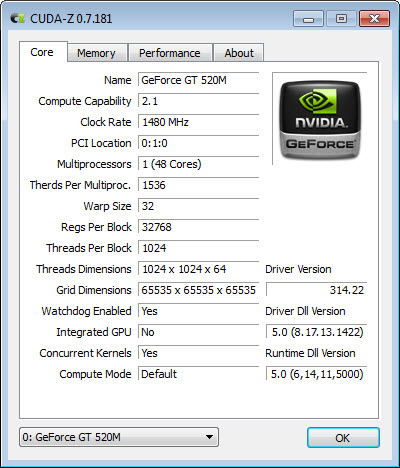
Writing code that runs on a graphics card means working within limits the card imposes, and most of those limits are not printed on the box. How many threads a block may contain, how much shared memory each block gets, the warp size, the register count, the compute capability the card reports. CUDA-Z puts all of it in one window.
The scope is narrow and should be stated immediately. This reads cards supporting the parallel computing platform from one manufacturer, so a card from any other maker produces nothing at all. That is not a shortcoming, it is what the tool is for.
The numbers the card reports about itself
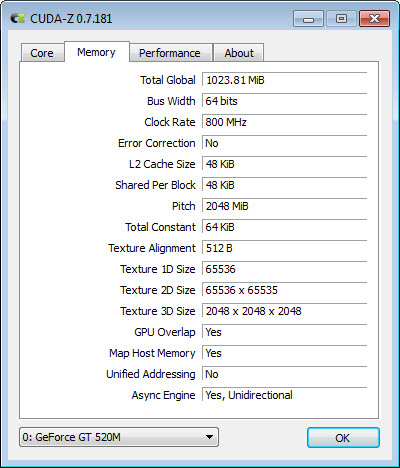
The CUDA-Z information tab covers what a programmer actually needs. Compute capability, which determines which language features and instructions are available. Core count and clock speeds. Memory size, type, bus width. Warp size, maximum threads per block, maximum block and grid dimensions, shared memory and registers available per block, and texture alignment.
Those are constraints rather than trivia. Code written against a card offering one shared memory allowance will fail or run badly on a card offering less, and knowing the compute capability tells you which instructions you may rely on.
For identifying the card itself, its connection and its stock specifications rather than its compute characteristics, GPU-Z covers that ground and works with cards from every manufacturer.
The bandwidth tests are the useful part
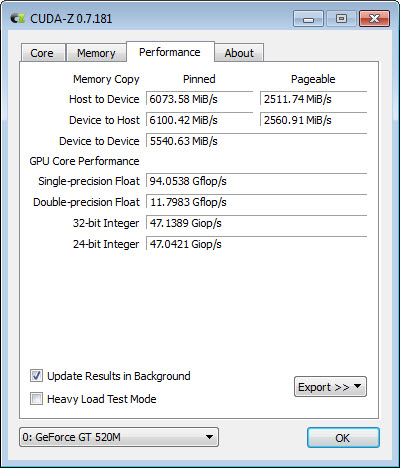
CUDA-Z measures three transfer rates, and the distinction between them explains more about real performance than any other figure here.
Host to device is the speed of getting data from system memory onto the card. Device to host is the return journey. Device to device is movement within the card’s own memory.
The third is enormously faster than the first two, and that gap is the single most important fact in this kind of programming. Computation on the card is cheap and moving data to and from it is not, which is why a naive implementation that shuttles data back and forth performs worse than code running on the processor alone. Seeing the actual figures for your card makes that concrete rather than theoretical.
Three precisions, and the one that disappoints
CUDA-Z measures compute throughput at single precision, double precision and integer arithmetic, and the three results are rarely proportionate.
Consumer cards deliberately limit double precision performance, often to a small fraction of their single precision rate, because the market for it is scientific and professional rather than gaming. A card that looks impressive on paper can be an order of magnitude slower at the precision numerical work requires.
Anybody choosing hardware for computation rather than graphics needs that number before buying, and it is the sort of thing marketing material omits. For measuring graphics performance rather than compute, 3DMark is the reference and answers an entirely different question.
What it will not do
CUDA-Z measures and reports, and changes nothing. There are no settings to adjust, no clocks to raise and no configuration of any kind, which makes it safe to run and limits it to being an instrument.
Multiple cards each get their own view, and results export to a file for keeping alongside the specifications of a machine.
Watching temperature and clock behaviour while a compute workload runs is a separate exercise, and a monitoring overlay reporting clocks, temperature and power draw shows whether a card is sustaining its rates or quietly throttling partway through.
Conclusion
CUDA-Z is a specialist instrument that answers questions nobody else asks. What are this card’s architectural limits, how fast can data reach it, and what does it actually manage at each precision. For somebody writing compute code or choosing hardware to run it on, those three answers are worth more than any benchmark score.
For everybody else it is a window of numbers without context. The tool assumes you know why warp size and shared memory per block matter, and it makes no effort to explain. Within its audience it is precise and quick, and outside that audience there is nothing here to use.
Features & benefits
Pros & Cons
- Reports the architectural limits that compute code has to be written against
- Bandwidth tests show the transfer cost between system memory and the card
- Compute throughput measured separately at single, double and integer precision
- Reveals the double precision penalty that marketing material leaves out
- Handles multiple cards with a separate view for each
- Exports results for keeping with a machine's specifications
- Single portable executable that changes nothing on the system
- Works only with cards supporting one manufacturer's compute platform
- Reports and measures without adjusting or tuning anything
- The figures assume you already know why they matter
- Development has been quiet for a considerable time
- Nothing here measures graphics performance, only compute
Frequently asked questions
No. It reads cards supporting one manufacturer's parallel computing platform, so anything from another maker is invisible to it. A general-purpose card identification tool is the alternative for those.
How expensive it is to move data between system memory and the card compared with moving it inside the card. The internal rate is far higher, which is why code that transfers data back and forth repeatedly performs badly however fast the computation itself is.
Because consumer cards limit it deliberately, reserving full double precision performance for professional hardware. If your work needs that precision, the figure here matters more than any headline specification.
No. It reads reported capabilities and runs measurements, with nothing to configure and nothing altered. That makes it entirely safe to run and means it diagnoses rather than fixes.


