

Ultrasurf
About Ultrasurf
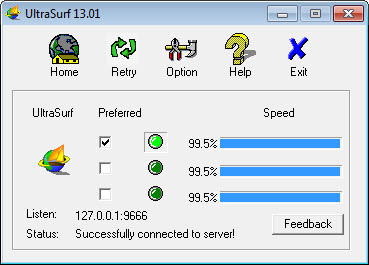
Ultrasurf is the small free proxy that’s been helping users in censored regions reach blocked websites since 2002. The application opens an encrypted tunnel from your computer to one of the servers operated by UltraReach Internet Corporation, with web traffic flowing through that tunnel rather than through whatever network filtering or surveillance exists between you and the public internet. Run the executable, wait for the connection to establish (typically a few seconds), and your default browser opens with traffic now routing through the proxy.
Websites that were blocked on your local network become accessible. Geographic content restrictions based on your real IP address get bypassed because the destinations see traffic coming from the proxy server’s location instead. The whole thing works through a single executable under 2 MB that requires no installation.
The tool was designed for a specific threat model. Authoritarian governments blocking access to news, social media, and various other content. Journalists and activists needing to communicate without surveillance. Users in restricted regions wanting access to content their governments prefer they not see. The design choices reflect those priorities throughout. Lightweight executable that runs from any folder. A
ggressive obfuscation that makes the encrypted traffic harder to identify and block. Server infrastructure designed for resilience against blocking attempts. Free for users without registration or payment requirements.
The current version supports Internet Explorer and Firefox directly through automatic configuration, with a Chrome extension covering Chrome users separately, though the proxy mechanism only protects browser traffic rather than all system traffic the way full VPNs do.
What it actually does at the technical level
The application establishes encrypted HTTPS connections to UltraReach’s server network, then routes your browser’s HTTP and HTTPS traffic through those connections. From your browser’s perspective, it’s making requests to a local proxy on your own computer (which is what the application sets itself up as). From the network’s perspective, your computer is sending encrypted HTTPS traffic to one of UltraReach’s servers, with the actual destinations of your browsing being invisible inside the encrypted tunnel.
The implementation uses standard HTTPS as its transport, which matters because HTTPS traffic looks identical to normal secure web browsing. Network filters that block specific protocols (like OpenVPN’s distinctive packet signatures) can’t easily distinguish this proxy traffic from regular HTTPS connections to banking sites or other secure services. The traffic obfuscation is one of the reasons the tool has remained functional in heavily-filtered networks where less stealthy alternatives get blocked.
The server selection happens automatically based on connection quality and availability. The application maintains a list of server addresses that gets updated periodically, with the active connection rotating between servers as conditions change. Users in restricted regions where governments actively block known proxy servers benefit from this rotation because the application can move to new server addresses faster than blockers can catalog and block them.
For users wanting comprehensive system-wide encryption rather than browser-only proxying, dedicated VPN services like NordVPN handle all internet traffic from the device rather than just web browser traffic. The trade-off is real and depends on your specific needs.
This software’s narrow browser-only scope works for the censorship-bypass use case but doesn’t protect email clients, messaging applications, or various other software that uses the internet beyond web browsers.
The legitimate use cases
The original use case (helping users in censored regions access blocked content) remains the application’s primary positioning. Users in countries with substantial internet restrictions use it to read news from outside their borders, access social media platforms blocked by their governments, communicate with people abroad through services that local networks block, and various other scenarios where the local network actively prevents access to content the user wants to see.
Journalists working in countries with hostile media environments use the tool for similar reasons plus operational security concerns. Communicating with sources, accessing research material that local filtering blocks, and maintaining channels with editors abroad all benefit from circumvention tools that work even when general internet access is restricted. The tool’s history includes substantial documentation of journalist usage in various political contexts.
Activists and human rights workers in restricted regions form another substantial user base. The threat model for this category includes both passive surveillance (governments monitoring what people access) and active blocking (governments preventing access to specific content). Tools that handle both threats simultaneously fit operational security needs better than tools that handle only one.
For users in less restrictive environments who specifically want anonymous browsing rather than censorship circumvention, dedicated anonymity tools like OnionFruit Connect provide Tor-based connections that produce stronger anonymity properties than single-hop proxies. The choice between these tools depends on whether you primarily need to bypass blocks (where this software fits) or primarily need anonymity (where Tor-based tools fit better).
Why some users encounter it unintentionally
A substantial portion of search traffic for this software involves users asking how to remove it or stop it from popping up, which reflects the reality that the application has historically been bundled with various installers that included it without prominent disclosure. Users running installers for unrelated software sometimes discovered they’d also installed this software, with the unexpected appearance creating friction.
The legitimate distribution path produces no such issues. Users who deliberately download the application from official sources or from this catalog get the application without bundled additions. Users who encountered the application unintentionally typically did so through bundled installers from various third-party download sites that monetize through bundling, which isn’t how this software is intended to be distributed.
For users wanting to remove the application after unintentional installation, the removal process is straightforward because the application is portable and doesn’t deeply integrate with the operating system.
Closing the application, deleting the executable, and clearing browser proxy settings (which the application would have configured during operation) handles complete removal in minutes. The lack of installer-based deep system integration that produces the friction of removing other unwanted software doesn’t apply here because the application doesn’t install itself in any traditional sense.
Performance and what to expect
The connection speeds through this software depend on which server you connect to, current server load, and the quality of your connection to the server. Servers in your geographic region typically produce better speeds than servers across the world, though for users in restricted regions the geographic limitation often means using more distant servers because closer servers might be blocked or filtered.
The performance characteristics fit basic web browsing well but don’t match what direct connections produce for bandwidth-intensive activities. Streaming video at high bitrates produces buffering on slower connections through the proxy. Large file downloads complete more slowly than direct downloads would. Real-time interactive applications experience higher latency than direct connections because traffic has to travel to the proxy server and back rather than directly to destinations.
For users primarily interested in reading content, accessing blocked websites, and various other low-bandwidth scenarios, the performance is typically adequate. For users wanting to use the proxy for general internet activity including video streaming or large downloads, the speed limitations may produce friction that more invested VPN solutions don’t have.
The tool prioritizes connection establishment over connection persistence. Connections sometimes drop and reconnect to different servers, with the application handling this transparently in most cases. Users don’t typically notice the reconnections, but applications that maintain long-running connections (like persistent SSH sessions or long file transfers) sometimes experience interruptions that direct connections wouldn’t have.
Considerations and limitations
The single-hop proxy architecture provides censorship circumvention but doesn’t provide the anonymity properties that some users assume any privacy tool should provide. UltraReach’s servers see your real IP address and the destinations you’re connecting to. The encryption protects your traffic from network observers between you and the proxy, but the proxy operator has full visibility into your activity through their service. For users who specifically need anonymity from the proxy operator, multi-hop anonymity tools are more appropriate.
The tool’s funding sources include US government grants from agencies focused on internet freedom in restricted regions, which produces concerns for some users about institutional bias or potential government access to user data. UltraReach has consistently maintained that they don’t share user information with anyone including their funding sources, but users with specific concerns about government-adjacent privacy tools should evaluate whether this matches their threat model.
The application’s age (over two decades of continuous development) produces some interface conventions that look notably older than current applications. The visual design hasn’t evolved much from the original concept, with the current version looking similar to versions from many years ago. Function over form is the obvious priority, which works for the use case but produces an experience that feels distinctly older than current applications.
The proxy approach to traffic protection means non-browser applications continue using your direct internet connection during the proxy session. Email clients, messaging applications, video conferencing software, and various other internet-using applications all bypass the proxy because the proxy only handles browser traffic specifically. Users wanting comprehensive protection across all applications need to combine this software with other tools or use full VPN solutions instead.
The Chinese government and various other restrictive governments actively work to block this software’s servers, with the result being that effectiveness varies across time and regions. Periods where the tool works reliably alternate with periods where extensive blocking makes connections difficult or impossible.
Users in restricted regions should understand that any single circumvention tool may not work consistently, with combinations of multiple tools producing better resilience than dependence on any single solution.
Conclusion
For users in censored regions trying to access content their networks block, Ultrasurf delivers the specific capability it was designed to provide through encrypted tunneling that’s hard to distinguish from regular web traffic. The tool fits users with a clear threat model around censorship and blocking rather than users wanting general privacy or anonymity, with the server-rotation infrastructure and HTTPS-based obfuscation specifically targeting that scenario. Two decades of continuous operation despite ongoing efforts by various governments to block it produces a track record that newer entrants in this category haven’t matched.
The application makes sense for users who need browser-level access to blocked content and don’t need the broader scope that full VPN solutions provide. The trade-off is genuine. Browser-only protection means non-browser applications stay exposed. Single-hop proxy architecture means the operator sees all your activity. Free funding from institutional sources comes with whatever implications users want to weigh into their evaluation.
Features & benefits
Pros & Cons
- Free without registration or payment requirements
- Single executable under 2 MB requires no installation
- Encrypted HTTPS tunneling is hard to distinguish from regular secure web traffic
- Automatic server selection and rotation handles blocking attempts
- Chrome extension provides browser-integrated access for users not wanting desktop applications
- Designed specifically for censorship circumvention with that threat model in mind
- Long development history (since 2002) with established server infrastructure
- Lightweight performance impact compared to full VPN solutions
- Single-hop proxy architecture doesn't provide anonymity from the proxy operator
- Only protects browser traffic rather than all system traffic
- Performance varies substantially based on server availability and current load
- Visual design reflects priorities from earlier development eras
- Effectiveness varies in heavily-restricted regions where active blocking happens
- Some users encountered it through bundled installers rather than deliberate installation
Frequently asked questions
This software is a free encrypted proxy tool from UltraReach Internet Corporation designed for censorship circumvention and accessing blocked websites. It establishes encrypted HTTPS connections to UltraReach's server network, with browser traffic routing through those connections rather than through local network filtering. The application has been in continuous development since 2002, with original funding from sources including US government internet-freedom programs.
A full VPN encrypts all traffic from your device including browsers, email clients, messaging applications, and various other software. This software only proxies browser traffic, with other applications continuing to use your direct internet connection during proxy sessions. VPNs typically require subscription payments and account creation, while this software is free without registration. For users wanting comprehensive system-wide encryption, dedicated VPN services produce broader coverage. For users specifically wanting browser-only proxying for censorship circumvention, this approach works without the cost or account requirements.
Run the executable from wherever you saved it (no installation required). The application automatically establishes a connection to UltraReach's servers and configures Internet Explorer and Firefox to route traffic through the local proxy. After the connection establishes (typically a few seconds), browse normally with traffic now flowing through the proxy. Close the application to disconnect and restore direct connections.
Close the application if it's running. Delete the executable file from wherever you saved it (the application is portable and doesn't install itself). Reset your browser's proxy settings if they don't reset automatically (Internet Options for Internet Explorer, Connection Settings for Firefox). For Chrome users with the extension installed, remove the extension through the Chrome extensions interface. The complete removal takes a few minutes because the application doesn't deeply integrate with the operating system.
This typically happens when the application was installed through a bundled installer rather than being downloaded deliberately, or when the application was set to start automatically with the operating system. Check your startup programs through the operating system's task manager to identify if it's set to launch automatically and remove it from startup if you don't want it running. For users who want to remove it completely rather than just preventing automatic startup, the removal process described above handles complete elimination.
The encryption between your computer and the proxy server protects your traffic from network observers between you and the proxy. Your local network, ISP, and any intermediate networks see encrypted traffic going to UltraReach's servers but can't see what specific sites you're visiting through that traffic. The proxy operator has full visibility into your activity through their service, which means the security depends on trusting them with that information. For users specifically needing anonymity from the proxy operator, multi-hop anonymity tools are more appropriate.
Connection speeds depend on server availability, current load, and your connection quality to the chosen server. Speeds are typically adequate for basic browsing including reading articles, viewing standard websites, and using social media. Bandwidth-intensive activities including video streaming and large file downloads produce slower experiences than direct connections would. The performance varies enough between sessions that consistent fast speeds aren't guaranteed.


