

Securepoint SSL VPN Client
About Securepoint SSL VPN Client
Securepoint SSL VPN Client is a desktop front end for OpenVPN connections. It takes the .ovpn files a server administrator hands out, lists them as named connections, and connects and disconnects them from a tray icon. Underneath sits the standard OpenVPN engine and the standard virtual network adapter, so it talks to any OpenVPN server anywhere, not only to the firewalls of the brand whose name it carries.
The reason to pick it over the reference OpenVPN client is who gets to press connect. The reference client needs elevated rights to bring the tunnel up, which on a locked-down office laptop means a call to IT. Securepoint SSL VPN Client runs a background service that owns the adapter, and any user of the machine can start a tunnel from the tray. That single difference is why it turns up on so many managed laptops.
Importing and organising connections
Click Import and point at an .ovpn file. The client copies the profile into its own folder along with the certificate, key and TLS files it references, and gives it a name in the connection list. Profiles with everything embedded in one file import in one step. Profiles that reference separate files need those files beside the .ovpn when you import, or the connection fails at the first handshake with a message about a missing certificate.
Connections sit in a tree, can be grouped, and each carries its own settings. A username and password can be saved per connection or prompted every time. A connection can also be marked to start with the client, so a machine that must always be on the office network reconnects at logon without a click.
The client can also scan a folder of your choosing for new .ovpn files, which suits administrators who drop profiles onto machines by script.
Connecting, reconnecting and the service
Right-click the Securepoint SSL VPN Client tray icon, pick a connection, and the tunnel comes up with a status colour and the assigned address shown on hover. If the link drops, an option reconnects automatically, which matters more than it sounds on laptops that sleep and wake in a different café. Without it, a wake from sleep leaves a dead tunnel.
The service model has one consequence to know about. Because the engine runs with system rights on behalf of any user, the client refuses configurations that try to run external scripts. It also protects its own configuration folder from being edited by a standard user.
Both are deliberate, and both mean an .ovpn that relies on custom scripts will need adjusting or a different client.
Deployment for administrators
An MSI package exists alongside the ordinary installer, with transform files for language and a property that tells it which driver to install for the system it lands on. Install it silently across a fleet, drop each user’s profile into the watched folder, and the connection appears in their tray with nothing else to configure. That is the workflow the program was designed for, and it is the one it does best.
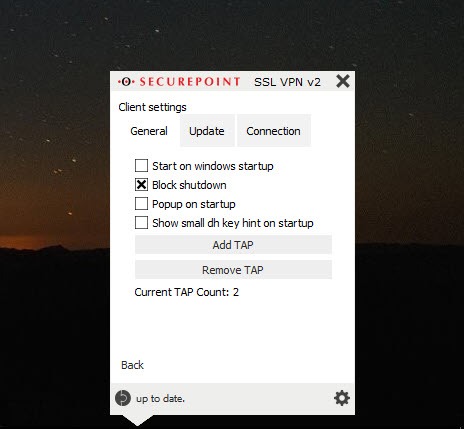
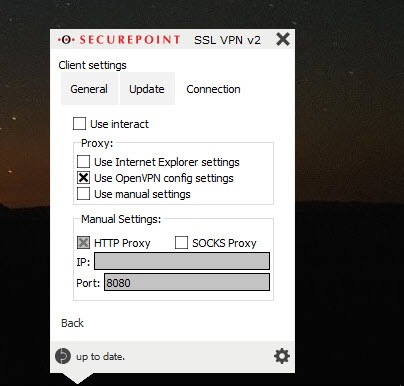
A proxy can be set for networks that only allow web traffic out. The log for each connection opens in a window for the moment a handshake fails, and the virtual adapter can be reinstalled from the menu when a system update has upset it.
Where it stops
There is no server here, no account, no list of endpoints and nothing to subscribe to. Securepoint SSL VPN Client connects to an OpenVPN server that somebody else runs, and if you have no .ovpn file you have nothing to import.
For a home user who wants to reach their own network from outside, the server side has to be set up first. A VPN server that also speaks OpenVPN is one way to get there. For the employee handed a file by IT, none of that applies.
It also speaks only OpenVPN. WireGuard, IPsec and the proprietary SSL protocols of other firewall makers are out of scope, so an office standardised on one of those will issue a different client.
Conclusion
Securepoint SSL VPN Client is for the office worker handed a profile by IT, and for the administrator who has to put that profile on two hundred laptops without granting anyone administrator rights. It does both jobs quietly and reconnects when the laptop wakes up somewhere new.
Anyone running their own VPN with WireGuard, or who needs a client that manages the server side too, should look elsewhere. This is the connect button, and a good one, for a tunnel somebody else built.
Pros & Cons
- Any user can connect without elevated rights, thanks to the background service
- Imports standard .ovpn profiles with their certificate files
- Automatic reconnect after sleep or a dropped link
- Tree of named connections with per-connection credentials and autostart
- MSI installer with transforms for silent fleet deployment
- OpenVPN only, no WireGuard or IPsec
- Rejects profiles that rely on custom scripts
- Needs an .ovpn file from a server you or someone else runs
- Interface is plain and dated
Frequently asked questions
Yes. It uses the standard OpenVPN engine and accepts any standard .ovpn profile, so it connects to any OpenVPN server regardless of who runs it.
The .ovpn file references separate certificate or key files that were not beside it when you imported. Put the files in the same folder as the profile and import again, or ask for a profile with the certificates embedded.
The client blocks OpenVPN configurations that run external scripts, since the engine runs with system rights for every user. Remove the script directives or ask the administrator for a profile that does not need them.


