

TorGuard
About TorGuard
TorGuard is a VPN client built for people who read the settings. The name is short for torrent, not for the anonymity network, and the design follows from that. Every protocol in current use is a dropdown choice, WireGuard, OpenVPN over UDP or TCP, IKEv2 and OpenConnect. Ciphers are selectable.
Traffic can be disguised as ordinary web traffic through three different obfuscation layers. A kill switch cuts the whole connection or only chosen programs, DNS goes to a resolver you pick, and scripts run before and after the tunnel comes up.
None of that is unusual on its own. What sets TorGuard apart from the polished consumer clients such as ProtonVPN is that all of it is exposed at once, in a window that looks like a network utility rather than a lifestyle app. Beginners find it cluttered.
People who have been let down by a pretty client that hid the one setting they needed find it a relief. The review below is written for the second group and tries to be honest with the first.
Protocols, ciphers and the tunnel type menu
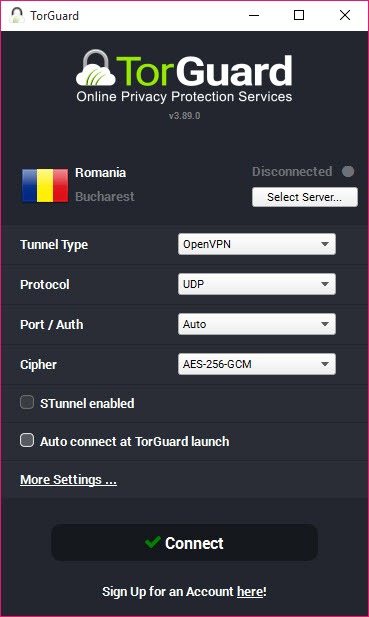
The TorGuard main window offers a Tunnel Type menu, and the choice matters more here than in most clients because nothing is hidden behind an automatic mode. WireGuard is the fast option and the one to use on a good connection.
OpenVPN over UDP is the compatible option, with TCP for networks that block UDP or drop it under load. IKEv2 reconnects quickly after a laptop wakes. OpenConnect wraps the tunnel in the same protocol corporate remote access uses, which passes through networks that block everything else.
Below the protocol sits the cipher. AES at 128 or 256 bits for OpenVPN, ChaCha20 under WireGuard, with the weaker legacy options still present for old routers. A port field lets you pick the outgoing port, and 443 is the one that gets through hotel and airport networks that only allow web traffic.
The client remembers a different configuration per server if you want it to.
Stealth, in three layers
Obfuscation is where TorGuard does more than the rest of the field. Stealth servers wrap the tunnel in Shadowsocks, so the traffic resembles an ordinary encrypted proxy rather than a VPN. Stunnel adds a TLS layer around OpenVPN so that inspection equipment sees a plain HTTPS session. OpenVPN scramble alters the packet signature that deep packet inspection looks for. There are also servers listening on port 443 and an obfuscated TCP variant for the stubborn cases.
The point of the layers is that different networks block in different ways. A campus that blocks known VPN ports is defeated by port 443. A national firewall that inspects packet contents needs Stunnel or Shadowsocks. The client lets you try each in turn without changing anything else.
None of it adds security, since the encryption is already there. It adds deniability to the traffic, and on a network that throttles anything it recognises as a VPN, it adds speed.
Two kill switches
Two kill switches are offered in TorGuard. The network kill switch cuts all internet access when the tunnel drops and restores it when the tunnel returns, which is the blunt instrument most people want. The app kill list is the precise one.
Add a torrent client, a chat program or anything else to it. When the tunnel drops those programs are closed rather than the whole connection, so a browser keeps working while the thing that must not leak is stopped. Both can run together.
DNS, ad blocking and leak protection
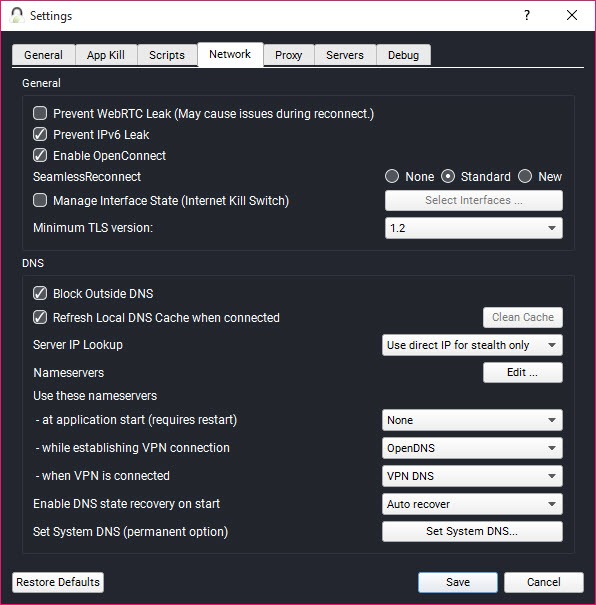
DNS handling in TorGuard is explicit. Pick the provider’s resolver, a public one such as Cloudflare or Quad9, or your own, and keep queries inside the tunnel. An Ad-Block DNS option answers advertising and known malicious domains with nothing, which removes a majority of banner ads without an extension. WebRTC blocking stops browsers giving away the real address through a video-call handshake, and IPv6 can be disabled to close the other classic leak.
The settings are there. Turning them on is your job, and the manual’s advice to test the kill switch once before relying on it is sound.
Port forwarding, dedicated addresses and the proxy
For the torrent users the name promises, port forwarding is the TorGuard feature. A forwarded port lets other peers connect to you, which is the difference between seeding at full speed and seeding barely at all. It is available on a subset of servers, arranged from the account page rather than the client, and it works with the kill switch and app kill in the way a seedbox operator would want.
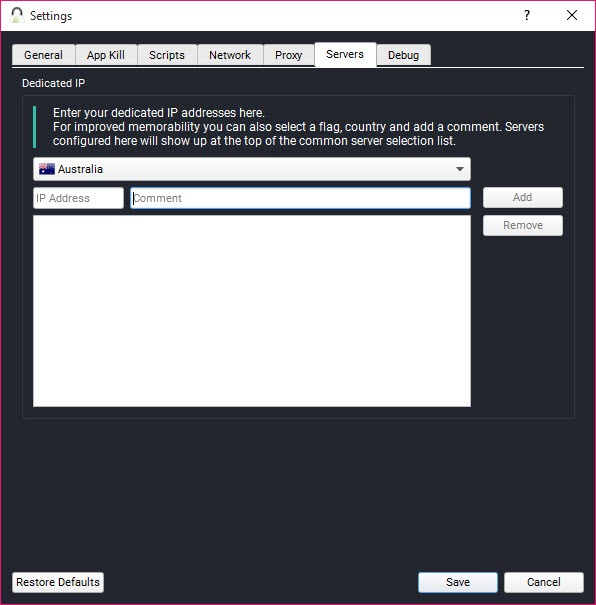
Dedicated addresses are a separate add-on rather than part of the service. A static address that only you use avoids the shared-address blocks that streaming services apply, and residential and streaming variants exist for exactly that.
Without one, expect the shared servers to be blocked by most video services, which the client does not pretend otherwise. A proxy service with SOCKS5 and HTTPS endpoints is another add-on, for programs that take a proxy setting and do not need a full tunnel.
Servers, favourites and scripts
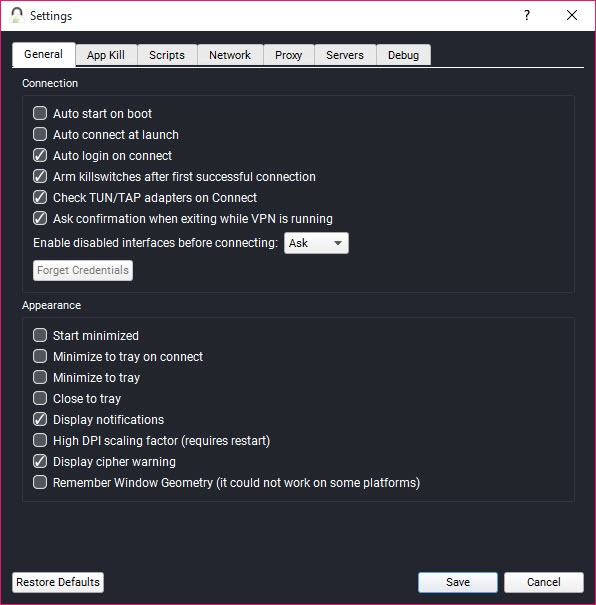
The TorGuard server list shows locations with a ping figure and a load indicator, filters by protocol capability and stealth support, and keeps favourites at the top. Auto-connect at startup, reconnect on network change and a choice of which server to use for each are all settings. Up to eight devices can be connected at once on the standard account.
Scripts are the power-user piece. A command or batch file can run before the tunnel connects, after it connects and after it disconnects. A drive can be mapped when the tunnel is up, a torrent client launched, or a route added for a device on the local network that should stay reachable.
It is the sort of feature that appears in a client whose users asked for it by name.
What is missing and what is dated
Split tunnelling, routing some programs through the tunnel and others outside it, is not here. The app kill list is the nearest thing and it does the opposite job. There is no multi-hop routing through two servers, no built-in speed test and no malware scanner beyond the DNS blocklist. Shared addresses are widely blocked by streaming services, and the answer to that is the paid add-on rather than a fix.
The interface is the other complaint. It is a dense grey window with tabs and dropdowns, not a map with a big button, and the WireGuard implementation has had rough edges that took releases to smooth. For a client this configurable, a VPN that ships a simpler interface over similar protocols will suit anyone who wants obfuscation without the settings sheet.
Conclusion
TorGuard is for the person who seeds torrents, works from networks that block or throttle VPNs, or simply wants every knob in view, and who is willing to learn what the knobs do. Port forwarding, the app kill list, the three obfuscation layers and the scripts add up to a client that the polished consumer services do not offer.
Anyone who wants a map, a button and a working streaming service should pick one of those instead. This client makes no effort to be that, and for its own crowd that is the point.
Pros & Cons
- WireGuard, OpenVPN, IKEv2 and OpenConnect selectable per connection
- Three obfuscation methods for networks that block or throttle VPN traffic
- Network kill switch plus a per-application kill list
- Selectable and encrypted DNS with an ad and malware blocklist
- Port forwarding on supported servers for seeding
- Pre- and post-connection scripts
- No split tunnelling
- Dedicated addresses and the proxy are separate add-ons
- Shared servers are blocked by most streaming services
- Dense, dated interface that intimidates newcomers
Frequently asked questions
Stealth servers wrap the connection in Shadowsocks so it looks like an encrypted proxy. Stunnel wraps OpenVPN in a TLS layer so it looks like an ordinary HTTPS session. Try port 443 first, then Stunnel, then a Stealth server if a network keeps blocking.
No. The app kill list closes chosen programs when the tunnel drops, but nothing routes selected programs outside the tunnel. Everything on the machine goes through the VPN while it is connected.
Request a port from the account page for a server that supports it, then connect to that server in the client and enter the port in your torrent client. Forwarding is not available on every location.
Shared server addresses are recognised and blocked by most streaming platforms. A dedicated address add-on, sold separately, avoids the block.
WireGuard for speed on an ordinary connection. OpenVPN over TCP on port 443 when a network blocks the tunnel. OpenConnect or a stealth option when it inspects traffic. IKEv2 on a laptop that sleeps and wakes often.


