

SuperScan
About SuperScan
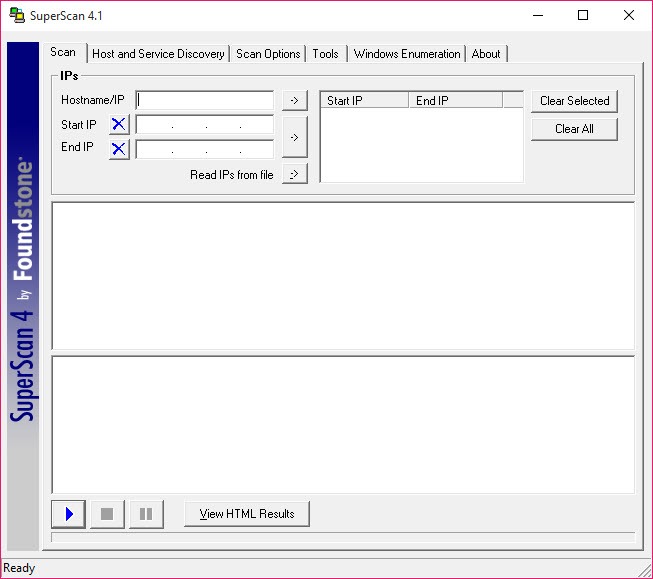
SuperScan is a TCP and UDP port scanner that also pulls information out of the hosts it finds. You feed it a single address, a range, or a text file full of addresses, press the play button, and get back a list of live machines with every open port the scan managed to touch. One executable, no installer, and it wants administrator rights before the more aggressive scan types will work at all.
What separates SuperScan from the click-and-go sweep tools is the tab strip across the top. Host and Service Discovery decides how hosts get found and which ports get probed. Scan Options handles timing and name resolution. A Tools tab collects the usual one-click network utilities. And a fourth tab digs into hosts over NetBIOS to pull out accounts, shares, policies. Angry IP Scanner will map your subnet faster and with less thinking involved.
The application tells you considerably more about each thing it finds. So it lands in an awkward middle ground, more configurable than the simple sweepers and well short of a full network mapper. Whether that middle is where you want to be depends on what you are actually auditing.
Two ways to scan TCP, two ways to scan UDP
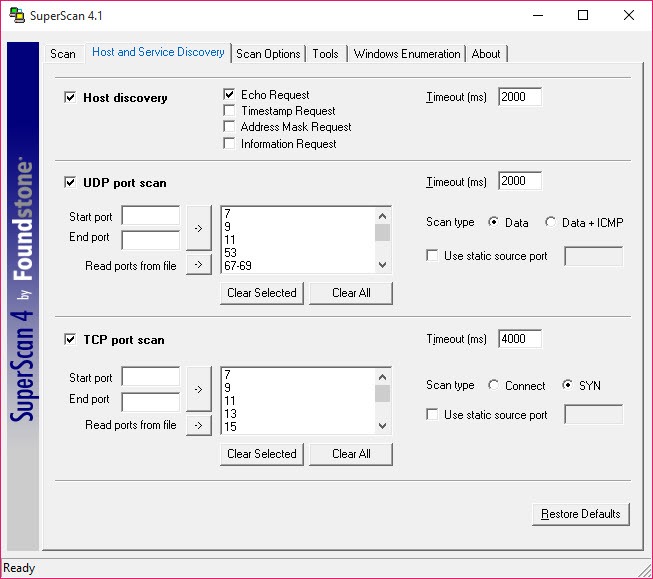
TCP scanning comes in Connect and SYN flavours. Connect completes the full three-way handshake, which is reliable and leaves an entry in every log on the target. SYN sends the opening packet and never finishes the conversation, which is quieter but needs raw socket access, and that is the main reason the executable has to be elevated.
UDP is where things get interesting, and by interesting we mean occasionally wrong. The Data method fires payloads at well-known ports in the 0 to 1023 range and waits for a service to answer. Data plus ICMP does the same thing but also treats silence as an open port, on the theory that a closed port would have replied with an ICMP Destination Port Unreachable message.
SuperScan even tests a known-closed port first to confirm the target generates those messages. Clever, and still prone to false positives, because plenty of systems throttle ICMP replies and the scan reads that throttling as a wide-open port. Treat a long list of open UDP ports as a hypothesis rather than a finding.
One thing that catches people out. The port selection does not default to everything. There are over 65,000 ports on each protocol and scanning all of them across a range would take most of an afternoon, so the tool ships with a shortlist of common ports and expects you to add the rest by hand.
And once a port comes back open, the analysis stops. Whatever banner the service volunteers gets recorded, but nothing tries to pin down which version of which daemon is answering, or what platform sits underneath.
That inference step is where Zenmap pulls ahead, and it matters if you are matching findings against a vulnerability list rather than closing stray ports.
Host discovery you can actually tune
Hosts are found by echo request out of the box, the same mechanism as a plain ping. Tick a few more boxes and the scan will also throw timestamp requests, address mask requests and information requests at each address, which is useful against hosts that drop echo but answer the older ICMP types.
Every extra request type multiplies the scan duration, though. Better to run a fast echo-only pass to find what is alive, then a second targeted run against the handful of addresses that matter.
Firing the full request set across a class B range is how you end up staring at a progress bar for an hour.
How loud do you want the scan to be?
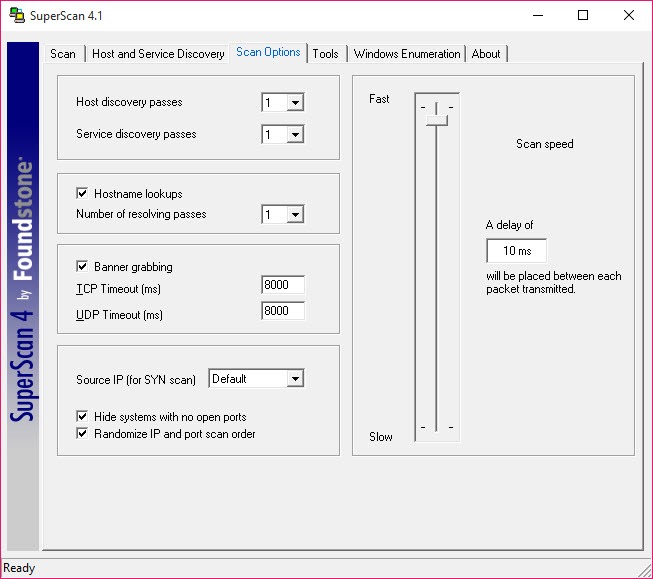
In SuperScan the scan speed slider sets the delay in milliseconds between outgoing packets. Drag it to zero and the scan is as fast as your interface allows, which on a congested segment means you are now part of the problem. Slide it up and the traffic thins out to something a production network will tolerate.
Two other settings matter more than they look. Number of passes repeats host and service discovery, worth raising above one only on a flaky link. And Randomize IP and port scan order shuffles the sequence so the traffic stops looking like a textbook sweep, which helps against intrusion detection and spreads the load instead of hammering one host at a time.
Banner grabbing has its own timeout, eight seconds by default. A heavily loaded service will not finish its greeting inside that window and you get a blank where the banner should be, so push it up when scanning something sluggish. If you need the actual bytes on the wire, that is a job for Wireshark instead.
The Tools tab, and what it saves you
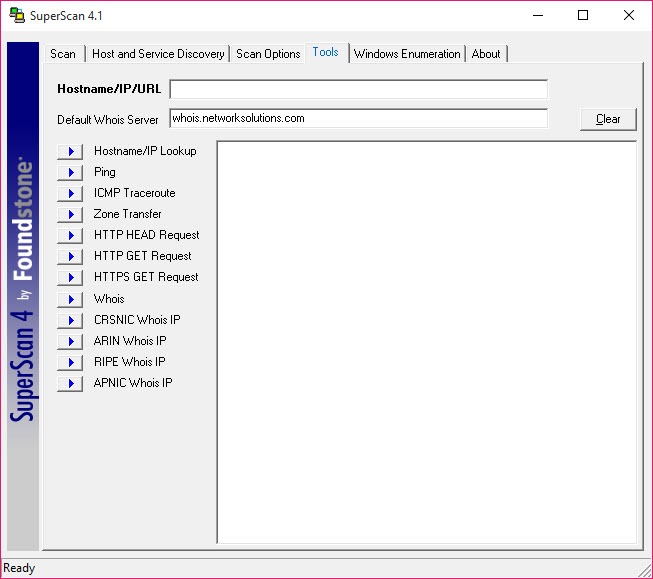
Ping. Traceroute. Hostname lookup, an HTTP request, whois against a server you nominate, and bulk resolve for turning a column of addresses into names. None of it is novel. All of it is faster than opening a terminal and remembering flags, and having it sit beside the scan results in SuperScan means you can chase an odd-looking host without leaving the application.
Bulk resolve is the pick of them. Feed it a scan’s worth of addresses and a column of numbers turns into print servers and forgotten test boxes. Small thing, used constantly.
Enumeration and the HTML report
The enumeration tab is where SuperScan stops being a port scanner. Against hosts that permit it, the tool will list local users and groups, network shares, trusted domains, the account and password policy in force, plus services in both running and stopped states. Supply credentials through the Options button and the volume of returned detail jumps sharply. This is what an attacker gathers early on, which is why it belongs in an audit.
Results export as an HTML report broken down host by host, with every port and any banner text underneath. Readable, and the only format on offer. No CSV, no XML, so getting the data into a spreadsheet means parsing HTML or copying by hand. SoftPerfect Network Scanner handles that side far better.
Conclusion
This one is for the administrator auditing a network they already know, and for anyone learning what enumeration looks like from the attacker’s side. The tab layout rewards a bit of reading, the UDP results need a sceptical eye, and the reporting is thin. In exchange you get one small executable that pairs port scanning with host enumeration, a combination surprisingly few tools bother with.
If you only need to know which addresses are live and what is listening, friendlier options exist, Advanced IP Scanner among them. If you want to see how much a host will tell a stranger who asks politely, SuperScan still does the job.
Pros & Cons
- Both TCP scan methods and both UDP methods in a single executable with no installer.
- Enumeration pulls users, shares and the account policy, not only open ports.
- Speed slider and randomized scan order give real control over how loud a scan is.
- Tools tab keeps ping, traceroute and bulk resolve beside the results.
- Data plus ICMP UDP scanning produces false positives against hosts that throttle ICMP.
- HTML is the only export format.
- Port coverage defaults to a shortlist, so thorough scans need manual range entry.
- Requires elevation, and antivirus software sometimes objects to the packet volume.
Frequently asked questions
SYN scanning and the ICMP-based discovery methods build packets directly rather than going through normal sockets, which requires elevation. Launch it without and the aggressive scan types quietly fail.
No. It starts with a shortlist of commonly used ports on each protocol. Full ranges have to be added manually in Host and Service Discovery, and expect the scan to take considerably longer once you do.
The Data plus ICMP method infers an open port from the absence of a Destination Port Unreachable reply. Hosts that rate-limit ICMP produce that same silence. Switch to the plain Data method to confirm anything suspicious.
No. The built-in report is HTML, organised per host with ports and captured banners underneath, so structured output means parsing that file yourself.


