

Intel Processor Identification Utility
About Intel Processor Identification Utility
Buying a processor second-hand involves trusting a description. The sticker says one model, the listing says another, and the system information repeats whatever the processor tells it. Intel Processor Identification Utility exists to check that story rather than repeat it.
The Intel Processor Identification Utility scope is fixed and stated by the tool itself. It reads Intel processors and makes no attempt at anything else, so a machine with a processor from another manufacturer gets nothing here at all.
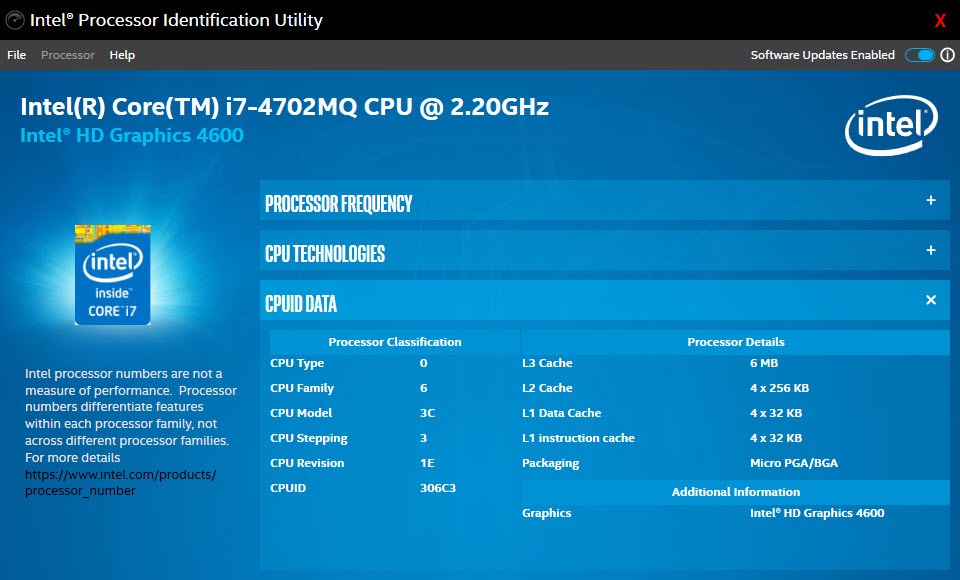
What it reports goes beyond a model name. Package type, cache arrangement, the technologies actually present, the identification data the processor carries internally, and the integrated graphics alongside it.
For the same job across every manufacturer with considerably more detail, CPU-Z remains the reference and covers processors this will not touch.
The frequency test is the part that matters
Here is what separates this from an information tool, and it is easy to overlook because the section has a dull name.
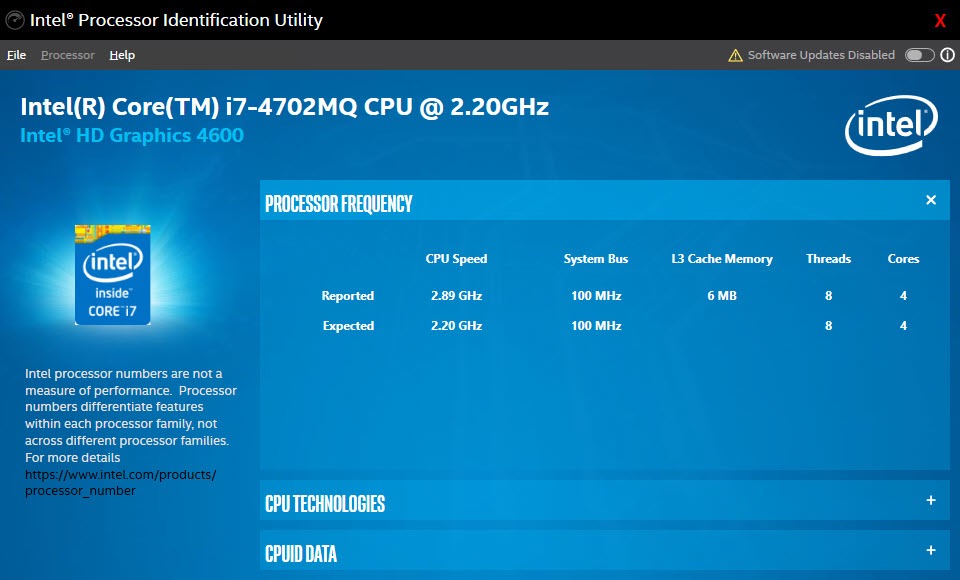
Most utilities report the frequency the processor claims. Intel Processor Identification Utility measures it. A determination routine works out the speed the processor is actually running at, then compares that against the rated speed held in the processor’s own internal data.
That comparison is the whole point. A processor remarked and sold as a faster model announces the faster name and runs at its real speed, and the discrepancy appears immediately. So does an unexpected mismatch on a machine somebody assured you was unmodified.
It also catches the ordinary case where a processor is running above its rated speed because somebody adjusted the settings and did not mention it, which on a second-hand purchase is information you would rather have.
Genuine, pre-production, or neither
The header carries an authenticity indicator, and understanding what it distinguishes is properly useful when buying.
An authentic production processor is marked as such. A pre-production part, meaning an engineering sample never intended for public sale, is identified separately, and Intel Processor Identification Utility explicitly does not support those.
That distinction matters because engineering samples circulate on the used market at attractive prices. They are real processors, they frequently work, and they can also carry locked multipliers, missing features, unstable behaviour or no upgrade path for their internal code. Somebody buying one should do so knowingly rather than discovering it afterwards.
What technologies are actually present
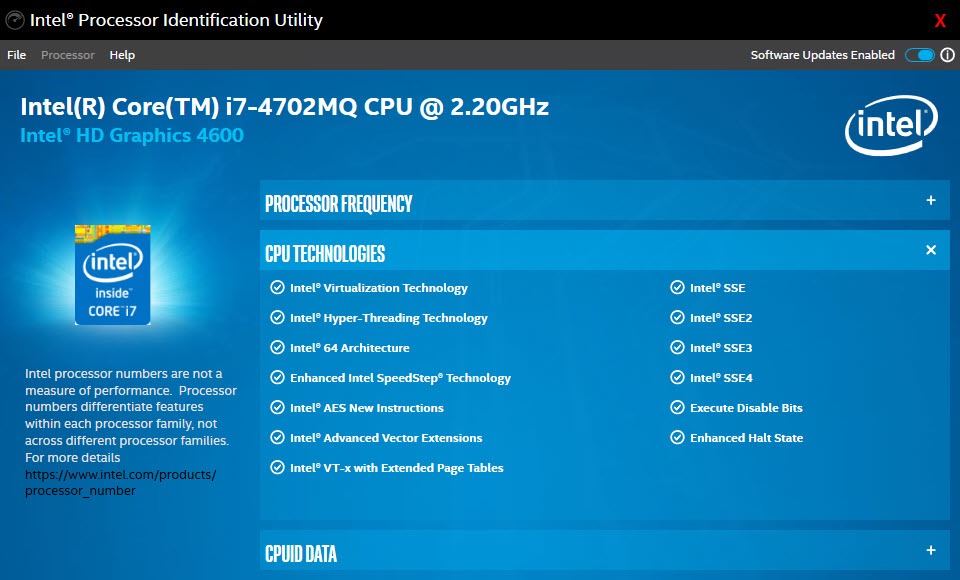
The Intel Processor Identification Utility technologies section answers compatibility questions that specification pages answer inconsistently.
Virtualisation support is the one people check most, since running virtual machines depends on it and identically named processors have sometimes shipped with it absent. Beyond that sit the instruction set extensions, the encryption acceleration, the threading arrangement, the power management features and, on recent parts, the dedicated acceleration hardware.
Newer processors combining different core types are handled properly, with the arrangement shown rather than flattened into a single core count. That matters because two processors with the same total can be built very differently, and the distribution affects how they behave under load.
Checking the driver situation for the same hardware is a related job, and Intel Driver & Support Assistant matches drivers to components from the same source.
Identification data, and saving it
Intel Processor Identification Utility reports the family, model, type, stepping the processor carries internally.
Stepping is the useful one for anybody troubleshooting, since a documented erratum affecting one revision and not another is resolved by knowing which you have. It is also how two processors sold under identical names are told apart when they behave differently.
Everything found saves to a text file, which is how this ends up attached to a support conversation or kept with a machine’s documentation.
For a broader picture covering the whole machine rather than the processor alone, Speccy gathers memory, storage, motherboard, temperatures in one readable summary.
What it does not do
Two boundaries close the Intel Processor Identification Utility description. It reports and measures without changing anything, so there are no settings, no tuning and no configuration of any kind.
And it does not test the processor. Confirming that a processor is what it claims to be is a different question from confirming it works correctly under load, and heat, stability and sustained behaviour all need something built for stressing hardware rather than identifying it. Watching temperature during that is a separate matter again, and Core Temp reports per-core readings and throttling behaviour.
Conclusion
Intel Processor Identification Utility answers one question better than any general tool, which is whether the processor in a machine is what somebody said it was. Measuring the real frequency against the rated one, and distinguishing production parts from pre-production samples, covers exactly what a second-hand buyer needs and takes about a minute.
Beyond that it is an ordinary information tool, and general utilities report more across more hardware. Keep it for the verification job, run it before money changes hands rather than after, and use something built for stress testing when the question moves from what this processor is to whether it works properly.
Pros & Cons
- Measures the actual operating frequency and compares it against the rated speed
- Identifies authentic production processors separately from pre-production samples
- Reports which technologies are actually present rather than which should be
- Handles processors combining different core types without flattening the arrangement
- Family, model, type and stepping reported for troubleshooting known errata
- Results save to a text file for attaching to a support conversation
- Comes from the same source as the hardware, so the reference data is authoritative
- Intel processors only, with everything else outside its scope entirely
- Engineering samples are explicitly unsupported
- Reports and measures without adjusting anything
- Does not test stability, temperature or behaviour under load
- General information tools cover more detail across more manufacturers
Frequently asked questions
Measures the actual running frequency and compares it against the rated speed held inside the processor, rather than simply reporting what the processor claims. That comparison is what reveals a remarked or misrepresented part.
It distinguishes authentic production processors from pre-production samples and reports that in the header. Combined with the frequency comparison, that covers the questions a second-hand buyer actually has.
No, and the tool states this plainly. It reads one manufacturer's processors and has nothing to offer for anything else, which is expected from software supplied by that manufacturer.
Because documented issues frequently affect one revision of a processor and not another. Knowing which revision you have turns a vague problem into a specific one with a known answer.
No. It identifies and measures frequency rather than checking stability or behaviour under load. Stress testing is a different job needing a tool built for it.


