

Doro PDF Writer
About Doro PDF Writer
Doro PDF Writer turns anything you can print into a PDF, and it does this by pretending to be a printer. After installation, a new printer appears alongside your real one, and from that moment every application on your machine that has a Print command can produce PDF files.
Open the document, picture, web page, or report, choose Print, pick the new printer instead of the physical one, and rather than paper coming out of a tray, a dialog asks where to save your PDF. That’s the entire concept, and its beauty is that it works everywhere, because printing is the one thing virtually all software knows how to do.
What sets this particular virtual printer apart is how little it asks of you and how little it sneaks past you. Doro PDF Writer installs quickly, adds no browser toolbars, stamps no watermarks on your output, and shows no ads.
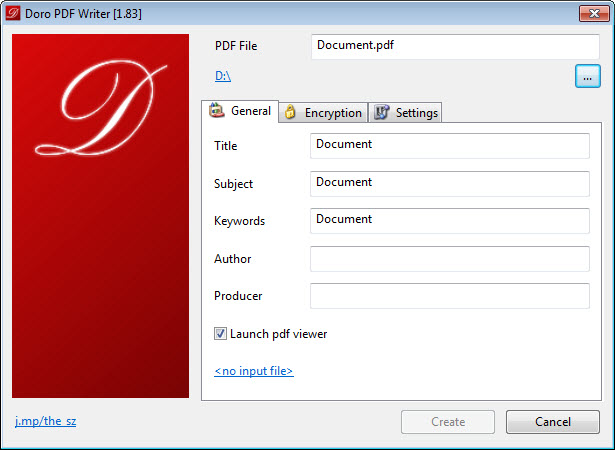
The save dialog it presents at print time is plain and complete, filename, destination folder, and a couple of tabs holding the extras, and the PDFs it produces are ordinary color documents that open anywhere.
The extras are the surprise. For a tool this small, getting document metadata and genuine encryption at creation time is more than the category usually offers, and it’s the reason this quiet little printer earns a place over some flashier rivals.
The virtual printer trick, for the uninitiated
If you’ve never used one, the workflow takes one attempt to learn. Any application, any content, as long as a Print option exists. A spreadsheet becomes a PDF. An email becomes a PDF. An old program from another era that never heard of PDF export becomes a PDF factory, because it can print, and printing is all Doro PDF Writer needs. This is the fundamental advantage virtual printers hold over export buttons, which exist only where a developer bothered to add them.
At print time the dialog appears, you name the file, choose the folder, and confirm. A few seconds later the PDF is on disk, looking exactly like the print preview promised.
Checking the result takes one double-click, and a fast viewer like Foxit PDF Reader makes that half of the routine equally painless.
Metadata and encryption, the unexpected extras
The dialog’s second layer is where this tool overdelivers. A properties tab lets you set the PDF’s title, author, subject, and keywords before it’s created, the details that document searches and file managers read. For anyone producing PDFs that other people will file, search, or archive, filling these in at creation beats retrofitting them later with a separate tool.
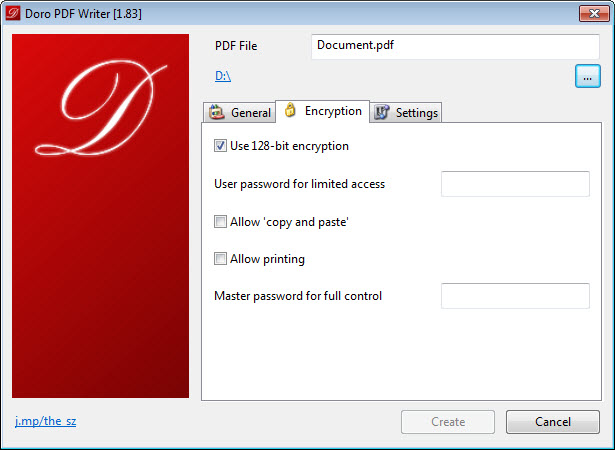
The security tab is the genuine standout. Doro PDF Writer can encrypt the PDF as it creates it, with a password required to open the document, and separate restrictions on copying text and printing.
A contract, an invoice, a report with personal data, all can leave your machine already locked, with no second program and no extra step. Free virtual printers that handle encryption this cleanly are rare, and it’s the single feature most likely to justify choosing this one.
What it deliberately doesn’t do
The boundaries are firm and honestly drawn. This is a creator, full stop. It doesn’t edit existing PDFs, doesn’t merge files, doesn’t split, stamp, or rearrange pages, and it processes exactly one print job at a time with no batch queue, no saved profiles, and no automation. Each print is a fresh dialog and a fresh decision, which is perfect at low volume and tiresome at high volume.
Users who outgrow it have natural next steps. PDFCreator adds profiles, automatic saving, and the ability to append jobs into one document, at the cost of a heavier presence and busier installation. PDF24 Creator goes further still, bundling a whole PDF toolbox with merging and page editing around its printer. And doPDF competes directly at the same minimal end of the spectrum, differing mostly in dialog taste and lacking the encryption trick.
The pattern is clear enough. This tool wins on simplicity plus security, and concedes everything workflow-related to the bigger names.
Conclusion
Doro PDF Writer is the minimal answer to a permanent need, done properly. It gives every program on the machine a PDF button, keeps the output clean, and adds metadata and real encryption where most tiny rivals stop at bare conversion. The person it suits is anyone whose PDF needs are occasional and straightforward, with the occasional confidential file that deserves a password.
Heavy producers will chafe against the one-job-at-a-time dialog and reach for the workflow-oriented alternatives soon enough. Everyone else gets a tool that installs in a minute, never advertises to them, and does one useful thing so reliably it disappears into the routine.
Pros & Cons
- Creates PDFs from any application that can print, with no export button required
- Encrypts documents at creation, with open passwords and copy/print restrictions
- Sets title, author, subject, and keywords before the file is even saved
- No watermarks, ads, or bundled clutter anywhere in the experience
- Small, fast, and simple enough to explain to anyone in one sentence
- Creation only, with no editing, merging, or page manipulation
- No batch processing, saved profiles, or automation for high-volume work
- Every print job means answering the same dialog again
- Spartan interface offers nothing beyond the essentials
Frequently asked questions
Open your document in any application, choose Print, and select the Doro printer instead of your physical one. A dialog asks for a filename and folder, and confirming it writes the PDF to disk instead of printing on paper.
Yes, and at creation time. The security tab in its print dialog sets a password required to open the file and can separately disallow copying text and printing, so the document is locked before it ever leaves your machine.
No. The PDFs are clean, full-color documents with no watermarks or branding, which is not something every free virtual printer can claim.
No, each print job becomes its own separate file. Combining documents calls for a tool with merge features, and pairing this printer with a PDF toolbox covers that gap when it comes up.


