

Clownfish Voice Changer

 (100 votes, average: 4.26 out of 5)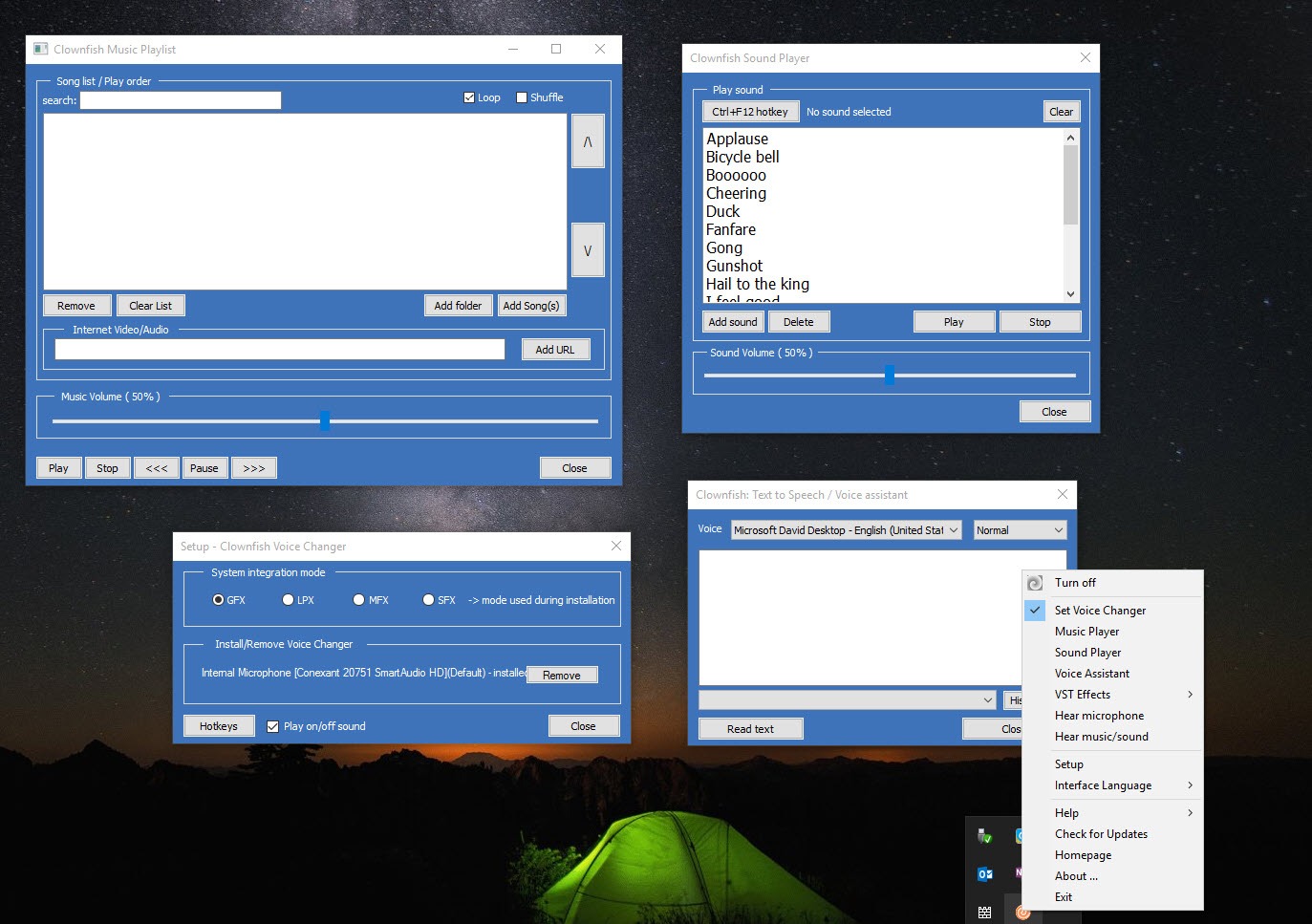
About Clownfish Voice Changer
Clownfish Voice Changer sits between your microphone and everything else on your computer, transforming your voice the instant you speak. Because it installs at the system level rather than hooking into one program, any application that picks up your mic hears the altered version. Talk in a voice chat and your friends hear a robot, an alien, or a helium-pitched cartoon, with no perceptible delay between what you say and what comes out.
That system-wide approach is the whole idea, and it’s what sets the tool apart from voice changers that only work inside a single app. You set it up once, and the effect carries across every program that uses audio capture. The same robotic voice that lands in a Discord call also works in a game’s team chat, a recording app, or a video call, without configuring each one separately.
The effects are firmly on the fun side rather than the convincing side. This is a tool for pranks, character voices, and livening up a stream, not for seriously passing yourself off as someone else. Once you accept that, it’s an entertaining bit of kit with more packed into it than the name suggests.
How the system-level approach works
Most voice changers modify your audio inside one specific application. Clownfish Voice Changer takes a different route by installing itself as a layer on your system’s audio capture. When you speak, it intercepts the raw microphone signal, applies whatever effect you’ve chosen, and passes the modified audio along before any program receives it.
The practical upshot is reach. Your altered voice shows up in voice chat apps, gaming platforms, and call software alike, because none of them know they’re getting anything other than a normal microphone feed. There’s a catch worth understanding, though.
Each app still needs its input set to the tool’s virtual audio device for the effect to come through, so it’s not entirely hands-off. Point a program at the right device once and you’re set, but it’s not magic, it’s routing. For more elaborate audio routing between apps, something like VoiceMeeter handles that side in depth.
The voice effects on offer
The built-in library covers the classics you’d want for a laugh. There’s the robotic voice, the alien, the helium-style high pitch, and male-to-female and female-to-male pitch shifts, among a dozen or so presets. Each is a click away from the tray menu, and you can flip between them mid-conversation to keep people guessing.
Beyond the presets, you can set a custom pitch to dial in exactly how high or low you want to sound, rather than being stuck with the fixed options. There’s even the ability to mix voices for stranger results. The honest assessment is that these effects are novelty-grade.
The robot and alien are great fun, but nobody’s going to mistake your gender-swapped voice for the real thing. For more refined results, a competitor like Voxal Voice Changer puts more effort into its effect library, and this tool’s real answer to that is its plugin support, covered further down.
More than a voice changer
This is where the tool quietly earns its keep. It bundles in a built-in music player with full playlist control, play, pause, skip, volume, the lot, that streams audio through your microphone channel. So you can pipe music into a call or stream without a separate setup. It handles a range of media formats, and with an extra filter installed it can even pull audio from online sources.
There’s also a sound player, effectively a soundboard, that triggers built-in or custom sound clips. Streamers and gamers use this to drop sound effects into a conversation on cue, mapping clips so they fire at the right moment. A dedicated tool like EXP Soundboard goes deeper on that one job, but having it built into the same app is convenient.
Rounding it out is a text-to-speech feature that reads typed text aloud through your mic in real time, handy if you’d rather type a line than say it, and the ability to record your modified voice straight to an audio file.
VST support for going further
The feature that rescues the effects from being purely novelty is VST plugin support. Virtual Studio Technology is the same plugin standard used in proper audio production software, and Clownfish Voice Changer lets you load third-party VST plugins into its processing chain.
That opens the door to far more sophisticated voice manipulation than the built-in presets manage. Want a deep, well-modeled voice effect, or a specific bit of audio processing the defaults don’t cover? Find the right plugin and load it in. It turns a simple joke tool into something an enthusiast can shape to taste, and it’s the main reason the tool has held the interest of people who’d otherwise have outgrown the basic effects.
Managing and configuring those plugins is done through a dedicated menu, separate from the main effect selection.
Conclusion
Clownfish Voice Changer is a fun, capable tool for anyone who wants to mess with their voice across all their apps at once. The system-level approach is its defining strength, one setup covering every program that uses your mic, and the bundled music player, soundboard, and text-to-speech turn it into more than a one-trick novelty. For pranks, character voices, and adding life to a stream, it delivers plenty without asking much of you.
Set your expectations right and you won’t be disappointed. The built-in effects are about entertainment, not deception, and serious voice transformation leans on adding VST plugins. But for gamers, streamers, and anyone who enjoys a laugh in a voice call, this is an easy tool to recommend. Install it, point your apps at it, and pick the voice that suits your mood, the rest takes care of itself.
Pros & Cons
- System-level install applies your voice effect across every app that uses the mic
- Real-time processing with no perceptible delay between speaking and output
- A dozen-plus built-in effects including robot, alien, and pitch shifts
- Custom pitch control lets you fine-tune your voice beyond the presets
- VST plugin support adds professional-grade effects far past the defaults
- Built-in music player streams audio through your microphone channel
- Soundboard fires built-in or custom sound clips on cue during calls
- Text-to-speech and voice recording round out a surprisingly full toolset
- Built-in effects are novelty-grade and won't convincingly disguise your voice
- Each app still needs its input pointed at the virtual audio device manually
- Effects apply everywhere at once, so it's easy to forget it's still on
- Getting refined results depends on sourcing the right VST plugins
- The interface is functional and dated rather than polished
Frequently asked questions
It changes your voice in real time at the system level, so any application using your microphone receives the altered audio. You can sound like a robot, an alien, or a different pitch across voice chat, games, and call software using one setup.
It installs as a layer on your system's audio capture and intercepts the microphone signal before any program receives it. You point each app's input at its virtual audio device, and the chosen effect then applies in all of them at once.
It offers a dozen or so built-in effects such as robot, alien, helium-style pitch, and male-to-female and female-to-male shifts. You can also set a custom pitch to fine-tune your voice or mix voices for more unusual results.
Yes. It has a built-in music player that streams audio through your mic channel with full playlist control, plus a soundboard for triggering sound clips on cue. Both are useful for streamers wanting to add atmosphere to a call.
Yes. It supports VST plugins, the same standard used in audio production software. Loading third-party plugins lets you go well beyond the built-in presets for far more sophisticated and convincing voice effects.
Because it works at the system level, the active effect applies to every application using your microphone simultaneously. To stop it, double-click the tray icon to toggle the application off or use the clear effect button to remove the active effect.


