

EasyBCD
About EasyBCD
EasyBCD edits the hidden boot configuration that decides what your computer loads when you turn it on, and it does so through a friendly window instead of the cryptic command line most people are scared to touch. If you’ve ever installed a second operating system and watched your boot menu either vanish or fill with entries you can’t rename, this is the tool that puts you back in charge. It reads the Boot Configuration Data store, shows you every entry in plain English, and lets you add, remove, reorder, or rename them without typing a single command.
The appeal is control over something that’s normally locked away. Underneath, the boot process is governed by a database that the built-in tools expose only in fragments. EasyBCD opens the whole thing up.
You can set which system boots by default, change how long the menu waits before picking one, point an entry at a different drive, or fold in operating systems the standard bootloader doesn’t even recognize.
And it goes well past simple dual-boot setups. The application can chain-load other bootloaders, boot from ISO images and virtual hard disks sitting on your drive, and even repair a boot configuration that’s been wiped out entirely.
For a utility this compact, the range of rescue scenarios it covers is the real draw.
Managing multiple systems without the command line
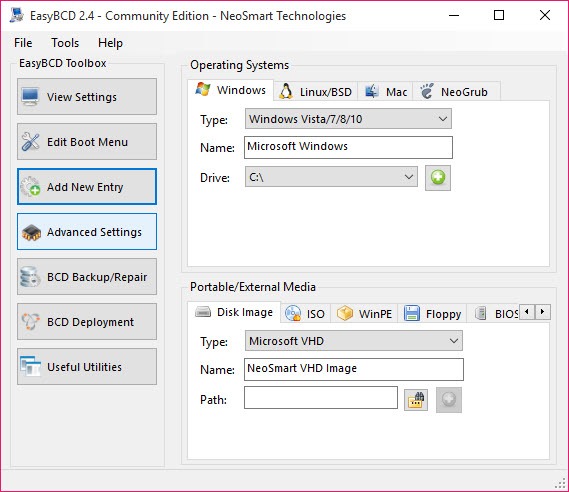
The everyday job is juggling more than one operating system on the same machine, and EasyBCD makes that painless. Add a new entry and you pick the type from a dropdown, point it at the right partition, give it a name you’ll actually recognize at boot, and you’re done. No memorizing identifiers, no copy-pasting long strings into a terminal and praying you got the syntax right.
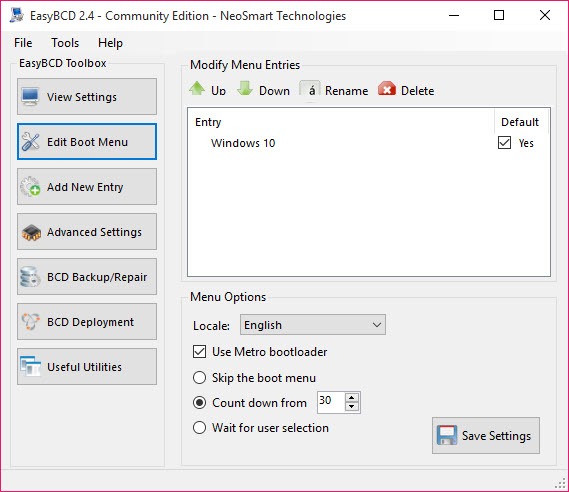
Reordering is just as direct. Drag the entries into the sequence you want, set one as default, and adjust the countdown timer. You can hide the menu entirely if you boot the same system every time, or stretch the wait if you share the machine and people need a moment to choose.
For lower-level surgery on the actual boot record (rather than the menu that sits on top of it), BootIce handles MBR and partition editing that goes a layer deeper than this tool reaches.
Booting things the standard loader won’t
Here’s where it gets interesting. The application can create entries that boot from an ISO file or a virtual hard disk stored right on your drive, no physical media required. Drop a recovery image or a small rescue environment onto a partition, point an entry at it, and it shows up in your boot menu like any installed system. That’s genuinely handy when you want a rescue environment on hand but don’t want to keep hunting for a USB stick.
It also chain-loads other bootloaders, which matters if you’ve got a setup that relies on GRUB or a similar loader for one of your systems. Instead of the loaders fighting over which one runs first, you let EasyBCD hand control to the other one cleanly.
There’s a catch. Some of these advanced entry types behave differently depending on your firmware, and the tool doesn’t always warn you which combinations are finicky until you test them.
Why does the BCD store matter so much?
The Boot Configuration Data store is the single thing standing between a working machine and a black screen at startup. Mess it up, and nothing loads. The built-in editing tool is powerful but unforgiving, and one wrong flag can leave you stranded. EasyBCD wraps that same database in a layer that’s hard to break by accident, showing you the consequences of a change before you commit it.
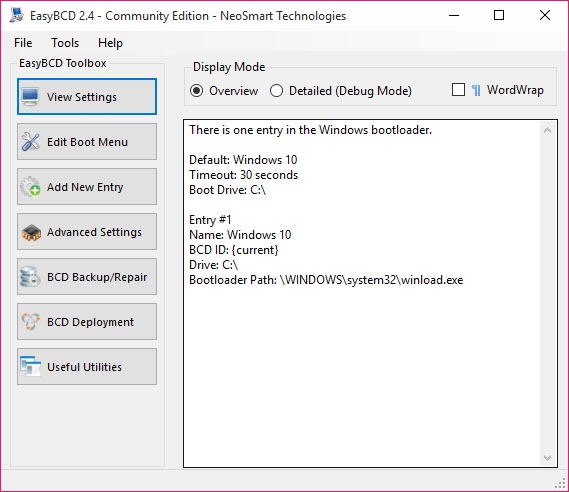
There’s also a view mode that displays the raw BCD contents in a couple of formats, useful when you’re following a guide that references specific entry details. So even power users who could do this from the command line often keep it around, because reading the store at a glance beats parsing terminal output line by line.
Backup, repair, and starting over
One feature that earns its keep: you can back up your entire boot configuration to a file before you change anything, then restore it in seconds if a tweak goes wrong. Anyone who’s bricked a boot menu and spent an evening fixing it will appreciate that safety net.
When things have already gone south, the repair tools step in. EasyBCD can rebuild the BCD from scratch, rewrite the boot sector, or reset the whole configuration to a clean default. It won’t recover a corrupted partition or lost files, that’s a job for something like DiskGenius, but for resurrecting a boot menu that’s stopped working, it’s often the fastest route back to a usable desktop.
How it fits alongside other boot tools
It helps to know what this tool is not. It doesn’t create bootable USB drives, so for that you’d reach for Rufus or, if you want many images on one stick, Ventoy. EasyBCD works on the system that’s already installed, managing how it starts up rather than getting it onto the machine in the first place.
That focus is its strength. Where multi-boot USB builders are about installation media, this one owns the post-install territory. It decides which system boots, in what order, from where, and what to do when the menu breaks. The two roles complement each other rather than overlap.
Conclusion
For anyone running more than one operating system, repairing a wrecked boot menu, or wanting an ISO-based rescue option always at hand, EasyBCD turns a genuinely intimidating part of system maintenance into something you can manage in a few minutes. It respects beginners with safe defaults and an honest interface, while giving experienced users the deep entry types and repair tools they’d otherwise wrestle out of the command line.
The boundary is clear enough: it manages booting, it doesn’t create install media, and a few advanced features depend on your hardware cooperating. But for owning the moment your computer decides what to load, this is the tool that hands you the keys, and a backup in case you fumble them.
Pros & Cons
- Edits the boot configuration through a clear visual interface, no command line needed
- Adds, renames, reorders, and removes boot entries with a few clicks
- Boots from ISO images and virtual hard disks stored on your drive
- Chain-loads other bootloaders like GRUB cleanly
- Backs up and restores the entire boot configuration before risky changes
- Repairs and rebuilds a broken boot menu without a full reinstall
- Does not create bootable USB drives, so you still need a separate tool for that
- Some advanced entry types behave inconsistently across different firmware
- Misconfigured entries can still leave a system unbootable if you ignore backups
- Offers little hand-holding on which advanced combinations are safe to try
Frequently asked questions
Yes. It includes repair tools that rebuild the BCD store, rewrite the boot sector, or reset the configuration to a clean default. It won't recover lost files, but for a boot menu that refuses to load it's usually the quickest fix.
It does. You can create an entry that points at an ISO or a virtual hard disk sitting on your drive, and it appears in the boot menu like any installed system. This is handy for keeping a recovery environment ready without a USB stick.
Yes, through chain-loading. Instead of the bootloaders competing at startup, the application hands control to GRUB cleanly when you select that entry, so both systems coexist without overwriting each other's boot setup.
The interface is built to be hard to break by accident, and it shows you changes before committing them. Still, back up your configuration first using the built-in tool. With a saved copy, a bad change is a quick restore rather than a stranded system.
This application manages how an already-installed system boots, controlling the menu, order, and entries. A USB creation tool gets an operating system onto a drive in the first place. They handle opposite ends of the same process.


