

Angry IP Scanner
About Angry IP Scanner
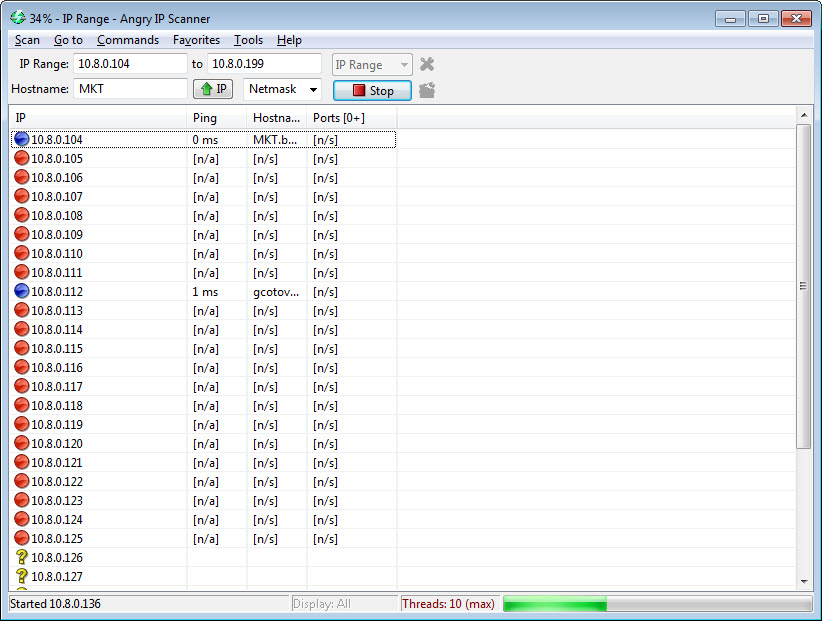
Working out what is actually on a network used to mean pinging addresses one after another and waiting. Angry IP Scanner removes the waiting by giving every address its own thread and asking all of them at once.
That is the entire architectural idea and it explains the speed. A range of two hundred and fifty addresses does not take two hundred and fifty times as long as one, because the scan is limited by how quickly answers come back rather than by how many questions were asked.
The practical result is that scanning a whole subnet takes seconds, which changes it from something you do when investigating a problem into something you do casually to see what is there.
Fetchers decide what each column shows
The second Angry IP Scanner decision is that it does not fix what it collects. Each column is produced by a fetcher, and you choose which ones run.
The basic set covers response time and hostname. Beyond those sit open port detection, hardware addresses and the manufacturer they identify, workgroup and machine name information, web server detection, and a comments column for your own notes about what each address turned out to be.
That last one is more useful than it appears. A scan of an office network produces forty addresses, and typing what each one is as you identify it turns a list of numbers into documentation that persists between scans.
For considerably deeper columns, including share enumeration and certificate details, SoftPerfect Network Scanner gathers more per host at the cost of a heavier interface.
Reading the results honestly
Two misreadings of Angry IP Scanner results are common and both matter.
A host that does not answer has not necessarily gone away. Plenty of machines are configured not to respond to the probes a scanner sends, and a firewall doing its job makes a perfectly healthy computer look like an empty address. Angry IP Scanner reports what answered, which is not the same as reporting what exists.
The second concerns ports. An open port means something is listening there, and it says nothing whatever about whether that something is vulnerable, misconfigured or even interesting. Treating a port list as a security assessment is the classic mistake.
Actual analysis of what a service is and which version it runs belongs to a different class of tool, and Zenmap provides that depth along with the responsibility that comes with it.
Feeding it, and getting results out
Angry IP Scanner accepts a range, a random selection within one, or a list of addresses read from a file, which covers both sweeping a subnet and checking a specific set of machines you already care about.
Output matters more than people expect. Results export as comma-separated values, plain text, structured markup, or a simple list of addresses and ports suitable for feeding directly into another tool.
That last format is what makes this part of a workflow rather than an endpoint. A scan produces the list, and something else does the next step with it, which is how a technician actually works. For a friendlier interface with device names and shared folder browsing built in, Advanced IP Scanner covers the same ground with less configuration.
It runs from anywhere
Angry IP Scanner is small, requires no installation and leaves nothing behind, which means it lives on a stick alongside the rest of a technician’s tools and runs on a machine you have never seen before.
That portability matters in the situations this gets used in. Arriving at an unfamiliar network, plugging in and finding out what is present within a minute is exactly the job, and installing software on somebody else’s machine to do it would be both slow and unwelcome.
Favourites store ranges you scan repeatedly, so a regular check of the same network is one click rather than typing the range again. For continuous watching rather than scanning on demand, a monitor that alerts when a new device joins the network covers the other half of the question.
Where scanning is not appropriate
This deserves stating plainly rather than being left implied.
On a network you administer, running Angry IP Scanner is routine and unremarkable. You are inventorying your own equipment, and the fact that the tool is fast makes doing it regularly practical.
On a network you do not administer, it is a different matter. Scanning a workplace network without authorisation is likely to breach the acceptable use policy you agreed to, scanning a hotel or a café network is rude and possibly worse, and any network with intrusion detection will record the scan along with the address it came from. Angry IP Scanner is not stealthy and does not try to be.
The honest position is that this is an administrator’s inventory tool that happens to be equally usable by somebody with no business running it, and the distinction is entirely about whose network it is.
When the question moves from what is present to what is actually being sent, a packet analyser answers that instead, with the same caveat about whose traffic you are entitled to examine.
Conclusion
Angry IP Scanner does one job with unusual efficiency. Threading every address separately turns a subnet sweep into a few seconds of work, the selectable fetchers mean each scan gathers exactly what you asked for, and the export formats make it a component of a process rather than an answer in itself.
Keep two things in mind and it is close to ideal for network inventory. Silence from an address is not proof of absence, and an open port is a fact rather than a finding. Beyond that, remember that the speed making it pleasant to use also makes it conspicuous, so run it on networks that are yours to examine and leave everybody else’s alone.
Pros & Cons
- A thread per address makes a full subnet scan finish in seconds
- Fetchers are selectable, so each scan gathers only what you need
- Comments column turns a list of addresses into persistent documentation
- Accepts ranges, random selections or an address list from a file
- Exports to several formats including a plain address and port list for other tools
- Portable, with no installation and nothing left on the machine
- Favourites make repeated scans of the same range a single click
- Reports what answered rather than what exists, so firewalled hosts look absent
- Port detection identifies listening services without assessing any of them
- Aggressive threading can saturate a slow or congested link
- Makes no attempt at stealth and will be logged by any detection system
- Deeper per-host information requires a heavier tool
Frequently asked questions
Because it scans every address simultaneously rather than in sequence, giving each its own thread. The scan takes as long as the slowest reply rather than the sum of every reply.
Because they chose not to answer. Firewalls and hardened configurations frequently suppress the responses a scanner relies on, so an address showing nothing may hold a perfectly healthy machine that is simply declining to reply.
The modules producing each column, covering response time, hostname, open ports, hardware address, workgroup information and your own comments. Selecting which ones run determines what the scan gathers and how long it takes.
No. It means a service is listening. Whether that service is current, correctly configured or exposed to anything is a separate question that needs a tool built for assessing services rather than finding them.
Only ones you administer or have permission to examine. Scanning a workplace network usually breaches the policy you agreed to, and any network with monitoring will log the scan and the address it came from.


