

Reduce Memory
About Reduce Memory
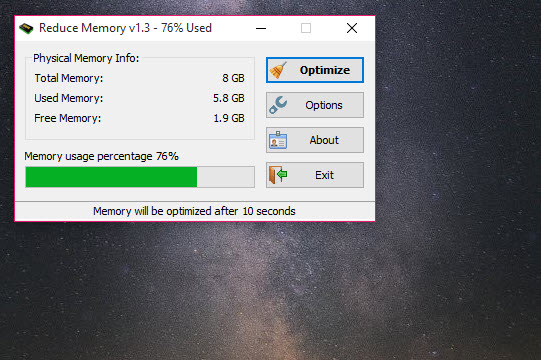
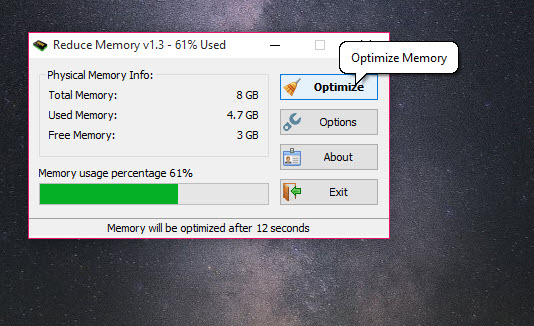
Watch the memory figure in the task manager climb through an afternoon of work and the temptation to do something about it is hard to resist. Reduce Memory is built for exactly that itch. One window shows total, used and free RAM, one button trims the working sets of everything running, and a line of text tells you how many megabytes came back.
Reduce Memory sits in the same category as CleanMem and the handful of other memory trimmers that have been around for years, and it is one of the more restrained examples. No scanning animation, no score out of a hundred, no upsell. Just a readout, a button and an options panel.
Whether you should be pressing that button at all is a more interesting question, and this review spends more time on it than on the interface, because the interface takes about ten seconds to understand.
What the button actually does
Pressing it asks the memory manager to trim the working set of each running process, which means pages currently held in RAM get written out to the pagefile and dropped. The system cache gets flushed alongside them. The number in the task manager falls, sometimes by a gigabyte or more on a busy machine, and the readout reports the difference.
That is the entire mechanism. Nothing gets compacted, nothing gets defragmented, and no leak gets repaired. Pages that a process still needs are simply moved somewhere slower.
Why a lower number is not a faster machine
Here is the part most tools in this category never mention. Unused RAM is not a resource being saved for later, it is a resource going to waste, and the memory manager deliberately fills it with cached pages so that programs and files open without touching the disk. Standby memory looks alarming in a graph and is doing useful work.
Trim it and the next thing you do is slower, because the pages you just evicted have to be faulted back in from storage. Alt-tab to a browser after a big clear-out and you will watch it redraw. If you want to see what is actually being held before you throw it away, RAMMap breaks the standby list down by file and process, and it is a sobering thing to look at once.
Where it does earn its place
None of that makes the tool useless, it just narrows the cases. The honest one is a machine short on RAM where you are about to launch something demanding, a virtual machine or a large game, and you would rather hand it a clean slate than have the allocator fight for pages mid-load. One manual click before the launch is a reasonable move.
The other is a process with a slow leak, the kind that grows steadily until you restart it. Trimming buys time between restarts. That is a workaround for someone else’s bug rather than an optimisation, but a workaround that keeps a machine usable until Friday still counts for something.
Automatic mode and the interval trap
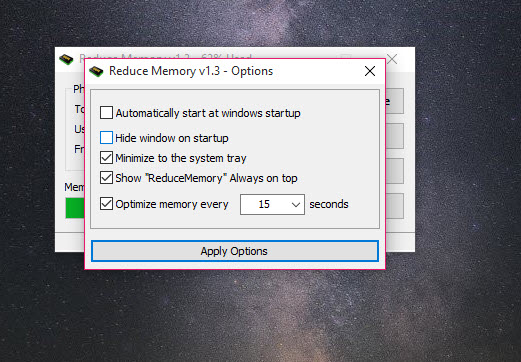
The options panel can run the trim on a timer, with the interval accepting anything from 3 seconds up to 99999, and anything below 3 quietly treated as 3. A separate threshold slider only lets the timer fire once memory usage passes the percentage you set.
Three seconds is the single worst setting available. At that rate Reduce Memory and the memory manager spend the afternoon undoing each other’s work, and the disk pays for all of it. If you want automation, set the threshold high, somewhere around ninety percent where the machine is already close to swapping, and give the interval several minutes. Then it behaves like a safety valve rather than a metronome.
The panel also handles the usual desktop conveniences, starting with the system, hiding at launch, sitting in the tray or staying on top.
The exclusion list, and what it admits
You can name processes to leave alone, which is the most revealing option in the program. An exclusion list exists because trimming actively harms some applications. Video editors holding a timeline cache and virtual machines with allocated memory both suffer when their pages get pushed out, so anyone using Reduce Memory alongside that kind of software needs the list populated before switching automation on. A process viewer showing each working set is the way to work out which names belong there.
One thing the exclusion list cannot do is change what gets cleared. If your interest is specifically the standby list rather than process working sets, Mem Reduct exposes those as separate choices and lets you pick.
Conclusion
Reduce Memory is well built for what it is, and what it is happens to be a tool most machines do not need. If you have plenty of RAM, the memory manager is already doing a better job than any button can, and the falling number you get here is cosmetic. That is not a criticism of the software so much as of the category it belongs to.
Where it makes sense is on constrained hardware, in front of a demanding launch, or as a holding action against a leaky application. Used that way, with a high threshold and a populated exclusion list, Reduce Memory is the most sensible version of a bad idea. Just do not leave it firing every few seconds and expect the machine to thank you.
Pros & Cons
- One button, a clear before and after figure, and no scanning theatre or scores
- Threshold plus interval together make a reasonable safety valve for machines close to swapping
- Process exclusion list keeps editors and virtual machines out of the trimming
- Tray operation and startup options mean it can sit quietly until needed
- Trimming pushes pages to the pagefile, so the application you switch to next is slower
- Short intervals fight the memory manager continuously and generate pointless disk writes
- No breakdown of what was cleared or which processes were affected
- Cannot target the standby list separately from process working sets
- Presents a falling memory figure as an improvement, which it usually is not
Frequently asked questions
Not by itself. It lowers the reported memory figure, and the pages it evicts have to be read back from storage afterwards, which takes time. The narrow exception is clearing space immediately before launching something large on a machine that is short of RAM.
It can. Video editors, virtual machines and anything holding a large cache in memory will slow noticeably when their pages get trimmed, which is precisely why the exclusion list exists. Populate it before enabling any automation.
Minutes rather than seconds, paired with a high usage threshold so it only fires when the machine is close to swapping. The three second minimum is technically available and there is no sensible reason to use it.
It flushes the system cache along with process working sets, but it does not give you standby memory as a separate target. Tools that expose the standby and modified page lists individually offer finer control there.


