

TinyPic
About TinyPic
Digital cameras and phones save photos at sizes built for printing posters, then we go and email them to grandparents who just want to see the birthday cake. TinyPic exists for exactly that gap. Drag a batch of photos onto its small window, pick one of a few sensible size presets, and the tool spits out copies shrunk to a fraction of the original weight, typically somewhere between a tenth and a thirtieth of the starting file size, while the picture still looks like the picture.
There’s no learning curve to describe because there’s almost no interface. That’s the entire product philosophy, one job, a handful of decisions, and results in seconds. The question a review has to answer isn’t whether it works (it does) but whether its stubborn simplicity fits your situation or fights it.
Drag, pick a preset, done
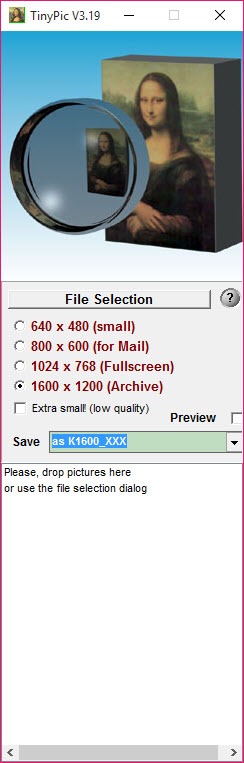
The workflow is three gestures long. Drop images onto the window, individually or by the folder-load, choose a target from the preset list, and start the run. The presets map to real intentions rather than pixel trivia, a small size for forum avatars and thumbnails, the classic email-friendly middle sizes, and larger options for full-screen viewing or archiving, with the biggest topping out at 1600×1200. An extra-small option exists for when transfer size beats every other concern, with the quality cost that implies.
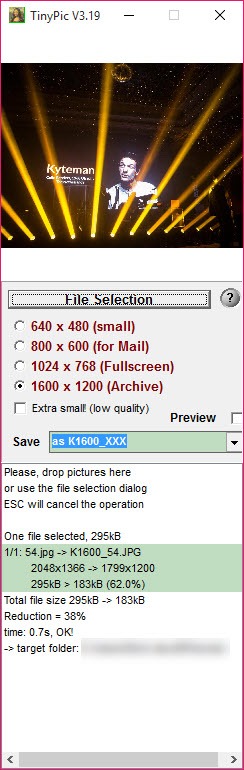
The queue view keeps the process honest, listing each file with its original size, the reduction percentage achieved, and status as the batch churns. Watching a folder of multi-megabyte photos collapse into email-sized files, complete with the running total, is oddly satisfying, and the compression math is what makes the tool’s old promise real.
The shrinkage is enough that a hundred-plus photos fit into a single message where three originals wouldn’t have.
Your originals, and the one setting that matters
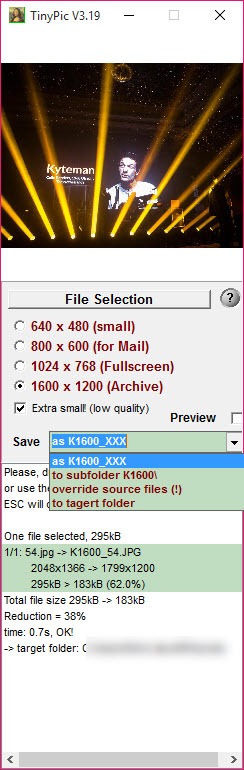
Output handling is where the only real decision lives, and one of the options deserves a warning label. Shrunk copies can be saved next to the originals with a size prefix added to the name, into an automatically created subfolder, or into any folder you choose.
All three keep your originals untouched. The fourth option overwrites the source files, and it means it, the full-resolution photos are gone once it runs. There is no undo, so that mode belongs only to people processing copies they already backed up. Everyone else should pick the subfolder and never think about it again.
Format support covers the everyday spread, JPG in and out as the main event, with PNG, GIF, and BMP joining the party. A bloated BMP scan shrinks the most dramatically of anything you’ll feed it, since that format wastes space with unusual enthusiasm.
What it refuses to do, on purpose
Now the honest inventory, because the simplicity cuts in both directions. There is no custom size field, so if your use case demands exactly 1200 pixels wide, the presets simply don’t offer it and nothing in the settings will help. There’s no cropping, no rotation, no watermarking, no renaming patterns, no editing of any description. The output folder doesn’t even open itself when a batch finishes.
None of that is an oversight, it’s the design, but it draws a clear line around the right user. Anyone needing precise dimensions or web-optimization control is better matched with a fine-grained compressor like RIOT, where quality, size, and format details are all dials.
Batch work with renaming, watermarks, and format conversion belongs to a full toolkit like IrfanView.
And squeezing PNG graphics for a website without touching their pixels is a lossless PNG specialist‘s territory. This tool competes with none of them. It competes with the fifteen minutes those programs cost to learn, and for the pure “make these photos mailable” errand, it wins that contest outright.
Conclusion
TinyPic is for the person whose entire requirement is “these photos are too big”. Families mailing event albums, sellers attaching listing photos, and anyone feeding a form that rejects files over a couple of megabytes are exactly who it was made for. It solves that in seconds, teaches itself, and asks for nothing.
Power users will hit its preset walls in the first minute and should go straight to a fuller toolkit. That’s not a flaw so much as a border, and inside its borders, this remains one of the purest examples of a tool that does one thing and stops.
Pros & Cons
- Shrinks photos to a small fraction of their size with minimal visible loss
- Drag-and-drop batches with a live queue showing per-file reduction
- Presets match real uses, from thumbnails to email to full-screen
- Three of the four output modes keep originals completely safe
- Small, undemanding, and instantly understood by any user
- No custom dimensions, presets only
- The overwrite-originals mode destroys full-resolution files permanently
- No editing, cropping, renaming, or watermarking of any kind
- Output folder must be opened manually after each batch
Frequently asked questions
Typical camera photos shrink to somewhere between a tenth and a thirtieth of their original file size at the email-oriented presets, which is the difference between attaching three photos and attaching a hundred.
Only if you choose the overwrite mode, which permanently replaces the originals and should be avoided unless they're backed-up copies. The prefix, subfolder, and custom-folder modes all leave originals untouched.
No, resizing works strictly from the built-in presets. If a task requires precise custom dimensions, this tool is the wrong instrument for it by design.
The common ones, JPG, PNG, GIF, and BMP among them, with JPG as the primary output. Oversized BMP files show the most dramatic reductions of all.
Yes, batches are the normal mode of use. Drop any number of images onto the window and the queue processes them in one run, reporting the size reduction for each.


