

VPlayer
About VPlayer
VPlayer is a small media player with an unusually wide front door. The same modest window plays video, plays music and displays pictures, which makes it a candidate for the role of all-purpose opener on a machine where you would rather not install three separate programs. One window, one set of habits, every common file.
The honest framing comes right behind that promise. This is a tiny program with real conveniences and real rough edges, and whether it suits you depends on which of the two you meet first. So let us lay out both without the marketing fog.
One window for three kinds of files
The playback side covers the classic formats, with AVI, MPEG, WMV, DivX, VOB and ASF on the video list, so DVD-era material and old family recordings play without ceremony. Music plays in the same window, with support for the tags inside audio files, and pictures open there too, covering JPEG, PNG, GIF, BMP, TIFF and even icon files.
Notice what the list is missing, though. The video roster predates the MP4 and MKV world the internet now lives in, so a folder of recent downloads will meet refusals unless the system has codecs of its own to lend.
For a library of older files VPlayer is in its element, and for a current one it is not, and no amount of goodwill changes that arithmetic.
It remembers where you stopped
The feature that quietly earns VPlayer affection. Close a half-watched film, and the next time the file opens, playback resumes from the exact spot, no bookmarks and no scrubbing through two hours of timeline hunting for the scene. For people who watch long material in short sittings, this alone can justify a small player’s place on the machine.
The other playback trick is fragment skipping. Sections of a video or song can be marked to be jumped over during playback, with the file itself left untouched, so the boring intro or the damaged stretch disappears from viewing without any actual editing.
Undoing it all means clearing the marks, since nothing was ever cut.
An image viewer with working hands
The picture side of VPlayer goes past mere display. Images can be zoomed and copied, moved between folders, compressed, and converted between formats from the same window, which turns the player into a passable everyday image manager for light duty.
Passable is the operative word. Mixing images into a session is where the seams show, because loading pictures stops whatever was playing, and the workflow around it feels improvised rather than designed.
Anyone whose image work goes beyond glancing and sorting will be happier with a dedicated image viewer, and the conversion tools there run circles around these.
The interface asks for patience
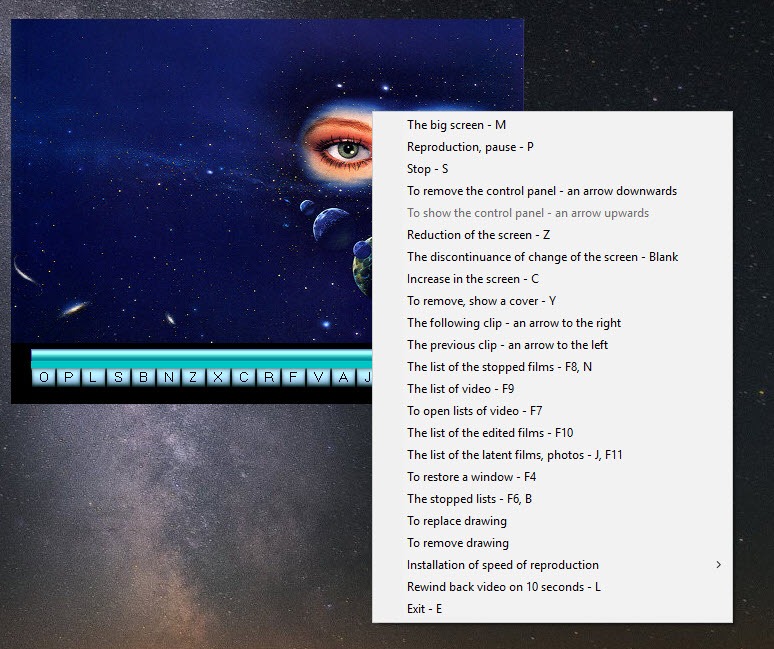
Most commands hide in the right-click menu rather than on visible buttons, so the first session involves genuine exploration, and a few behaviours, like the image loading interrupting playback, feel like bugs wearing the costume of features. The design is plain to the point of austerity, and short-tempered users will not stay long enough to learn its layout.
That is the trade in plain terms. Against VLC Media Player, which plays essentially everything ever recorded, this program competes only on smallness and on its resume-and-skip tricks. As a second player kept for old formats, long films and quick picture sorting, it earns a corner.
As the main player on a modern machine, it would be a daily argument.
Conclusion
VPlayer fits a narrow and real audience. Owners of older machines and older media collections, who want one small program that plays the film, resumes it tomorrow, skips the dull stretch and sorts a folder of photos on the side, will find it does those exact things with very little weight.
Everyone else will collide with the missing modern formats and the puzzle-box interface inside the first evening. Keep it as a specialist for legacy files and long viewing sessions, pair it with a modern player for everything current, and both programs end up doing what they are actually good at.
Pros & Cons
- Plays video, plays music and views images in one small program
- Resumes every file from the exact spot where you stopped
- Fragments can be marked and skipped without altering the file
- Images can be sorted, converted and compressed from the player's own window
- Starts instantly and stays light on an old machine
- The format list predates MP4 and MKV, so recent files often refuse to play
- Loading images interrupts whatever is currently playing
- Most commands hide in a right-click menu rather than visible controls
- The overall design is rough and takes patience to learn
Frequently asked questions
Yes, automatically. The player remembers the position in each file, and reopening the file resumes playback from that exact spot with nothing to set up.
Not on its own strength. Its native list covers AVI, MPEG, WMV, DivX, VOB and ASF, so modern container formats depend on codecs already present on the system, and often simply fail.
Not cut, but skip. Fragments can be marked to be jumped over during playback while the file stays completely unchanged, and clearing the marks restores normal playback.


