

Plotagon

 (64 votes, average: 4.06 out of 5)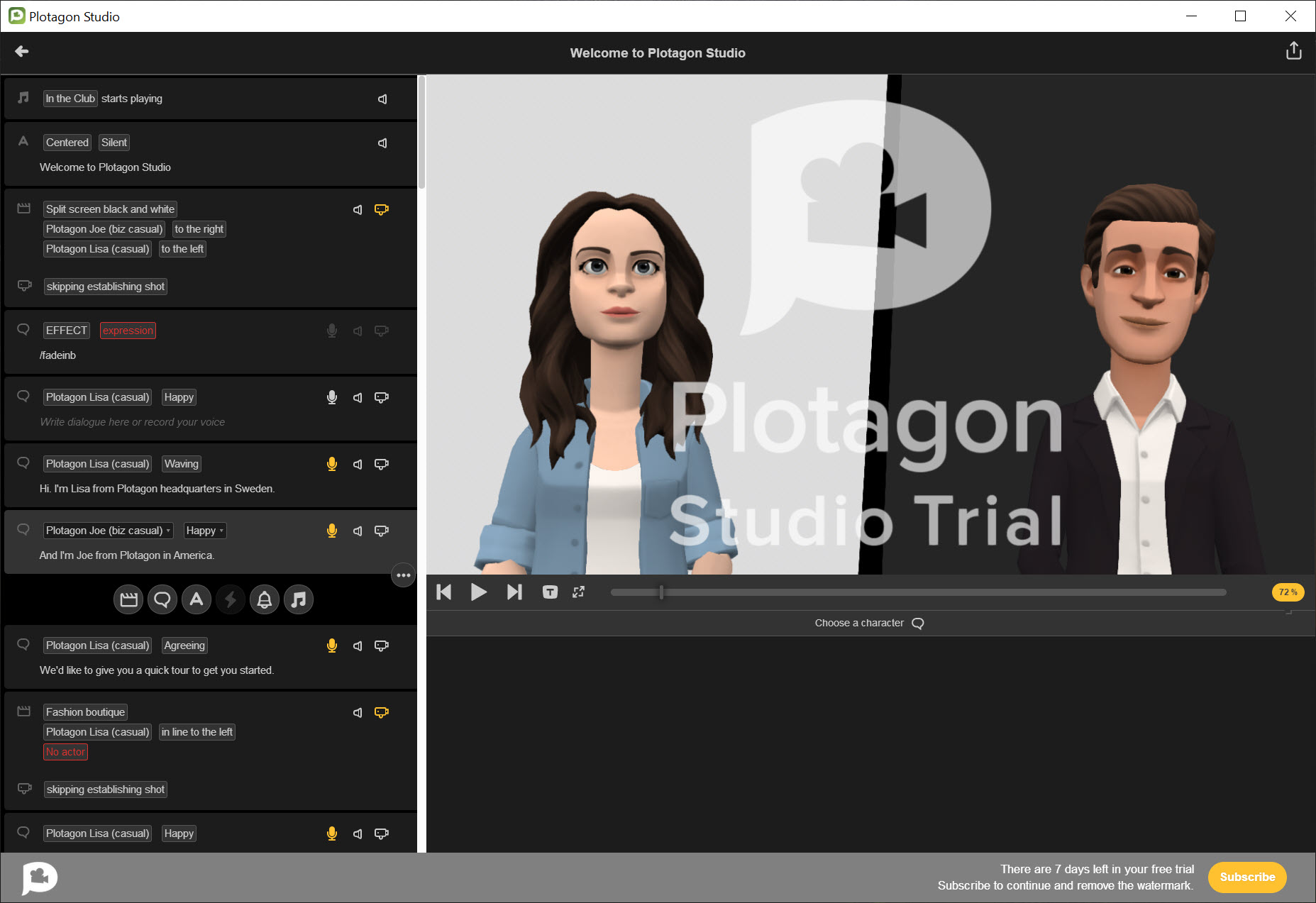
About Plotagon
Plotagon is an animation tool that takes the technical work out of making animated videos. You write a script in a screenplay-like format, pick characters and scenes from a library, and the application renders a full 3D animated short with lip-synced dialogue, camera angles, and character emotes. The pitch is that anyone who can write can make an animated video, regardless of whether they’ve ever touched Blender or any other serious animation software.
This is a legitimately interesting category. Real animation tools demand months or years of learning before you can produce anything watchable. Plotagon collapses that learning curve to roughly an afternoon, at the cost of accepting a fixed visual style and a constrained library of characters, environments, and movements. Whether that trade-off works for you depends entirely on what you’re trying to do.
For a classroom history teacher who wants to dramatize a historical conversation, it works brilliantly. For an indie animator with a specific aesthetic vision, it doesn’t.
The script-first workflow
Open a new project in Plotagon and the main editing surface looks like a screenplay. Scene heading on top (INT. CLASSROOM – DAY), character name on its own line, dialogue beneath it, the next character name, and so on. You type dialogue exactly as you’d write a script, and the application generates the animation from that text.
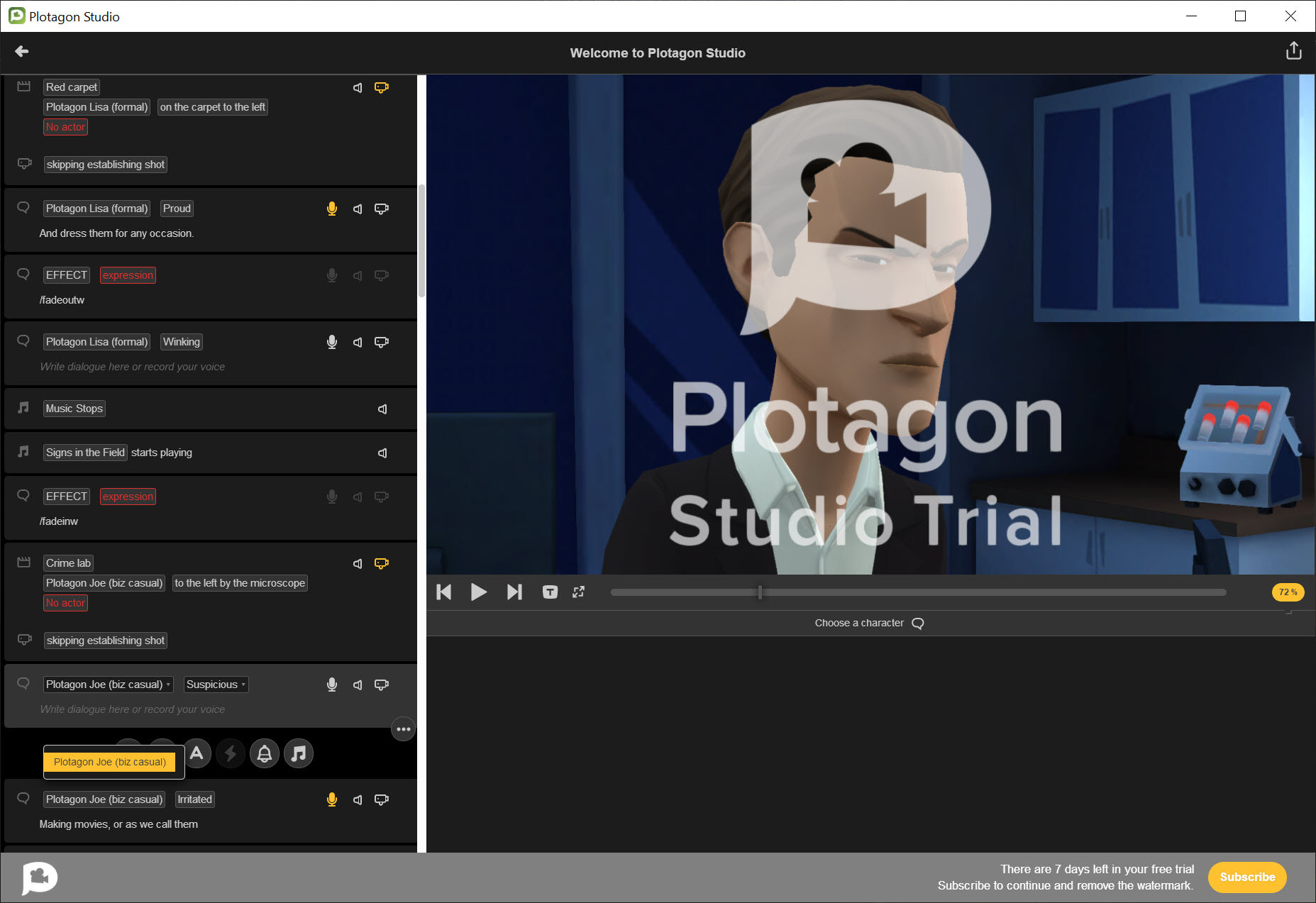
The pivotal design choice is making the script the primary editable artifact. You’re not arranging keyframes on a timeline, not posing skeletons, not animating lip movements. You’re writing words. Every line of dialogue triggers a corresponding animation in the rendered output: the speaking character looks at the listener, their mouth moves to match the audio, the camera cuts to whoever is talking, and the next line plays after the current one finishes.
For users who think in narrative and dialogue rather than in motion and timing, this is liberating. For users who actually want to direct the small moments of animation precisely, it’s restrictive. The script-as-source-of-truth means you have less granular control over individual frames than you would in a traditional animation pipeline.
Stage directions in brackets let you trigger emotes, scene transitions, and camera movements between dialogue lines. (CHARACTER: angry) makes the next line delivered with an angry expression. (SCENE: bedroom) cuts to a different environment. These directions function essentially like the controls a film director would call out on set, except they execute as keyword commands inside your script.
Characters and the visual style trade-off
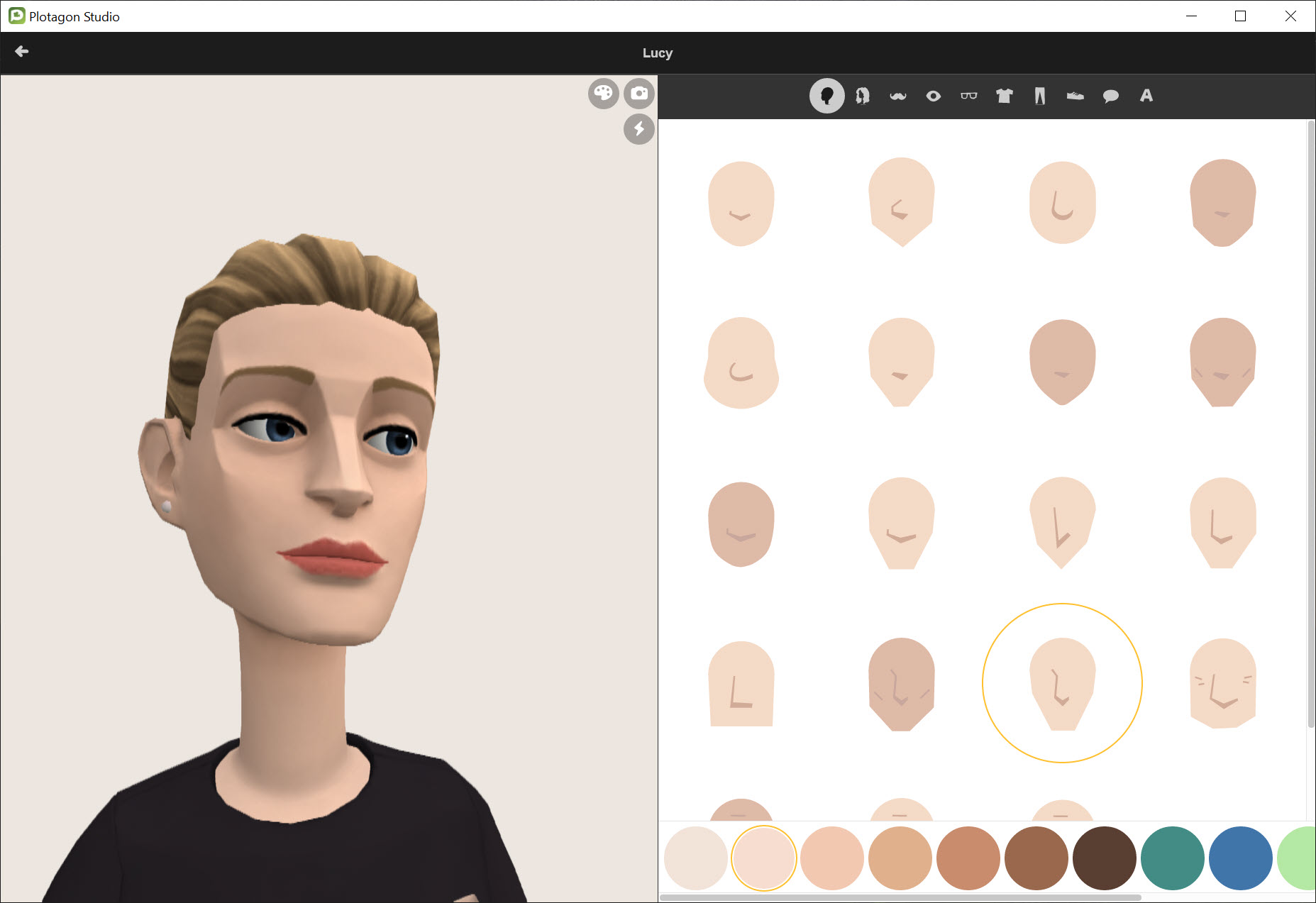
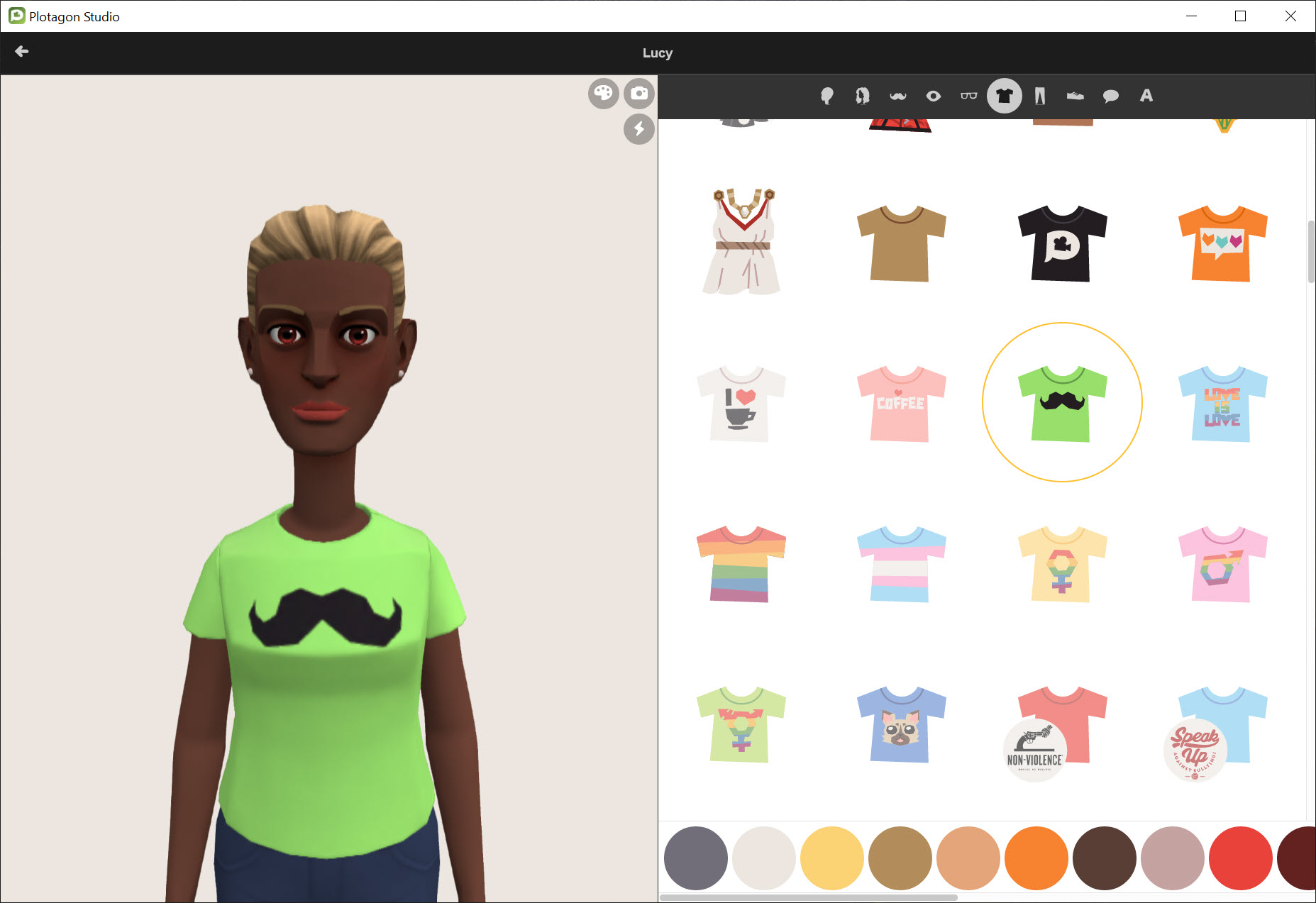
The character creator lets you customize face shape, hair, skin tone, eye color, clothing, accessories, and a handful of body proportions. The base library includes a wide range of characters across ages, ethnicities, and styles, and you can mix and match wardrobe items to create custom looks. Saved characters can be reused across projects.
Here’s where the visual style trade-off becomes visible. Plotagon characters have a specific stylized 3D aesthetic that’s instantly recognizable. Slightly cartoonish proportions, a particular rendering style for skin and hair, and animation that feels deliberately simplified rather than naturalistic. People who watch a lot of YouTube will probably recognize the look from the genre of “Plotagon videos” that has built up around the application.
This visual identity is both a strength and a limitation. A strength because the consistency means even your first project looks coherent and professional within the style. A limitation because you can’t deviate from the style at all. Want photorealistic characters? Wrong tool. Want anime-style aesthetics? Wrong tool. Want gritty noir lighting? Wrong tool. The application produces Plotagon-looking videos, and that’s the only style it produces.
For users who specifically chose the application for that look, this is fine. For users who picked it without realizing the aesthetic was so distinctive, it sometimes comes as an unwelcome surprise after the first export.
The text-to-speech engine and the voices
Each character can be assigned a voice from a multilingual library. Languages cover the major options (English in multiple regional accents, Spanish, French, German, Portuguese, Italian, Russian, and more), with several voice variants per language. The text-to-speech engine reads your dialogue lines and produces audio that gets synced to the character’s lip movements automatically.
The voices have a distinctive quality. Modern neural TTS systems like the ones in browser extensions or ElevenLabs sound substantially more natural than what Plotagon uses, which sits closer to the older generation of synthetic voices. Some users find the slight artificiality charming and on-brand for the visual style. Others find it grating. A YouTube subgenre exists specifically around these voices, where the “Plotagon voice” has become an in-joke that the application can’t really shake.
Voice acting is the alternative. You can record your own dialogue or import audio files, and the application syncs lip movements to your recorded audio. This produces noticeably better results if you have a decent microphone and don’t mind the time investment. The TTS pathway is faster but the recorded-voice pathway delivers a more polished final product. For serious projects, recording your own audio is almost always worth the effort.
Multilingual support is genuinely useful for educators preparing materials in multiple languages. The same script can be duplicated with different language voices assigned to each character, and the application produces clean versions in each language without re-animating. For training materials with international audiences, this is a strong workflow.
Scenes, props, and the content library
The scene library covers a wide range of environments. Classrooms, offices, living rooms, restaurants, streets, courtrooms, parks, beaches, hospitals, and several dozen others. Each scene comes with appropriate furniture, lighting, and props pre-arranged, which makes setup essentially zero-effort. Pick the scene, and the characters appear in plausible positions within it.
Props are limited compared to a real 3D scene tool. You can position characters and adjust the camera, but you can’t drag in arbitrary objects or substantially restructure the layout of a scene. If the bedroom scene you picked has a bed on the left and a window on the right, that’s the bedroom you have. For most narrative purposes this is enough. For scenes that require specific spatial setups, you’ll be improvising with whatever the closest pre-made scene gives you.
The content library matters because the variety of scenes and characters available directly determines what stories you can tell. The free version includes a solid base of options, enough for casual experimentation and many educational use cases. Premium content unlocks substantially more scenes, characters, costumes, and props. Whether the premium catalog is worth the cost depends entirely on how often you’ll use the additional content and how restricted the free library feels for your specific projects.
Emotes, camera, and the directing tools
Emotes are the system for expressing character emotion and action. Pick from a list of options (happy, sad, angry, surprised, thinking, laughing, crying, and dozens more) and the character performs that expression or animation. Emotes apply per line of dialogue or as standalone directions between lines. The library is wide enough to cover most narrative needs and limited enough that you’ll occasionally want something specific that isn’t there.
Camera control is intentionally simple. You can cut between speakers, change angle (close-up, medium, wide), and trigger a few cinematic moves (dolly, pan, zoom) between scenes or within them. There’s no manual keyframing of camera position. You pick from preset shot types and the application interpolates between them. For most projects this produces watchable cuts without requiring directorial expertise. For users who want very specific camera choreography, the limited control is frustrating.
Background music and sound effects can be added on a separate audio track. The library covers common moods (dramatic, lighthearted, suspenseful, romantic) and common SFX (doorbell, phone ring, applause, etc.).
For richer audio post-production, exporting and editing in a real audio tool or video editor like DaVinci Resolve is the right path.
Where Plotagon outputs actually work
The output formats include MP4 at common resolutions, suitable for upload to YouTube, social media, or learning management systems. The rendering happens locally and takes a few minutes per minute of video depending on your hardware. Quality is consistent and the technical fidelity (lighting, smoothness of animation, audio sync) is solid.
The contexts where Plotagon outputs genuinely work are these. Educational content where the goal is illustrating a concept with characters and dialogue rather than impressing with animation quality. Training materials and corporate explainers where speed of production matters more than aesthetic individuality. Social stories for therapy and autism support contexts (a documented use case where the simplified, consistent visual style is actually a benefit). Storyboarding and previsualization for larger animation projects where you’re prototyping a script before committing to a real animation pipeline. Fan fiction and amateur narrative work where the production value is appropriate to the medium.
Where it doesn’t work: marketing content where you need a unique visual style to stand out, professional storytelling where the Plotagon look would feel amateurish, projects requiring photorealistic or stylized aesthetics outside the application’s range, and anything where character performance subtlety matters.
For those use cases, real animation tools like Blender, OpenToonz, or commercial alternatives are the appropriate choice, with the corresponding learning investment.
The free and paid divide
The free version of Plotagon is functional but limited. You get a base library of characters, scenes, and emotes, the text-to-speech engine, and the script editor. You can produce complete videos and export them.
The premium tier expands the content library substantially, with additional characters, scenes, props, costumes, and emotes that aren’t accessible in the free version. There’s also an education tier specifically for teachers and schools, with different content priorities and bulk licensing.
The honest assessment is that the free version is enough to evaluate whether the application fits your needs but probably not enough for sustained use if you’re producing content regularly. The premium content is where the variety needed for diverse projects lives. Whether that’s a fair commercial structure or a bait-and-switch depends on perspective. The application does deliver real value at the free tier, but power users will hit the content limits quickly.
Conclusion
Plotagon is the right pick for users who need to produce animated narrative content and don’t have the time or interest to learn a real animation tool. Teachers building lesson content, trainers producing corporate explainers, therapists creating social stories, and writers prototyping screenplay ideas all find the application genuinely useful within its scope. The accessibility is real, the multilingual workflow is genuinely strong for international content, and the speed of production from script to finished video is faster than any alternative.
It is not the right pick for anyone who cares about visual style individuality, who wants to develop animation skills that transfer to other tools, or who’s producing content where the Plotagon look would feel out of place.
For those use cases, accepting the steeper learning curve of Blender or OpenToonz is the better long-term investment. Plotagon trades creative range for ease of entry, and that trade is excellent for some users and a non-starter for others. Knowing which side of that divide you’re on is essentially the whole evaluation.
Pros & Cons
- Script-based workflow makes animation accessible without animation skills
- Automatic lip-sync, camera cuts, and character positioning save substantial time
- Multilingual text-to-speech with multiple voice options per language
- Strong fit for educational content, training materials, and social stories
- Consistent visual quality across all projects without requiring aesthetic decisions
- Custom voice recording option for users who want better audio than TTS provides
- Fixed visual style that can't be modified, making outputs instantly recognizable
- Text-to-speech voices sound dated compared to current neural TTS alternatives
- Limited camera and scene customization compared to real animation tools
- Much of the content library sits behind the premium paywall
- Not suitable for projects requiring aesthetic individuality or specific styles
- The "Plotagon look" carries cultural baggage in some YouTube communities
Frequently asked questions
Plotagon is a script-based 3D animation application that turns written dialogue into animated videos. You write a screenplay-format script, choose characters and scenes from a library, and the application produces an animated video with lip-synced dialogue, camera cuts, and character emotes.
You write dialogue lines in the script editor, assigning each line to a character. The application automatically generates the corresponding animation, with the speaking character's mouth synced to the audio (either text-to-speech or recorded voice), camera cutting between speakers, and stage directions in brackets controlling emotes, scene changes, and camera movements.
A multilingual text-to-speech library with voices in many languages and regional accents, several variants per language. You can also record your own voice or import audio files, which the application then syncs to character lip movements automatically.
Yes. The character creator lets you adjust face shape, hair, skin tone, eye color, clothing, accessories, and body proportions. Custom characters can be saved and reused across projects. The base style of the characters is fixed within the Plotagon aesthetic.
Educational content, training materials, social stories for therapy and learning contexts, classroom storytelling exercises, corporate explainers, storyboarding for larger animation projects, and amateur narrative content. It's less suitable for projects requiring a unique visual style or professional-grade animation quality.
Traditional animation tools like Blender or OpenToonz require months or years of skill development and produce visually unique results limited only by your ability. Plotagon requires roughly an afternoon to learn and produces consistent Plotagon-style results that can't deviate from the application's aesthetic. The trade-off is accessibility versus creative freedom.
Yes. The text-to-speech library includes many languages and accents, and the application can produce versions of the same script with different language voices assigned to characters. This is particularly useful for educators producing learning content in multiple languages.
Yes. Videos export as MP4 at common resolutions, suitable for direct upload to YouTube, social media platforms, or learning management systems. Rendering happens locally and takes a few minutes per minute of finished video depending on your hardware.


