

Audio Router

About Audio Router
Sending one program’s sound to the headphones while everything else stays on the speakers sounds like it should be trivial. For a long time it was not, and Audio Router existed because the system offered no way to do it.
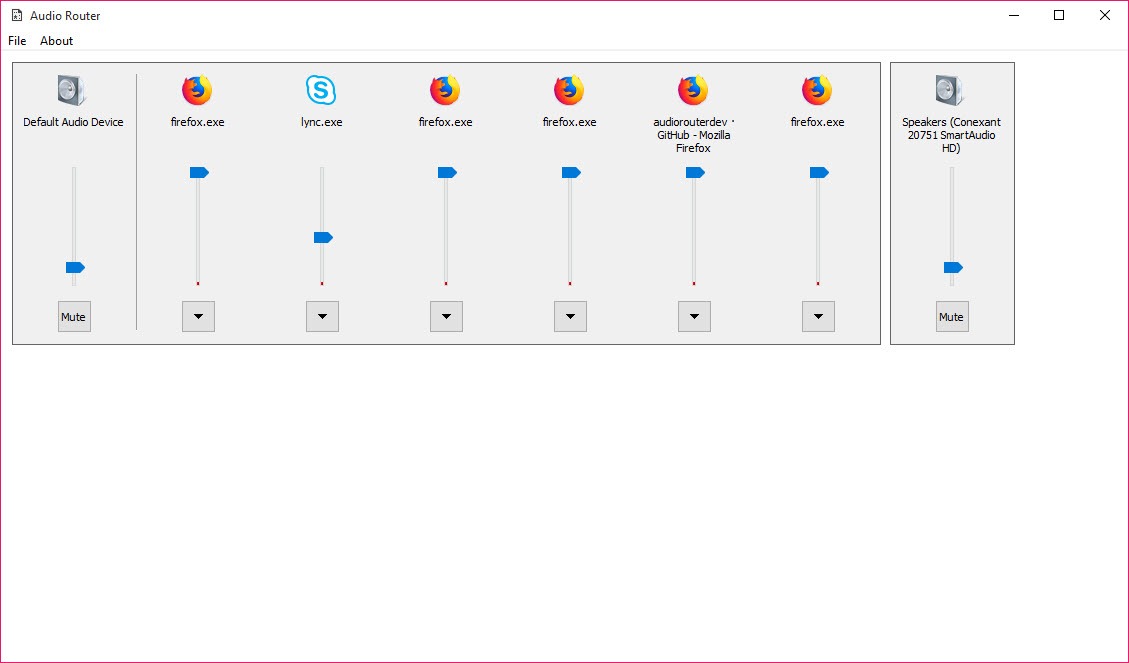
The Audio Router approach is direct. It lists the applications currently producing sound, and each one can be assigned to whichever output device you choose, independently of what the rest of the machine is using.
That covers the situation everybody meets eventually. A game through the headset while a video plays on the television, a call routed to one device while music continues on another, or a browser sent somewhere separate from everything else.
Sending one sound to two places at once
Here is the capability that still has no ordinary equivalent, and it is the reason to keep this in mind even now.
Audio Router duplicates an application’s audio rather than moving it, so the same sound arrives at two devices simultaneously. A game plays through the headset and through the speakers together, or through the headset and into a capture device at the same time.
Anybody recording or streaming will recognise why that matters. Hearing something yourself while also feeding it to something else is otherwise a job for a virtual audio device and a mixing arrangement, which is considerably more setup than a single duplication.
Where that mixing arrangement is what you actually need, Voicemeeter is the tool built for it, providing virtual devices and a proper mixer rather than a routing shortcut.
How it works, and why that matters
The mechanism explains the limitations that follow. Audio Router injects itself into the target application and redirects that application’s audio session from inside it.
That is a more invasive approach than asking the system to reroute something, and it has consequences. The injection has to match the target’s architecture, some applications refuse it, and a few crash when it is attempted. Anything that guards its own process, which increasingly includes games with anti-tampering measures, is likely to reject it or react badly.
None of that is a fault in the design so much as the cost of doing something the system did not expose. It also means results vary by application in a way that cannot be predicted from the outside, so trying it is the only way to find out.
What the system now does by itself
Being honest about Audio Router relevance matters here. Current systems include a per-application output setting, letting you send one program’s sound to a chosen device without any additional software.
That covers the main reason this tool existed. For simply moving one application to another output, the built-in setting is the better answer, since it involves no injection, no compatibility question and nothing to install.
What the built-in setting does not offer is duplication to two devices at once, which remains the distinctive thing here. So the honest position is that this has narrowed from a general solution to a specific one.
Development has stopped
Audio Router has not been maintained for a considerable time, and that shapes what to expect.
Applications that do not work will not start working, new protective measures in games will not be accommodated, and problems on newer systems will not be addressed. It works where it works, and that set is not going to grow.
For shaping the sound rather than routing it, Equalizer APO operates at the system level and remains maintained, which is a different job and a more dependable tool.
Conclusion
Audio Router solved a real problem before the system did, and the system has since taken most of that problem back. Routing a single application to a chosen output no longer needs anything installed, which removes the main reason people came here.
What survives is the duplication. Sending one application’s sound to two devices simultaneously remains awkward without either this or a full virtual mixing setup, and for anybody who needs exactly that, a small portable tool is a lighter answer than the alternative. Test it with your particular application first though, because the injection approach means compatibility is discovered rather than guaranteed.
Pros & Cons
- Assigns individual applications to output devices independently of the system default
- Duplicates one application's sound to two devices at once, which the built-in setting does not
- Per-application volume alongside the routing
- Portable, with no installation and nothing left behind
- Simple enough to understand entirely within a minute of opening it
- Works by injecting into applications, which some refuse and a few crash on
- Games with anti-tampering protection are likely to reject it
- Development stopped, so unsupported applications will remain unsupported
- Current systems handle basic per-application routing natively
- Results vary by application in ways that cannot be predicted in advance
Frequently asked questions
Duplicate one application's sound to two output devices at once. Current systems can send an application to a chosen device, and sending it to two simultaneously is where this still has no ordinary equivalent.
Because it works by injecting into the target process rather than by asking the system to reroute anything. Applications that guard themselves, particularly games with anti-tampering measures, refuse the injection or react badly to it.
Less than it was. The per-application output setting in current systems covers the common case, so what remains distinctive is the duplication to two devices, which is a narrower reason to install it.
No. Applications that do not work with it now will not begin working, and problems on newer systems will not be addressed. It functions where it functions and that set is fixed.


I can’t see how to route the output of one app (say VisualDJ) into another app, like your Digital Audio Workstation. Without that functionality this is not very useful.