

StaxRIP
About StaxRIP
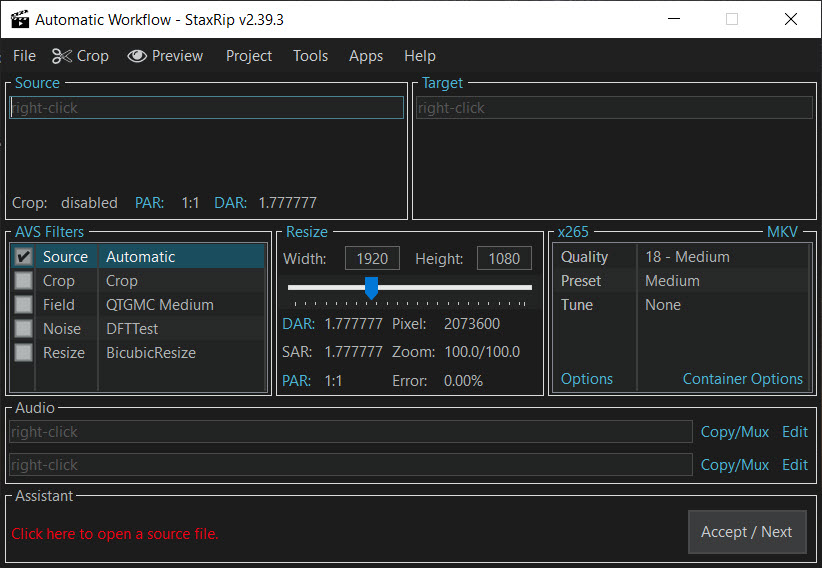
StaxRIP is a video encoding front-end that ties together a whole toolbox of separate encoders and processing tools under one workflow, so you can rip and re-encode video with deep control without juggling a dozen command-line programs yourself. It does not invent its own encoder. Instead it drives the heavy hitters like x264 and x265, hands video through filtering engines for cleanup and scaling, and muxes the finished result, all from a single interface that keeps the whole chain in view.
That design is the point. The tools it orchestrates are extremely capable but notoriously fiddly on their own. StaxRIP wraps them so you set up a source, choose your encoder and quality, add any filters you want, and let it run the pipeline end to end. For someone who wants the output quality that serious encoders produce but does not want to memorize a wall of command flags, this sits in a useful middle ground.
It is squarely an enthusiast tool. Casual users converting a clip for their phone will find it heavier than they need. But if you care about squeezing maximum quality out of a given file size, this is built for exactly that obsession.
One front-end, many encoders
The core strength is encoder coverage. StaxRIP can target the major modern codecs, driving x264 for H.264 output and x265 for the more efficient HEVC, along with hardware-accelerated paths when your graphics card supports them. That means you can pick the codec that fits your goal, whether that is broad compatibility or smaller files at the same quality.
Why does this matter? Because the choice of encoder and its settings is where almost all the quality-versus-size tradeoff lives. A good encoder run at the right settings produces a noticeably better file than a quick one-click convert. The application exposes those settings in a structured way, so you can lean on sensible presets to start and then dig into the detail when you want to.
If you would rather have a simpler converter that hides most of this, a tool like HandBrake covers that more approachable end, while this one trades simplicity for control.
Filtering and source cleanup
Encoding is only half the story. What you feed the encoder matters just as much, and this is where StaxRIP earns its enthusiast reputation. It plugs into frame-serving and filtering engines that let you clean up, resize, deinterlace, crop, and otherwise process the source before it ever reaches the encoder.
That pre-processing makes a real difference on imperfect sources. An old interlaced video, a file with noise, or footage that needs precise cropping all benefit from filters applied in the right order. The tool lets you build that filter chain and preview the effect, so you are not encoding blind and discovering problems only after a long render.
Much of the underlying muscle here comes from the same kind of processing power found in a universal toolkit like FFmpeg, but presented through a workflow you can actually see and adjust step by step.
Muxing, subtitles, and the finished container
Once the video is encoded, you still need to package it properly with audio and any subtitle tracks, and the application handles that final assembly too. It can combine your encoded video, audio streams, and subtitles into a clean container, typically MKV, with the track structure you want.
This is the stage people often underestimate. A great encode is wasted if the audio is out of sync or the subtitle tracks are missing. Having the muxing built into the same pipeline keeps it coherent. For more surgical control over the container after the fact, a dedicated tool like MKVToolNix lets you inspect and rework MKV files in detail, and it pairs naturally with the output this produces.
And if you simply want to read exactly what a finished file contains, codec, bitrate, track layout and all, MediaInfo reports it cleanly.
Who it is really for
Let us be honest about the learning curve. StaxRIP presents a lot of options, and that density is intimidating at first. The encoders alone have endless tunable parameters, and the filtering side assumes you know roughly what you want to fix. This is not a tool you master in five minutes.
But that depth is the trade for genuine control. If your aim is to archive a movie at the smallest size that still looks pristine, or to batch through a stack of files with a tuned, repeatable setup, the payoff justifies the climb.
The presets give you a soft landing, and you can stay shallow until you want to go deeper. For the encoding hobbyist who treats file quality as a craft rather than a chore, few free front-ends pack this much capability into one place.
Conclusion
For the encoding enthusiast who wants real command over quality and file size, StaxRIP is one of the most capable free front-ends going. It unifies powerful encoders, a flexible filtering stage, and proper muxing into a single pipeline, which means you can take a raw source all the way to a polished, tightly compressed file without leaving the application or touching a command line.
The cost is the learning curve, and it is a real one. Casual users will be happier with something simpler, and even experienced users should expect to spend time understanding the options before the output reflects their intent.
But for anyone who treats video encoding as a craft worth doing well, the control on offer here rewards the effort and keeps rewarding it.
Pros & Cons
- Drives major encoders including x264 and x265 plus hardware-accelerated options
- Exposes deep encoder settings for fine quality-versus-size control
- Built-in filtering for deinterlacing, denoising, cropping, and resizing the source
- Handles muxing of video, audio, and subtitles into a clean container
- Presets give beginners a starting point while leaving full control available
- Steep learning curve with a dense, option-heavy interface
- Overkill for casual users who just want a quick one-click conversion
- Filtering assumes you know which problems you are trying to fix
- Long renders mean mistakes in setup cost real time to discover
Frequently asked questions
It is a front-end that controls multiple video encoders and processing tools through one workflow. You set a source, pick an encoder and quality, add filters, and it runs the whole encode-and-mux pipeline for you.
It targets the major modern codecs, driving x264 for H.264 and x265 for HEVC, along with hardware-accelerated paths when your graphics card supports them, so you can choose between compatibility and smaller files.
It has a steep learning curve. The presets give a usable starting point, but the depth of options is aimed at enthusiasts. Someone who just wants a fast, simple conversion may find it more than they need.
Yes. It connects to filtering engines that let you deinterlace, denoise, crop, and resize the source before encoding, which can noticeably improve the result on imperfect footage.
Yes. After encoding the video, it muxes your audio streams and subtitle tracks into the final container, so the finished file comes out properly assembled rather than video-only.


