

Duplicati
About Duplicati
Cloud storage solved the “where do I put backups” problem and created a new one, since handing your files to someone else’s servers means trusting someone else’s eyes. Duplicati resolves that tension the correct way around.
It encrypts every backup with AES-256 on your own machine before a single byte leaves it, then uploads the sealed result to more than twenty destination types, from a drive in the closet and an SFTP server to S3, Google Drive, OneDrive, Dropbox, and Backblaze B2. The storage provider hosts ciphertext it cannot read, and the key never travels.
The second pillar is efficiency. After the first full backup, the software splits files into blocks and uploads only the blocks that changed, deduplicating along the way. A hundred-gigabyte photo archive that gained three pictures since yesterday costs three pictures’ worth of upload, and every historical version stays restorable.
Between the encryption and the block model, this is a proper backup system, not a folder synchronizer.
A backup program that lives in your browser
The interface choice surprises people at first. Duplicati runs quietly in the background and presents its controls as a local web page, the same dashboard whether you’re sitting at the machine or checking a headless server in another room.
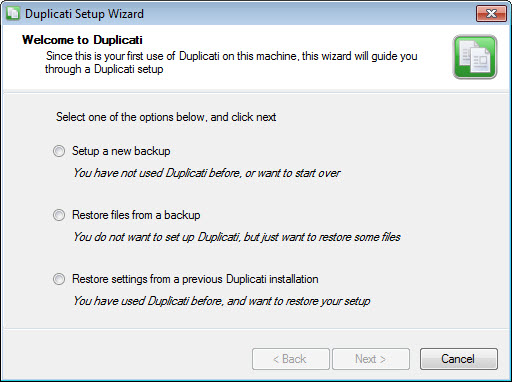
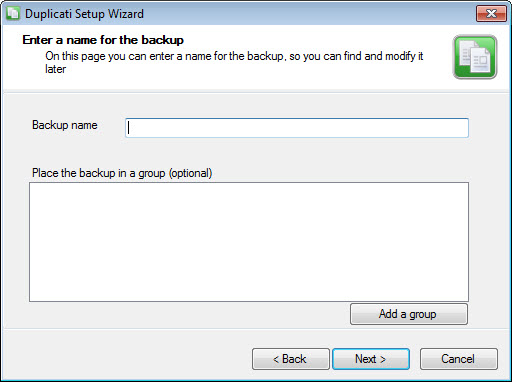
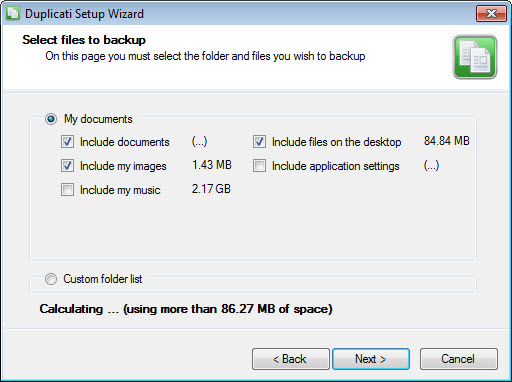
Backup jobs are defined in a five-step wizard (name and encryption passphrase, destination, source folders, schedule, retention), and the dashboard afterward shows job status, next run times, and logs in one glance.
The scheduler deserves specific praise for how it handles real life. A laptop asleep at the appointed hour doesn’t skip its backup, the job simply runs when the machine wakes. Missed schedules chase themselves, which over months is the difference between a backup set with holes and one without.
Versions, retention, and the art of not hoarding
Every run creates a restorable point in time, and the retention system decides how many points survive. Beyond simple rules like “keep everything for ninety days”, the smart retention option thins history the way an archivist would, one version per day for the recent week, one per week for the recent month, one per month beyond that. Storage stays bounded while the ability to reach back a year survives.
Restores work at any granularity, the whole set, one folder, or a single file as it existed on a particular date, searchable by name. Because everything at the destination is encrypted, restoring on a fresh machine needs only the software, the storage credentials, and your passphrase.
Lose that passphrase, on the other hand, and the backups are cryptographically gone, which is the deal zero-knowledge encryption always offers.
Write it somewhere that survives the same disaster as the computer, perhaps inside a VeraCrypt container stored separately.
The honest maintenance bill
Now the part experienced users will nod at. The block model relies on a local database that tracks what lives where, and when that database is lost or damaged, rebuilding it from the remote data can take painfully long on large backup sets, sometimes hours stretching toward days. It’s the single most cited frustration with the program, the repairs usually succeed, but the waiting is real. Two habits blunt the problem.
Let the automatic verification keep running (the software periodically downloads samples and checks them against expectations), and test a restore once in a while instead of assuming. An untested backup is a hope, not a backup.
Set expectations on scope, too. This tool backs up files and folders, not whole disk images, so it will faithfully preserve your documents, photos, and projects but won’t resurrect an entire bootable system after a drive death. Image-level work belongs to a tool like AOMEI Backupper, and many careful setups run both layers, an image for the system, this program for the irreplaceable data and its history.
Plain mirroring between folders is a different job again, FreeFileSync territory, and mistaking synchronization for backup is how people discover too late that their mirror faithfully copied a ransomware infection.
Open where it counts
Feature for feature, Duplicati stands next to the big commercial cloud-backup services while remaining fully open source, and the openness has practical teeth. The backup format is documented, a standalone recovery tool exists outside the main program, and nothing about the arrangement locks your data to a vendor’s continued goodwill.
Add command-line access for scripted and headless setups, plus compression that shrinks what deduplication didn’t already, and the total package explains the loyal following.
The following is loyal but honest, and so is this review. Uploads of enormous first backups take as long as your connection dictates, the interface is functional rather than pretty, and the database caveat above is permanent homework. None of it changes the core equation of client-side encryption, any storage you like, and full version history.
Conclusion
Duplicati fits the person who wants cloud-grade backup discipline without the trust exercise. Privacy-minded users encrypting before uploading, home-lab owners backing up headless machines through the web dashboard, and anyone with irreplaceable files in storage accounts they’d rather not depend on blindly are all squarely in the audience. The encryption model and block efficiency are the draw, and the open format keeps the exit door unlocked.
It asks for a little adult supervision in return, a safeguarded passphrase, tested restores, patience if the database ever needs rebuilding. Pay that maintenance and it quietly does one of computing’s most important jobs, and asks nothing back.
Pros & Cons
- AES-256 encryption applied locally, so storage providers only ever see ciphertext
- Block-level incremental uploads with deduplication keep daily backups tiny
- More than twenty destination types, from local drives and SFTP to S3, Google Drive, and B2
- Smart retention thins old versions while preserving long reach into history
- Web dashboard manages local and headless machines identically
- Missed schedules run automatically when the machine wakes
- Database rebuilds after corruption can take extremely long on big sets
- Files and folders only, no full disk images
- First full backup is slow on large data over ordinary connections
- Interface is plain and occasionally technical
Frequently asked questions
No. Encryption happens on your machine before upload, and only ciphertext reaches the destination. Without your passphrase the stored data is unreadable, including to you, so guard that passphrase carefully.
Files are split into blocks, and only blocks that changed since the last run are uploaded. Identical blocks are stored once, so even large archives cost almost nothing daily once the first backup completes.
Yes. Restore points are browsable and searchable by file name, and you can pull one file, one folder, or the entire set as it existed at any retained version.
A local database tracks the backup's block layout, and if it's lost or damaged it must be reconstructed from the remote data. On large backups that reconstruction is the program's slowest operation, which is why periodic verification and test restores are recommended habits.
No, it protects files and folders with versioned history. A bootable system image after total drive failure requires a disk-imaging tool, and the two approaches pair well.


