

NSudo
About NSudo
NSudo launches programs with privilege levels that sit above even an administrator, reaching the System and TrustedInstaller accounts that own the most protected corners of the machine. Administrator rights, the ceiling most people ever touch, still get told no by certain files, registry keys, and services, because those belong to accounts more powerful than any human login.
This tool lets you run a command prompt, an editor, or any program as those accounts, and suddenly the folders and keys that refused every attempt open without argument.
The plain warning belongs before anything else, because this tool is exceptionally sharp. Running as System or TrustedInstaller removes the guardrails that normally stop a mistake from becoming a catastrophe, and a wrong deletion at that level has no polite refusal to save you.
NSudo is a tool for people who already know exactly what they intend to change and why, and it should never be pointed at instructions copied from a stranger who promises it fixes something.
The privilege levels, and what each one unlocks
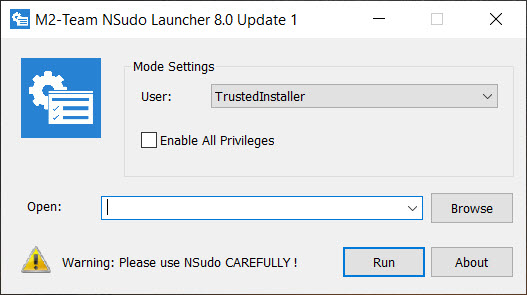
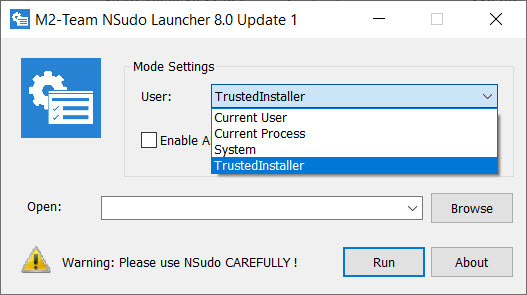
The interface is a small window, a dropdown of accounts, a field for the program to run, and a launch button. The account choices climb a ladder. Administrator is the familiar top of normal use, System is the account the operating system itself runs under with access administrators lack, and TrustedInstaller is the owner of protected system files and components, the account whose name appears when even System is refused.
Choosing the level and launching a command prompt is the common pattern, since from a prompt at that privilege everything else inherits the same power. Deleting a stubborn system file that survives every ordinary attempt, editing a protected registry branch, stopping a service that won’t stop, all become possible because the process asking is now the account that owns the thing.
Additional toggles control the process integrity level and which privileges are enabled, refinements the target audience understands and everyone else should leave alone.
The jobs it actually gets used for
The recurring real uses cluster around removal and repair. A file locked as in-use by the system yields once approached from the right account, though for the everyday version of that problem a friendlier tool like Unlocker handles it without the risk.
Registry keys with permissions that block even administrators open for editing. Leftover components from a broken uninstall, the ones that reinstall-and-remove cycles can’t shift, finally clear.
The pairing with a process inspector is natural, since seeing exactly what holds a file or runs a service comes first, and a tool like Process Hacker reveals the culprit before this one supplies the authority to act on it.
Investigate first, elevate second, act with certainty, that sequence is the difference between a fix and a disaster.
Command line, portability, and staying safe with it
Beyond the window, a command-line version runs the same elevation from scripts and batch files, which is where technicians fold it into repeatable maintenance and repair routines. The whole thing is portable, a single small executable that runs from a folder or a USB stick with no installation, which suits the toolkit it naturally lives in alongside the other rescue utilities.
The safety discipline is not optional decoration, it’s the price of the power. Know the exact change before elevating, prefer moving or renaming over deleting when a reversal might be needed, and back up any registry branch before editing it at this level.
The tool assumes competence and offers no seatbelt, so the seatbelt has to be the habits you bring. Used that way, it does what no lesser privilege can, and used carelessly, it does damage nothing can undo.
Conclusion
NSudo is a specialist’s instrument for technicians, advanced users, and anyone who has hit the wall where administrator rights simply aren’t enough, and who understands the machine well enough to proceed past that wall deliberately. It opens what nothing lesser can, cleanly and portably, and it belongs in a serious repair toolkit.
Casual users facing a stubborn file or a cluttered system should reach for the gentler, safer tools built for those exact problems. This one hands you the keys to the whole machine, and the responsibility that comes with them is entirely yours.
Pros & Cons
- Runs any program as System or TrustedInstaller, above administrator limits
- Opens protected files, registry keys, and services that refuse normal access
- Command-line version scripts the same elevation into maintenance routines
- Portable single executable that fits any technician's toolkit
- Integrity and privilege toggles give fine control for those who need it
- Removes the safeguards that normally prevent catastrophic mistakes
- Demands real knowledge, offering no protection against wrong actions
- Wrong deletions at this level are typically unrecoverable
- Overkill and dangerous for problems that gentler tools solve safely
Frequently asked questions
It runs programs as the System and TrustedInstaller accounts, which own files, keys, and services that refuse even administrators. Those are the exact things that reject every ordinary attempt.
At its highest levels, yes. It removes the protections that stop mistakes from becoming permanent damage, so it suits people who know precisely what they're changing and never instructions from an untrusted source.
Deleting truly stuck system files, editing registry keys locked to administrators, or clearing components a broken uninstall left behind. For simpler locked-file cases, a gentler dedicated tool is the safer choice.
Yes, its command-line version performs the same elevation non-interactively, which technicians use inside batch files and maintenance scripts.
Know the exact change first, favor renaming or moving over deleting, and back up any registry branch before editing it. The tool provides no safety net, so the caution has to come from you.


