

OkayFreedom VPN
About OkayFreedom VPN
Installing a tunnelling service normally begins with an account. An email address, a password, a confirmation link, and a subscription decision before anything connects. OkayFreedom VPN skips all of it. Install, press connect, and you are through, with no registration of any kind.
That is unusual, and it is the reason to look at this rather than at the better-known names. Everything else about it is modest, and the absence of an account is not.
One button, or a country if you want one
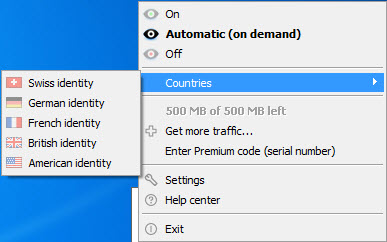
The OkayFreedom VPN default is automatic. Press connect and it chooses a server for you, which is the correct design for somebody whose goal is reaching a blocked page rather than appearing in a particular place.
Choosing the country manually is available when the destination matters, for anybody reaching material published in one region and withheld in another.
Encryption uses the standard strong cipher, and importantly the tunnel covers everything the machine does rather than only the browser. Downloads, applications and background traffic all go through it, which distinguishes it from browser extensions that leave the rest of the system exposed.
Automatic triggering, the feature nobody mentions
The cleverest part sits in the settings. Rather than staying connected permanently, OkayFreedom VPN can be told to activate only when you visit particular sites or use particular applications.
That arrangement suits how most people actually want this to work. A tunnel slows a connection and consumes the traffic allowance, so having it switch on for the one site that needs it and stay out of the way otherwise is more useful than an always-on connection.
Automatic triggering works with the mainstream browsers, while manual connection works with anything, which is the usual arrangement for a feature that needs to see what you are opening.
What the unpaid tier actually gives you
Being clear about the boundary matters. The basic tier carries a monthly traffic allowance that suits occasional use rather than daily browsing, shows advertising, and restricts which servers you may choose.
The paid tier removes the allowance and opens the server list. One limitation applies to both, and it is significant. A single connection per account means one device, which compares poorly with services covering an entire household, and IPVanish sits at the opposite extreme by not counting devices at all.
For a service with a considerably more generous free allowance, Windscribe gives substantially more traffic each month and remains the usual recommendation for anybody whose requirement is occasional and unpaid.
What any service of this kind can and cannot do
The honest structural point applies to OkayFreedom VPN as to everything here. A tunnel does not remove somebody watching your traffic, it changes who that is. Your connection provider stops seeing where you go and the tunnel operator starts.
Whether that trade favours you depends on which of the two you would rather trust, and on the legal obligations the operator is subject to wherever it is based. A stated no-logging policy is worth having and is a statement rather than a proof unless somebody independent has verified it.
The practical uses remain real regardless. Reaching a blocked page, using a public wireless network without the operator reading your traffic, and appearing to be elsewhere are all things it does. Anonymity is not, and no service in this category delivers that whatever the marketing says.
For building your own tunnel to a server you control, rather than trusting anybody’s service, OpenVPN is the tool and the work is entirely yours.
Conclusion
OkayFreedom VPN stands out for one specific quality, which is that it asks nothing of you before working. Somebody who wants to open a blocked page once, or use a hotel network without the hotel reading everything, can install this and be connected in under a minute without creating anything.
Judge it on that rather than on its feature list, which is thin beside the established names. One device, a small network, a modest allowance without paying and an unaudited logging claim are all real limitations. As the tool you keep for occasional use, where signing up for an account would be more trouble than the task deserves, it fills a gap the bigger services leave open.
Features & benefits
Pros & Cons
- No account, no email and no registration before the first connection
- One button connects with an automatic server choice, or pick a country manually
- Covers all traffic from the machine rather than only browser traffic
- Can activate automatically for specific sites or applications and stay off otherwise
- Standard strong encryption on the tunnel
- Simple enough for somebody with no interest in how any of it works
- One connection per account, so a second device needs a second arrangement
- The unpaid tier carries a modest traffic allowance and shows advertising
- Server network is small compared with the established names
- Server choice is restricted unless you pay
- Speeds are reported as modest and variable between servers
- The no-logging claim has not been independently audited
Frequently asked questions
No, and that is its main distinction. The basic tier installs and connects with no email address, no password and no registration, which is rare in a category where signing up is normally the first step.
Everything the machine sends, including downloads and background traffic from applications. That is a meaningful difference from browser extensions, which leave anything outside the browser untouched.
Yes, through automatic triggering for particular sites or applications, so the tunnel activates for what needs it and stays off the rest of the time. That preserves both speed and the traffic allowance.
One. A second device requires a separate arrangement, which is the sharpest limitation here and the point where services counting devices generously look considerably better.


