

Toucan
About Toucan
Toucan is three tools in one portable window, built to live on a USB stick. The first synchronises folders, between the stick and a computer or between two drives, in five modes that run from a plain copy to an exact match with deletions included. The second backs up folders into Zip, 7-Zip or GZip archives, complete or differential, with a password if you want one.
The third encrypts files one by one with AES-256, so a stick that goes missing on a train gives up nothing. Jobs are saved by name, rules exclude the files you never want copied, and a script engine ties the three tools into sequences that run with one click.
It was written for people who carry their work between machines and want more control than the simple tools give. Toucan runs from its own folder with no installation and compensates for the drive letter changing from one computer to the next, which is the detail that breaks most portable setups.
Its development has been quiet for some time, and its own project page now points people at dedicated tools for each of the three jobs, which is an unusual honesty to take seriously. The sections below cover each tool, the rules and scripts that connect them, and what the program is still the right choice for.
Five ways to synchronise
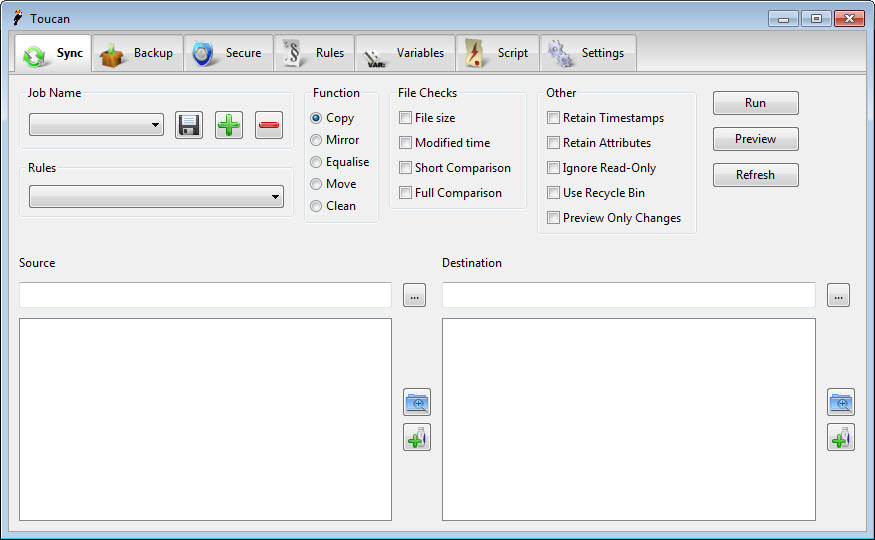
The Toucan Sync tab takes a source and a destination and a mode. Copy sends files one way, adding new ones and updating changed ones. Equalise works in both directions, so the newer version of a file wins on either side. Move transfers files and removes them from the source. Clean deletes from the destination anything that no longer exists in the source. The fifth mode makes the destination an exact copy of the source, including its deletions, which is the mode for a true backup drive and the one to use with care.
What decides whether a file is copied is configurable. Size, modified time and a check of the file’s header can be combined. A job then skips files that have not changed and catches the ones that have, even when the clock on one machine is wrong. For a dedicated two-way sync with a visual comparison and a versioning folder, FreeFileSync is the tool the project itself now recommends.
Backing up into archives
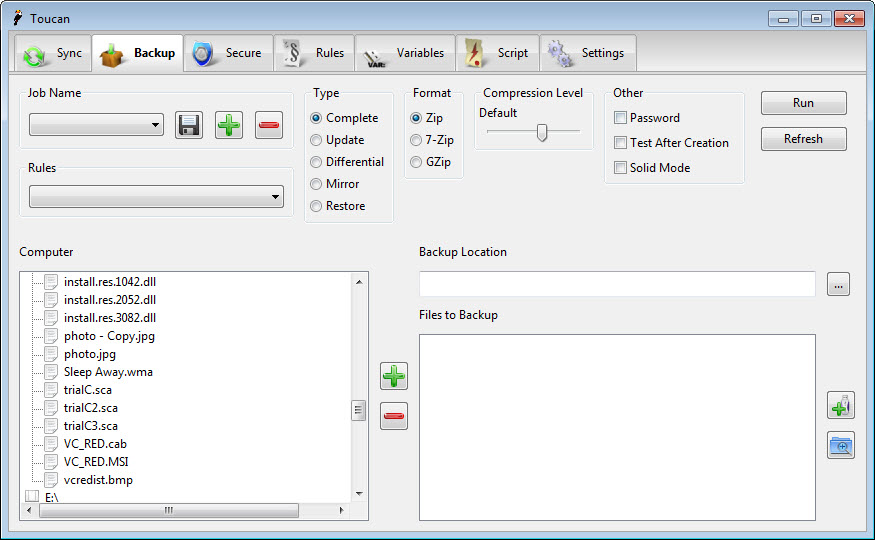
The Toucan Backup tab writes the chosen folders into an archive. Zip for compatibility with everything, 7-Zip for the smallest files, GZip for the systems that expect it. Complete writes everything. Update adds changed files to an existing archive. Differential writes only what changed since the complete backup, as a separate archive. A password option protects the archive, and an automatic test opens the finished file to confirm it is sound, which is the step most people skip until the day they need it.
Restore unpacks an archive or part of one to a folder. Because the archives are standard, any archiver opens them without this program, so a backup made here is never hostage to it. A standalone archiver reads the 7-Zip files directly, which is also where this program’s compression engine comes from.
Encrypting files one at a time
The Toucan Secure tab encrypts files and folders with AES-256 using a well-known command-line cipher, producing a file with a .cpt extension beside each original. Decrypting reverses it with the same password. It works on individual files rather than on a container, so a folder of documents becomes a folder of encrypted documents, each one independent.
That suits a stick where some files are sensitive and others are not. It does not suit a whole drive, where mounting an encrypted volume is simpler, and the project page points at VeraCrypt for that. A forgotten password is a lost file, since there is no recovery, so the password belongs somewhere other than the stick.
Rules and variables
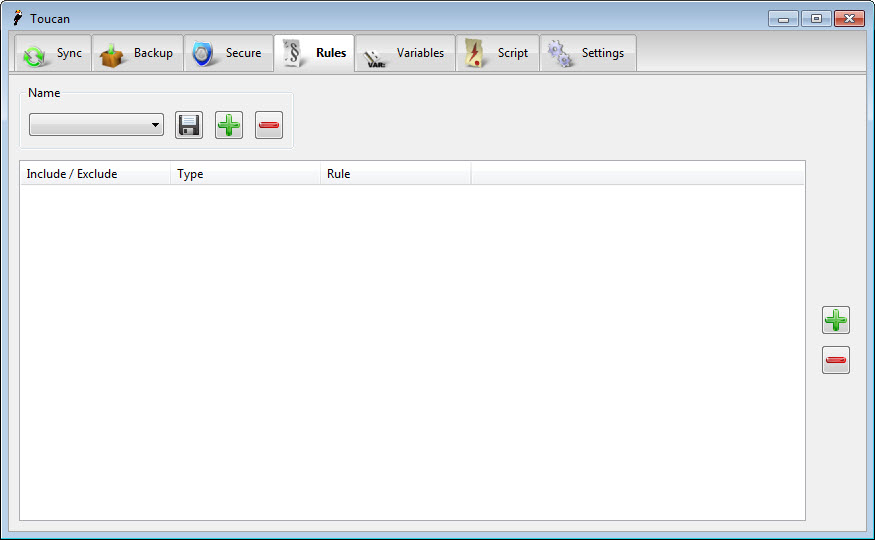
Toucan rules decide what a job leaves out. A rule matches files by name or by a regular expression, by a modified date before or after a point, or by size above or below a limit, and several rules combine. Give a rule set a name and attach it to any job, so the same exclusions for caches and temporary files apply to the sync and the backup alike.
Variables fill in paths that change. The current date and time, the drive’s label, the documents folder and others expand when a job runs. A backup archive names itself by date, and a sync job follows the stick whatever letter it gets. Jobs are saved by name, run from the window or from a command line, and the command line form is how a batch file or a scheduler runs them unattended.
Scripts that chain the tools
The Toucan Script tab runs scripts in Lua, a small programming language, with the program’s own functions exposed. A script can sync a folder to the stick, back it up into an archive, encrypt the sensitive subfolder and report what it did, in one run. The project’s own example is a backup that uploads itself when it finishes. For the people the program was built for, this is the part that makes it more than three tabs.
It is also where the audience narrows. Writing the scripts means learning the language and the function list, and the documentation assumes you are willing. Everyone else uses the tabs and the saved jobs and never opens this one.
What it is still the right choice for
Here is the honest answer about Toucan. It is still right for a stick that travels between computers and needs sync and backup, with encryption, from one folder with no installation on any of them. It is still right for anyone who wants named jobs with rules and variables, run from a command line, in a single small program. And the Lua scripts remain a way to chain those jobs that the dedicated tools do not offer.
It is no longer the best at any one of the three jobs. The project says so itself, pointing at a sync tool, an encryption tool and an archiver for people who want depth in one area. Updates have been rare, the interface is plain, and the three tabs are each a step behind the specialists.
Choose it for the combination on a stick, not for the parts.
Conclusion
Toucan suits people who carry their work on a stick and want sync, archive backups and file encryption from one portable program, with rules and saved jobs that survive the drive letter changing. The combination, the variables and the scripts are what it offers that the dedicated tools do not.
It has fallen behind those tools in each area and says so. Use it for the portable bundle, keep the password off the stick, and reach for a specialist when one job needs more than a tab can give.
Pros & Cons
- Five sync modes with configurable change detection
- Backups to Zip, 7-Zip or GZip, complete or differential, with testing and passwords
- AES-256 file encryption that leaves the originals' structure intact
- Rules by name or regular expression, by date and by size, saved and reused
- Variables for dates, drive labels and folders, with command-line jobs
- Lua scripts that chain the three tools in one run
- Development has been quiet, and the project points at dedicated tools instead
- Each tab is a step behind the best specialist in its area
- Scripting needs a programming language
- Plain interface aimed at advanced users
Frequently asked questions
Yes. Backups are standard Zip, 7-Zip or GZip archives that any archiver opens.
It makes the destination match the source completely, including deleting files that no longer exist in the source. Use it only for a drive that is meant to be a copy.
No. It encrypts individual files and folders with AES-256, producing .cpt files beside the originals. A whole drive needs a volume encryption tool.
Yes. Saved jobs run from the command line, so a batch file or a scheduler can run them, and Lua scripts chain several jobs together.


