

VIPRE Rescue


 (4 votes, average: 3.25 out of 5)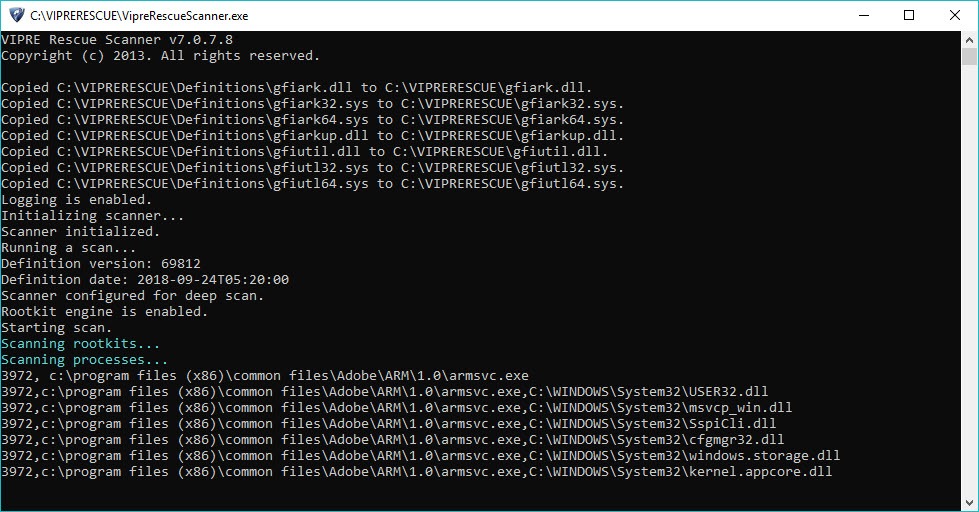
About VIPRE Rescue
Some malware blocks the antivirus from installing. Some kills the antivirus service the moment it starts. Some hijacks the network adapter so definition updates fail silently. When the resident protection you would normally rely on cannot get a foothold, the only path forward is a self-contained rescue scanner that runs without needing installation, network access, or even a stable host system. VIPRE Rescue is exactly that kind of tool, packaged as a single executable that you can carry on a USB stick and run on a machine that is otherwise too compromised to clean by normal means.
The application is a one-shot scanner, not a resident protection product. You download it when you need it, run it once or twice against an infected system, and discard it when the job is done. The definition set is baked into the executable at build time, which makes the download large but means the scanner can operate on machines with no working internet connection.
That tradeoff defines almost everything about how the application behaves and what it is useful for.
A scanner that works when nothing else will
The point of a rescue scanner is to handle the cases where standard antivirus software has already failed or cannot be installed. VIPRE Rescue is built for that scenario from the ground up. It runs without installation, requires no registration or activation, and does not register kernel drivers that an infected system might block. It launches as a user-space process with system permissions and walks through the disk, memory, registry, and standard infection locations using a packaged scanning engine.
That self-contained design is the whole pitch. A full antivirus like Bitdefender or ESET NOD32 Antivirus is the right answer for daily protection on a healthy system. Neither is the right tool for cleaning a system that is already infected to the point where their installers will not complete or their services get terminated within seconds of starting.
The rescue scanner exists for the gap between “this machine is broken” and “this machine can host a normal AV again.”
Bundled definitions and what that costs
Because the definitions ship inside the executable, every download is essentially a fresh build with the current threat signatures embedded. The file size reflects this. The application is significantly larger than a typical installer because it is carrying its entire detection database with it. The first time you encounter this, the download time feels excessive. Then you realize that the executable will scan an air-gapped infected machine an hour later without needing to phone home, and the tradeoff starts to look reasonable.
The cost is that the build goes stale. A scanner downloaded six months ago is missing every signature for the threats that emerged after its build date. The application does not auto-update itself, and there is no point trying to update an instance you already have on a USB stick.
The correct workflow is to re-download a fresh build immediately before each cleanup session. Portable scanners like Dr.Web CureIt! and Emsisoft Emergency Kit follow the same pattern for the same reason. Always grab a fresh copy before using one of these tools.
Command-line scanning and what it implies
VIPRE Rescue runs with a minimal command-line interface rather than a graphical one. You launch the executable, it extracts to a temporary folder, and the scan begins in a console window showing the current path, file count, and any detections in real time. There is no progress bar in the modern sense, no fancy dashboard, no graphical quarantine manager. Just text output reporting what is happening.
For technicians who run this kind of tool routinely, the command-line model is faster than clicking through wizards and easier to script. For end users who have only ever interacted with antivirus software through dashboards, the console interface is unfamiliar and slightly intimidating. The output is readable in plain English once you get past the initial impression of “this looks like a hacking movie,” but the design assumes the operator knows roughly what they are doing.
If you want the same kind of emergency cleanup with a more conventional graphical interface, Sophos Virus Removal Tool covers similar ground with a standard window-and-progress-bar experience.
Safe Mode and the workflow around it
Best practice for any rescue scanner is to run it from Safe Mode with Networking disabled, because Safe Mode prevents most malware from loading its active components at boot. VIPRE Rescue runs in this environment cleanly, which is exactly when you want it. Many infections that resist removal in normal mode become tractable in Safe Mode because their hooks into Explorer, the network stack, and the user session are not loaded.
The typical sequence is something like this. Boot the infected machine to Safe Mode. Insert the USB stick with a fresh VIPRE Rescue download. Launch the executable as administrator. Let it complete a full scan. Reboot to normal mode. Run a second-opinion scanner like Malwarebytes to verify nothing was missed. If the second scan also comes back clean, install or restore the user’s normal antivirus and consider the cleanup complete. The rescue tool is one step in a workflow, not the whole workflow.
What it actually catches
The detection engine inherits from the VIPRE consumer and business antivirus lineage, which uses a combination of signature matching and behavioral heuristics. In rescue mode, the heuristic side is reduced because the tool is operating on a system at rest rather than monitoring active execution, but the signature coverage remains the same as the full product at the time of the build. That covers the standard set of trojans, rootkits, worms, ransomware variants, browser hijackers, and PUPs that show up in real-world cleanup work.
What it does less well is the modern fileless or in-memory malware that lives only in running processes and registry persistence entries, especially the kind that PowerShell-based attacks rely on. The rescue tool focuses on disk-based artifacts.
For the in-memory side, tools like Norton Power Eraser take a more aggressive scanning approach that can catch suspicious running processes the rescue tool might leave alone. Combining the two is reasonable on a system you are not sure is fully clean.
The PUP and adware territory is also a weaker spot. VIPRE Rescue flags some adware bundles but misses others that more focused tools catch easily. AdwCleaner is the dedicated answer for that specific category and is worth running as a follow-up pass.
Reporting and quarantine handling
The application logs its findings to a text file in the same folder where the executable was extracted. Detections, file paths, quarantine actions, and the final scan summary all end up there. For technicians documenting a cleanup for a customer, the log is straightforward and parseable. There is no graphical quarantine browser, no per-file restore option through the GUI, and no scheduled re-scan capability. If you need to recover a quarantined file, you go into the quarantine folder manually and copy it back.
This minimalism is consistent with the rest of the tool’s design. The application is doing one thing, and the assumption is that anyone running it has either a technical background or is following step-by-step instructions from someone who does. The user-friendly polish that you would expect from a daily-use product is deliberately absent.
The reality check on rescue scanners
A rescue scanner is not a substitute for proper protection. If a system needed VIPRE Rescue to clean an active infection, that same system was running without adequate protection beforehand. The cleanup is the easy part. The harder part is figuring out what gap let the infection take hold in the first place, and closing it before the next attempt succeeds.
For most home users, the answer is installing real-time antivirus, keeping the operating system patched, and exercising basic caution with attachments and downloads. For machines that handle anything sensitive, full protection suites like Comodo Internet Security or one of the major commercial products cover the daily protection role while rescue tools sit in the toolbox for the rare day they are needed.
Conclusion
VIPRE Rescue is a specialist’s tool for a specific moment in a system’s lifecycle, the moment when normal protection has either failed to prevent an infection or cannot be installed because the infection is actively interfering. As that kind of emergency tool, it does its job competently. The bundled definitions, the no-installation design, and the ability to run from Safe Mode on a compromised system are all aligned with what the rescue scanner role actually requires.
It is not the only tool of its kind, and most technicians keep two or three different rescue scanners on a USB stick because no single scanner catches everything. The right way to use this one is as part of a small toolkit alongside complementary scanners that approach detection from different angles. As one tool in that kit, it is a solid choice.
As a standalone solution to active infections, no single rescue scanner deserves that level of trust.
Pros & Cons
- Self-contained executable that runs without installation or activation
- Works on systems where standard antivirus installers fail or are blocked
- Definitions baked into the build for offline scanning on air-gapped machines
- Compatible with Safe Mode operation for cleaning stubborn infections
- Free with no upsells or subscription pressure
- Plain text logs that are easy to archive and review later
- Definition database goes stale, so each scan needs a fresh download
- Command-line interface unfamiliar to non-technical users
- Large download size due to bundled definitions
- No real-time protection or scheduling, by design
- Weaker on fileless and in-memory threats compared to behavioral scanners
- Quarantine management is manual and lacks graphical restore
Frequently asked questions
Cleaning systems where standard antivirus software cannot be installed or has been disabled by an active infection. It runs as a portable executable with bundled definitions, requiring no installation, no activation, and no working internet connection on the target system.
The full VIPRE product is a resident antivirus that runs continuously and updates definitions in real time. VIPRE Rescue is a one-shot scanner without resident protection, intended for emergency cleanup. They share the underlying detection engine but serve completely different roles in a security workflow.
Only when you need it. The definitions are baked into the build, and a stored copy goes stale quickly. Download a fresh build immediately before each cleanup session for the most current detection coverage.
No. It has no real-time protection, no scheduled scanning, and no web protection. It is a portable scanner for emergency use only. After cleanup, restore or install a resident antivirus to protect the system going forward.
Yes, and Safe Mode is the recommended environment for serious cleanup work. Most malware cannot load its active components in Safe Mode, which makes detection and removal far more reliable than scanning a normally booted infected system.
A full system scan typically runs from one to several hours depending on the size of the drive, the speed of the storage, and the number of detections requiring deeper inspection. Plan for an unattended scan rather than expecting a quick pass.
Quarantine is the default action for detections, not direct deletion. Files identified as threats are moved to a quarantine folder where they can be recovered manually if a false positive is suspected. Review the log file before performing any subsequent cleanup based on the scan results.


