

Thermiqra
About Thermiqra
Thermiqra is a hardware monitor that refuses to stop at the live numbers. It reads processor, graphics card, memory and drive sensors about once a second, like Open Hardware Monitor or Core Temp, and then does the part those tools leave to you.
It keeps the readings in a local database, draws them over a day, a week or a month, flags the moments something crossed a threshold, and tells you in plain words whether a value needs attention. Drive health, memory module details and a disk space analyser with a cautious cleanup mode live in the same window.
It is a newcomer, and that shows in places. But the core idea, monitoring that remembers, is one most tools in this category still do not offer.
Live readings that know when to say nothing
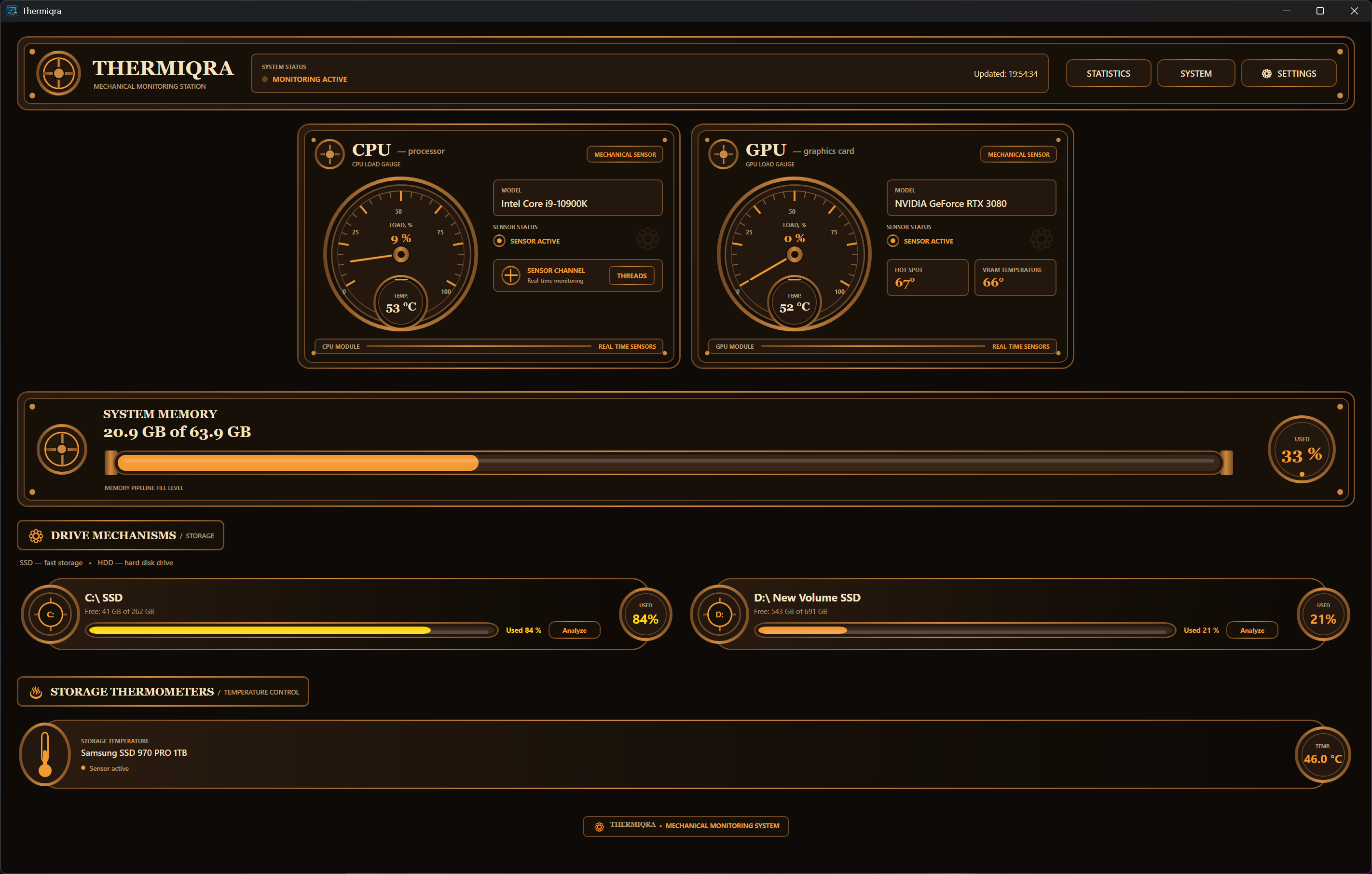
The monitoring view covers CPU temperature and load with a per-logical-processor breakdown, GPU temperature, load, hot spot and memory temperature where the card exposes them, RAM usage, and the temperature of each physical drive. Plugging in a USB stick adds its volume to the list without a restart.
The sensor reading goes through a kernel driver the installer sets up, which is why Thermiqra asks for administrator rights and why its readings match what the mature open monitors report rather than inventing their own.
Where a sensor does not exist, the field says unavailable instead of showing zero, and the same rule runs through the whole application. A drive whose controller hides its health data is marked as insufficient data, not as healthy, which is the correct answer and the one lesser tools avoid because it looks worse.
History is the actual product
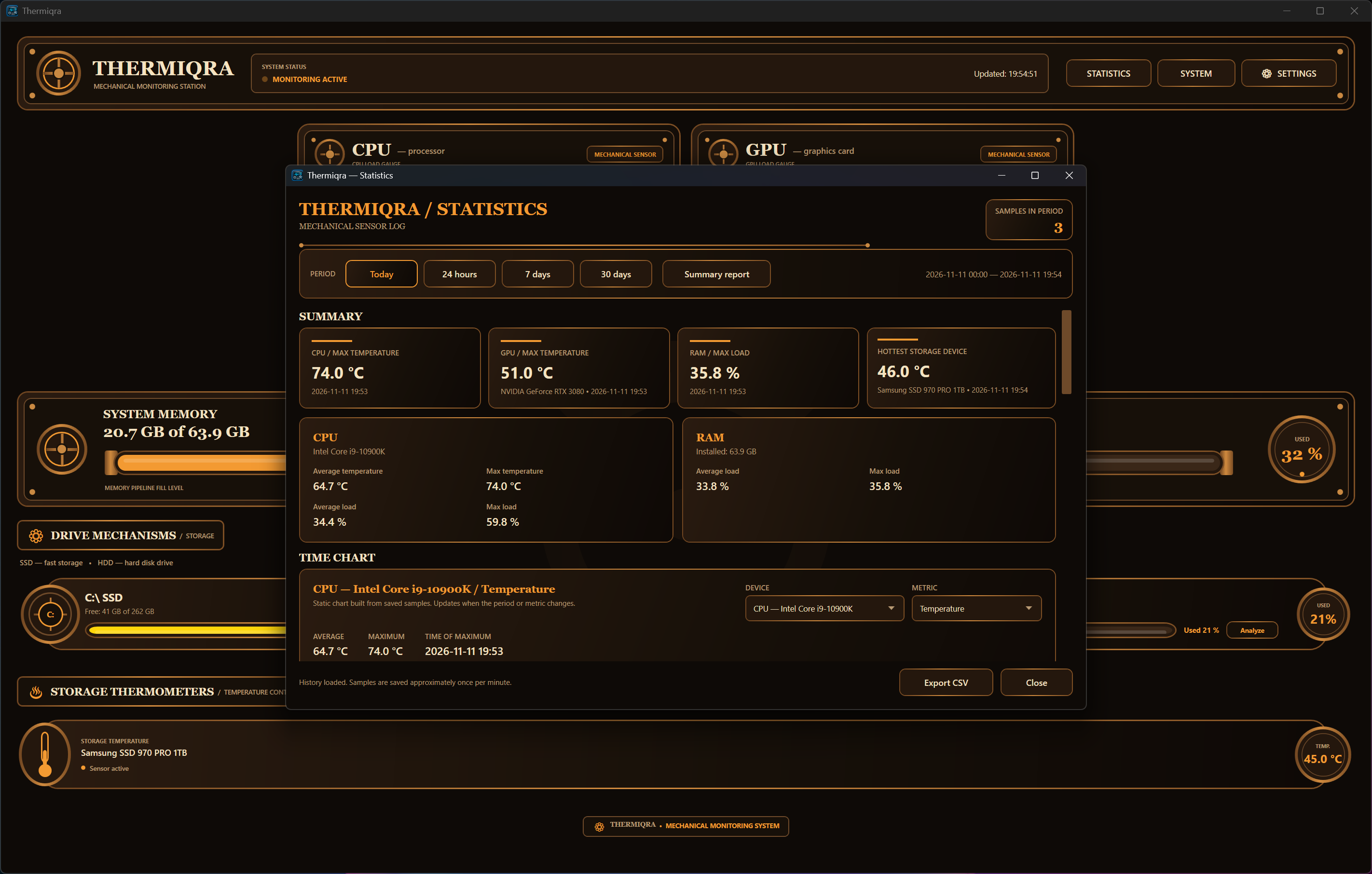
Every reading lands in a local SQLite store, and the statistics view replays it over Today, 24 hours, 7 days and 30 days as interactive charts, with averages, maxima stamped with the time they happened, all-time records and a log of every warning and critical event. Two periods can be compared side by side, so a graphics card that ran five degrees hotter this week than last shows up as a number rather than a feeling.
Why does this matter more than a live gauge? Because the question that sends people to a monitor is rarely “what is the temperature now” and almost always “what was it when the game crashed at eleven last night”. Thermiqra answers the second one. It also notices when hardware changes, once, and marks it in the history, so a new drive or a swapped memory stick does not quietly corrupt a month of comparisons.
Exports cover a technical TXT diagnostic report, the raw statistics as CSV, and an HTML summary with charts that you can send to someone helping you troubleshoot.
Alerts and the upgrade advisor that will not flatter you
Thermiqra fires warning, critical and informational alerts at thresholds you set, each with its own sound, and the warning and critical ones are written into the event history so a dismissed pop-up is not lost. From the tray, a tooltip shows temperatures without opening the window, and an elevated autostart entry through the task scheduler keeps the monitor running from boot with the rights it needs.
The Upgrade Advisor deserves a mention for what it declines to do. It only suggests an upgrade after repeated evidence over time, not after one spike, it ignores periods it recognises as benchmark runs, and it never produces a fake overall score or an invented frame rate gain. I would rather have its occasional silence than the confident nonsense of tools that score your PC out of a hundred.
Drive health read on demand
Thermiqra reads SMART data when you ask rather than polling it continuously. For SATA drives that means the full attribute table with normalised values and the firmware thresholds where the drive publishes them. For NVMe it means the standard health log, with critical warning flags, spare capacity, percentage used, power-on hours, unsafe shutdowns, error counters and lifetime read and write totals. Each drive gets a status of normal, attention, critical or insufficient data, with percentages only when the device reports one.
A Smart Guidance panel next to the raw values explains what a given attribute means and when it crosses from curiosity into concern, while leaving the numbers visible for anyone who already knows. If you only want the drive side of this, CrystalDiskInfo remains the lighter choice, but it will not put the drive temperature on a 30-day chart.
Memory slots, XMP profiles and the storage analyser
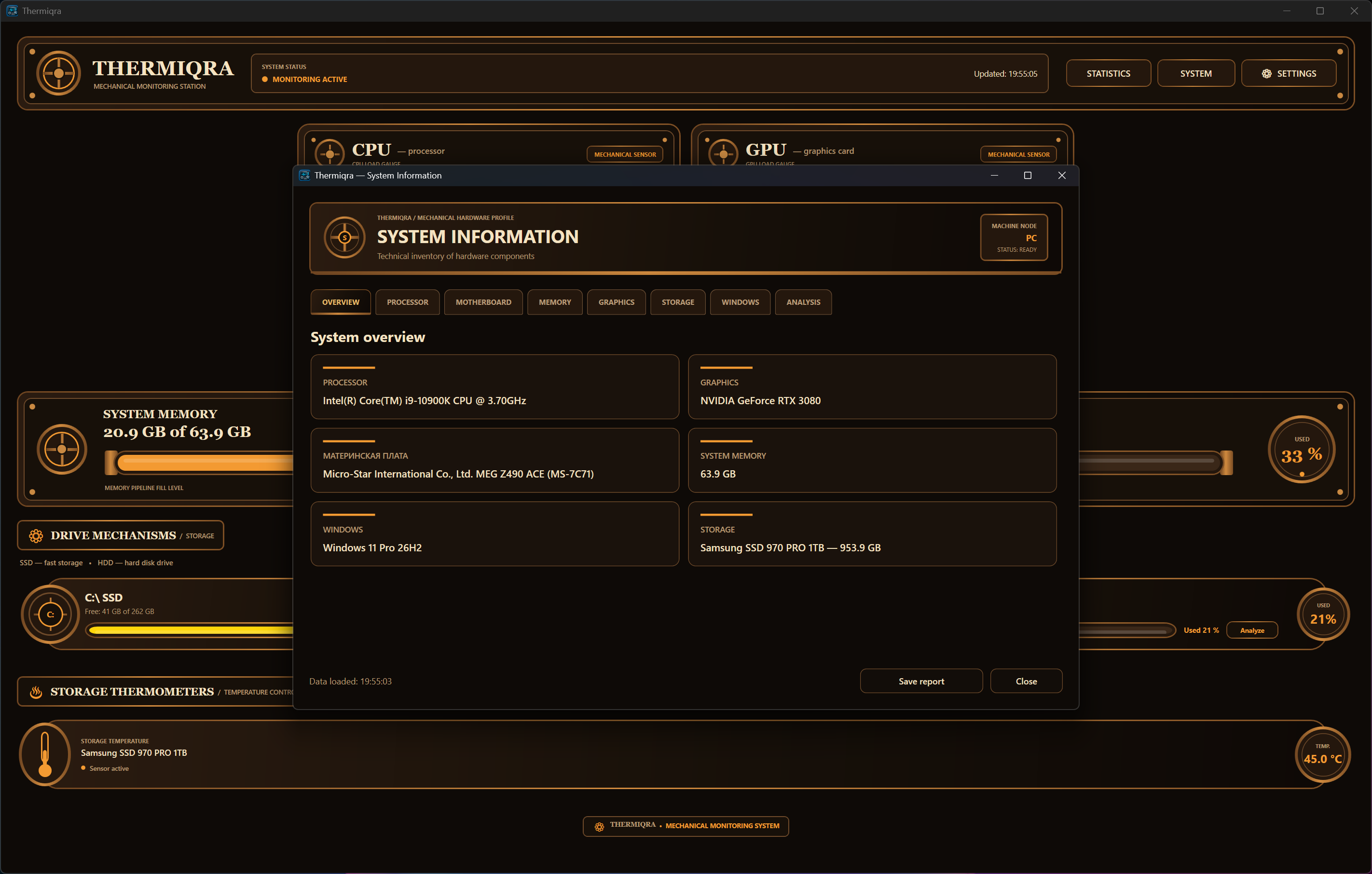
The system information view reads the modules through their SPD data, listing JEDEC timings, stored XMP profiles and which slots are occupied or free, which is what you need before ordering a second kit. Thermiqra reports XMP as profiles stored on the module, and will not claim a profile is active unless it can confirm that, which is more honest than the “XMP enabled” badge some tools show on guesswork.
The Thermiqra storage analyser scans NTFS volumes through the master file table, so a full drive takes seconds, and falls back to a conventional directory walk on exFAT and FAT32. The tree shows logical and allocated sizes, item counts, each folder’s share of the total and the largest files.
Safe Cleanup only touches scenarios it recognises, such as the Downloads folder and the Recycle Bin, asks you to confirm every deletion and offers the bin as the default destination.
Unknown folders are never treated as disposable. For a pure space hunt, a treemap analyser built for speed is faster still, but the point here is having it next to the drive health data.
The rough edges
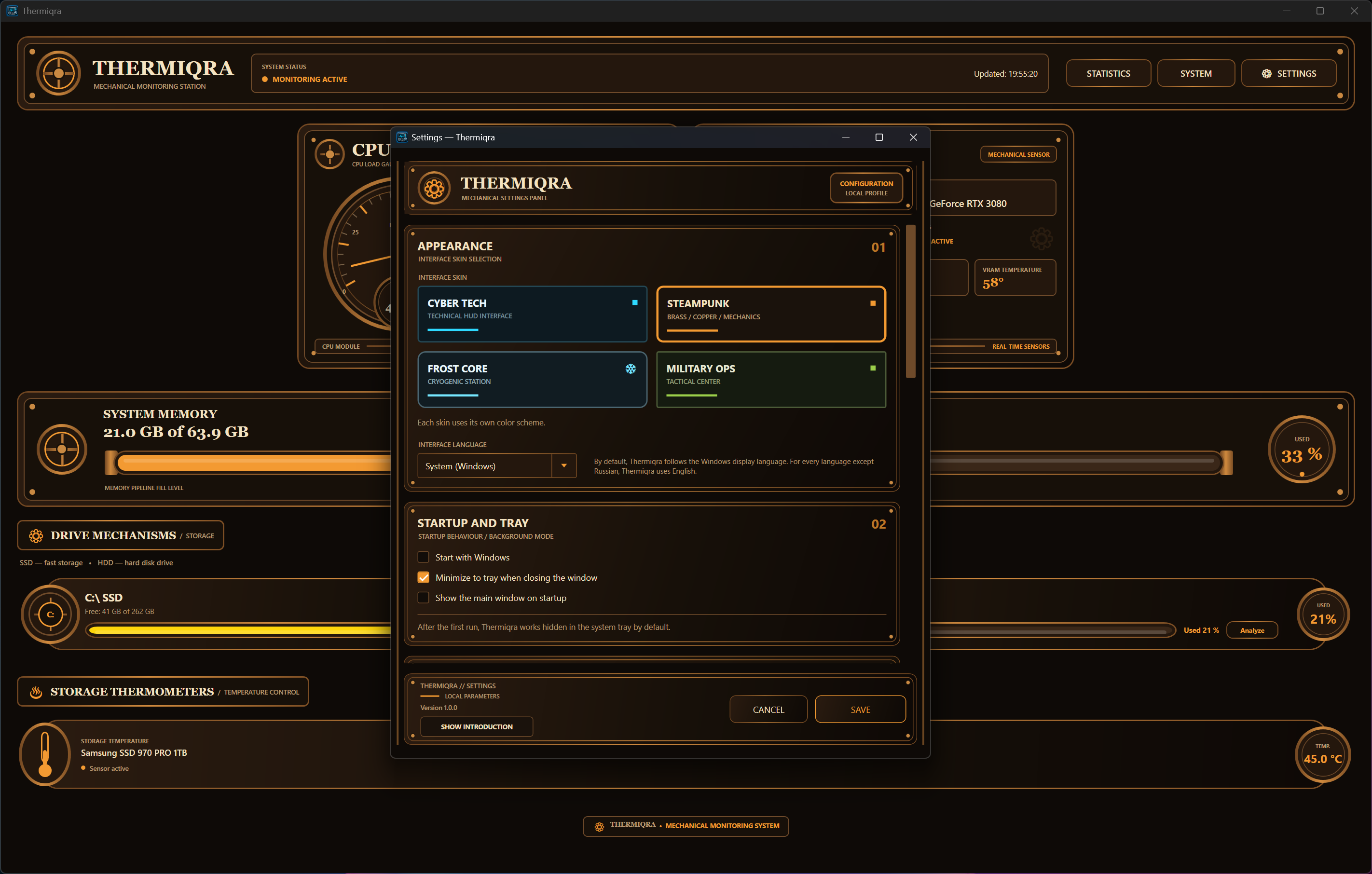
The four themes, with names like Cyber Tech and Military Ops, are an acquired taste, and there is no plain one. The interface ships in two languages plus a mode that follows the system, and the second language leaks through in a few labels.
The in-app updater downloads and verifies the installer’s SHA-256 digest before installing silently, which is good practice, though early builds had an updater fault that forces a manual reinstall before it works.
And the kernel driver stays behind on uninstall, deliberately, because other monitoring tools may share it.
Conclusion
Thermiqra suits anyone whose hardware question starts with “when” rather than “now”, like the laptop that throttles some afternoons, the drive that feels slower than last month, the graphics card that crashed once and might do it again. The stored history, the event log and the exportable reports turn those into answerable questions, and the drive and memory views add detail you would otherwise collect from three programs.
People who want a small tray thermometer and nothing else will find the themes loud and the install heavier than they need. For them Core Temp still wins. For everyone else this is an unusually thoughtful first attempt, rough paint over a sound structure.
Pros & Cons
- Keeps 30 days of sensor history in a local database with charts and event logs
- Reports missing sensors and hidden SMART data as unavailable rather than guessing
- SMART reading covers full NVMe health logs with plain-language guidance
- Memory view shows slot occupancy, JEDEC timings and stored XMP profiles
- MFT-based storage scan with a cleanup that only touches known folders
- Upgrade Advisor requires repeated evidence and never invents scores
- Heavily themed interface with no neutral skin
- Occasional untranslated labels
- Requires administrator rights and installs a kernel driver that uninstall leaves behind
- Early builds had an updater fault that needs a manual reinstall
Frequently asked questions
Yes. Readings are stored in a local SQLite database and the statistics view shows Today, 24-hour, 7-day and 30-day charts, with warning and critical events logged alongside.
Because the drive's controller or USB bridge does not expose them. The application marks missing fields as unavailable and the drive as insufficient data instead of reporting it healthy.
It lists the XMP profiles stored on the modules and only reports one as active when it can confirm that reliably. If it cannot, it says so rather than guessing.
No. Cleanup only covers recognised scenarios, lets you deselect items, requires explicit confirmation and defaults to the Recycle Bin.


