

Stretchly
About Stretchly
Sit at a computer long enough and your body quietly pays for it: dry eyes, a stiff neck, a lower back that has forgotten what standing feels like. The fix is simple in theory, take regular breaks, and almost impossible in practice, because nobody remembers to. Stretchly is built to be the thing that remembers for you. It is an open-source break reminder that sits in your system tray and nudges you to pause at set intervals, with a short suggestion for what to actually do with the pause.
The thinking behind Stretchly maps closely onto the eye-care guideline known as the 20-20-20 rule and the wider idea behind the Pomodoro technique, that frequent short rests keep you healthier and, counterintuitively, more productive than grinding through unbroken hours.
What makes the application worth a look over a phone alarm is that it does not just buzz at you. It structures your day into two kinds of breaks, suggests micro-exercises, and is smart enough to get out of the way when you have already stepped away from the desk.
Mini breaks and long breaks
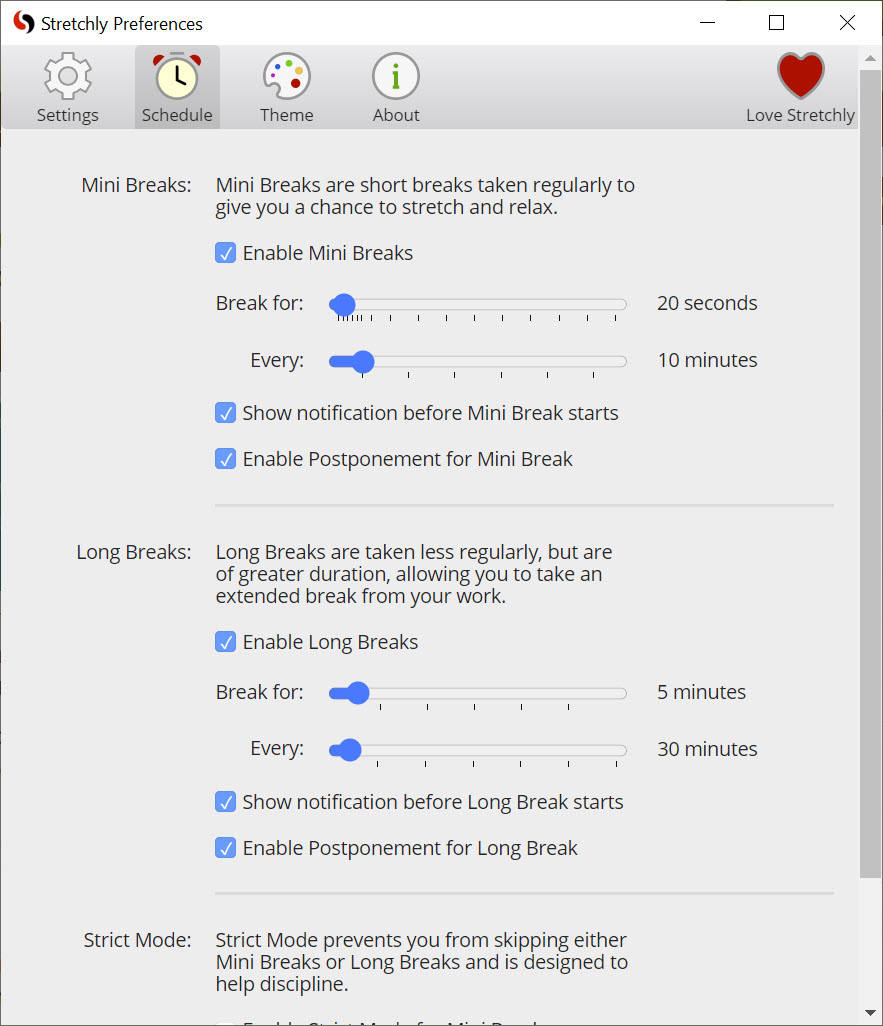
The whole system runs on two break types working together. Mini Breaks are the frequent, tiny ones, twenty seconds by default, arriving every ten minutes. They are meant for the eyes and the immediate posture reset: look away from the screen, roll your shoulders, unclench your jaw. Long Breaks are the substantial ones, five minutes by default, every half hour after a couple of mini breaks have passed. These are your cue to actually stand up, walk to get water, and let your eyes refocus on something far away.
The interleaving is the clever part. You are never more than ten minutes from a small reset, and never more than thirty from a proper one, which mirrors how strain actually accumulates. Before each break lands, Stretchly gives you a heads-up notification, ten seconds ahead of a mini break and thirty before a long one, so a break never ambushes you mid-sentence. You get a moment to finish your thought and pause cleanly.
Break ideas and the gentle nudge
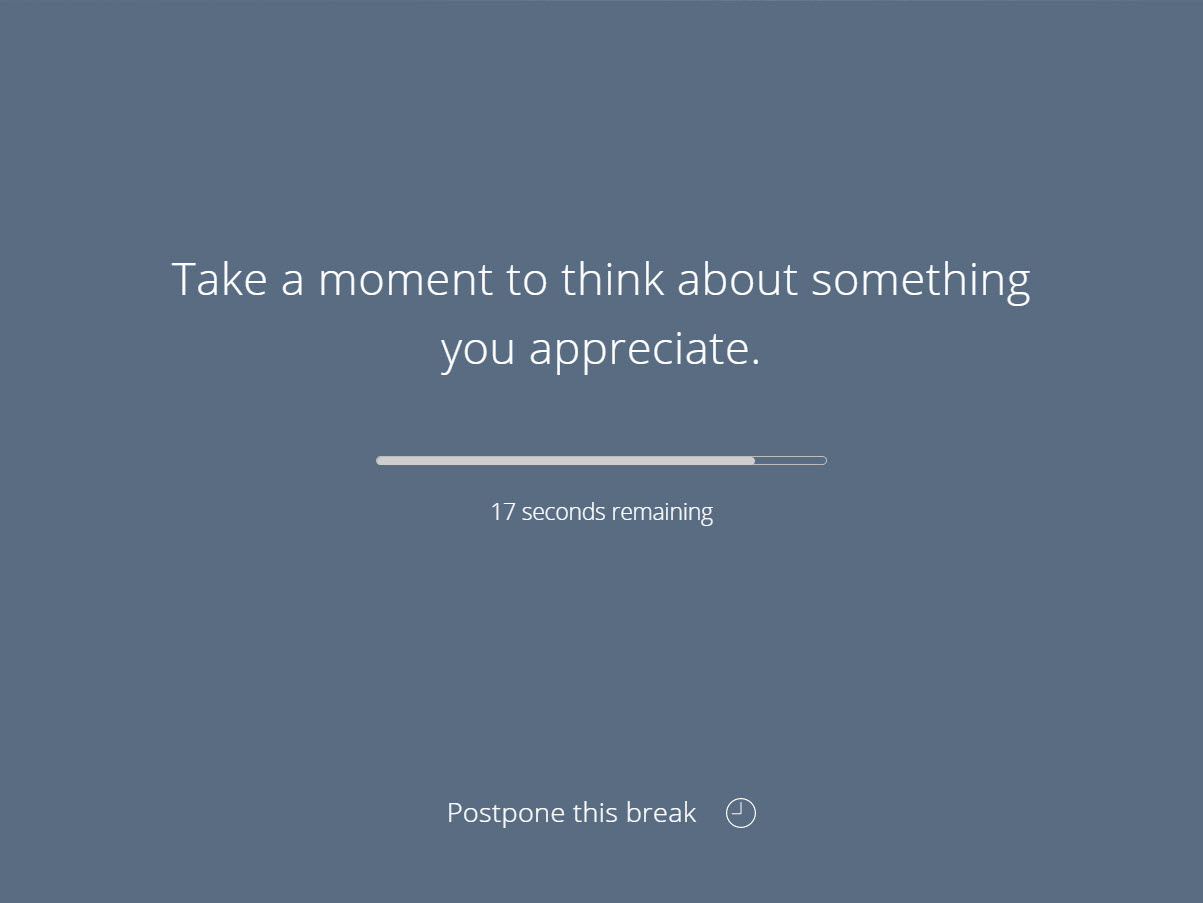
When a break begins, a window appears with the timer and, by default, an idea for what to do during it. These rotate through practical micro-exercises, slowly look all the way left then right, tilt your head to one side and hold, stretch your arms, close your eyes and relax. It is a small touch, but it solves a real problem, because most people told to “take a break” just stare at their phone instead. Being handed a specific physical action makes the break do what it is supposed to.
You are not trapped, either. When a break starts you can postpone it once, two minutes for a mini break or five for a long one, and after a short interval you can skip it entirely, both through a link in the window or a keyboard shortcut.
That flexibility is sensible for the days when a break genuinely cannot happen right now. The flip side, of course, is that an escape hatch is easy to abuse, which is exactly the problem the next feature addresses.
Strict mode, for people who ignore themselves
Here is the honest truth about every break reminder: it only works if you respect it, and most of us are very good at dismissing our own good intentions. Stretchly anticipates this with strict mode, which removes the ability to end a break early. Turn it on and when a break starts, you wait it out, full stop. No skipping, no cutting it short because a notification feels inconvenient.
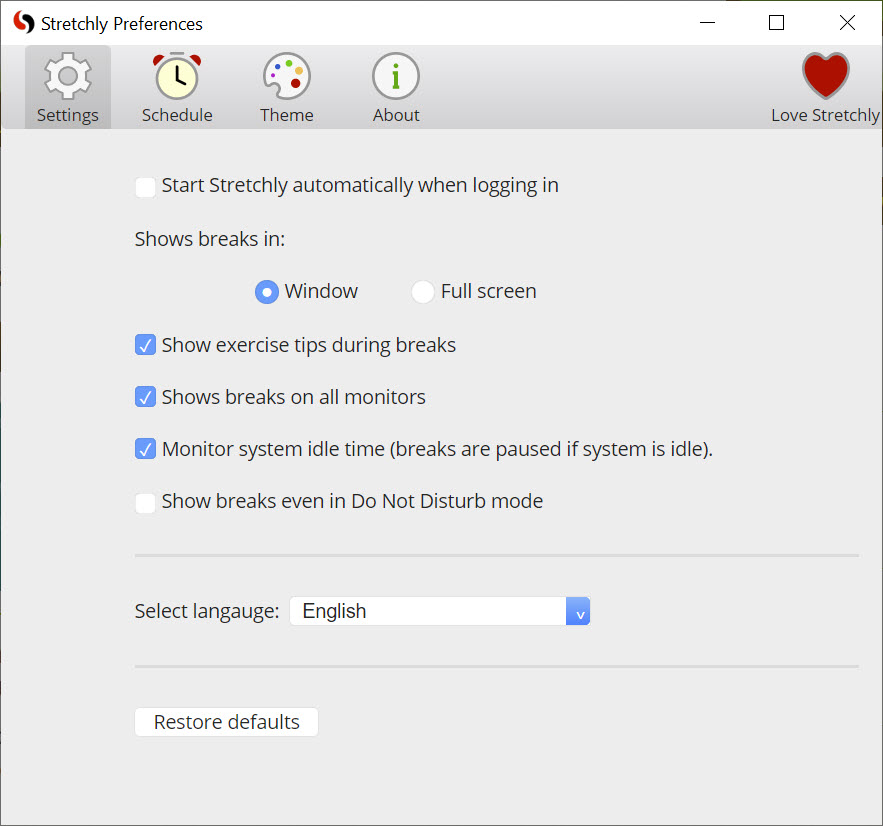
Paired with that is a full-screen break option that takes over the whole display rather than showing a small window you can glance past and ignore. Together they turn a polite suggestion into something you genuinely have to obey, which is the point for anyone whose willpower around screen time is, let us say, theoretical.
If your problem is broader than just breaks and you find yourself drawn back to distracting sites the moment a break ends, pairing it with a blocker like Freedom addresses the other half of the discipline problem.
Behaving sensibly around your actual workflow
A reminder app that nags you while you are away from the keyboard would be infuriating, so Stretchly watches your activity. If you go idle for a few minutes, walking away to a meeting, taking a call, it pauses breaks automatically and resumes only when you start using the computer again. There is no point reminding an empty chair to stretch, and the app understands that.
You also get manual control from the tray icon, where you can pause reminders for a set stretch of time, an hour, a couple of hours, until the next morning, or indefinitely, for those heads-down sessions where interruption genuinely costs you. On a multi-monitor setup it can show the break window across every screen at once, or you can pick a single display to use.
These are the practical accommodations that decide whether you keep an app like this running or uninstall it in a week out of irritation. Something distraction-free like FocusWriter handles deep-focus writing, but Stretchly is about pacing the whole day rather than one task, and a time tracker such as Clockify complements it well if you also want to measure where the hours go.
Customization, from sliders to the config file
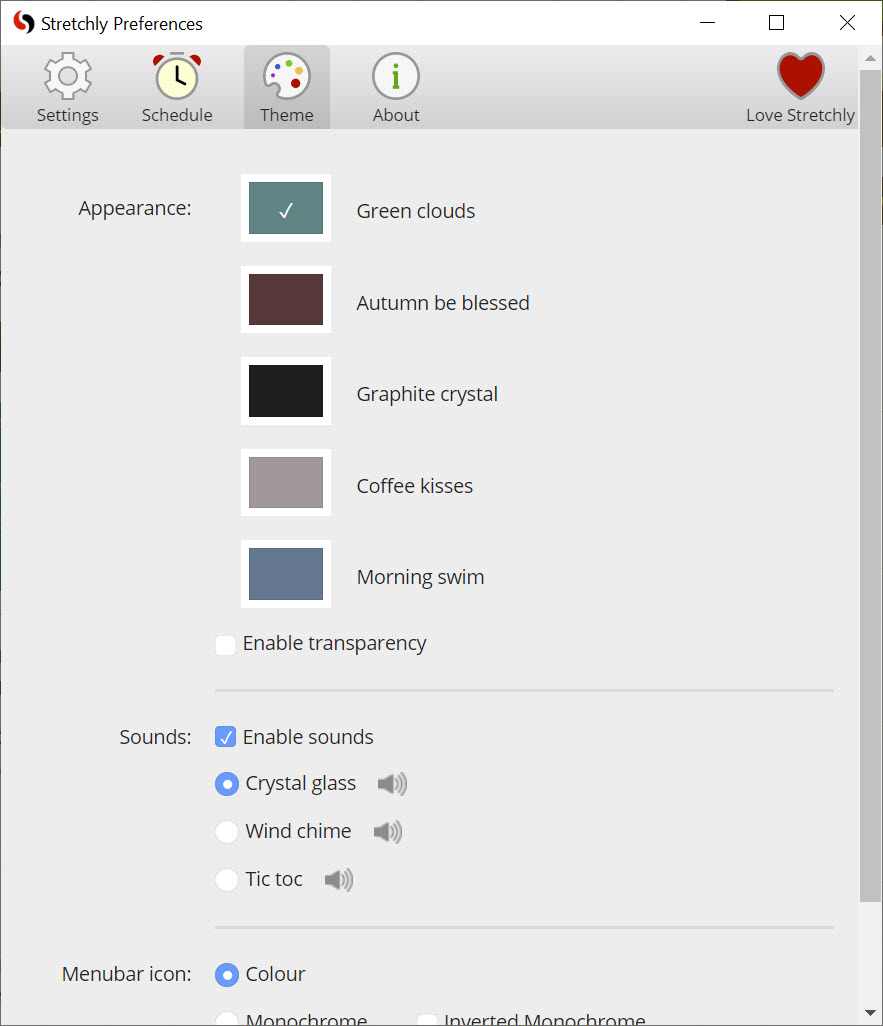
Out of the box the defaults are sensible, and many people never touch the settings. But almost everything is adjustable. You can change the timing and duration of both break types, disable one type entirely if you only want micro-pauses or only longer ones, switch off the break ideas or the pre-break notifications, and choose color schemes, including a separate theme for mini versus long breaks so you can tell them apart at a glance. The sound that marks a break can be set to one of several gentle tones, crystal glass, wind chime, a soft tic-toc, or silence if you would rather it stay quiet.
For the tinkerers, there is real depth underneath. Advanced options live in a JSON preferences file you can edit directly, exposing settings the regular interface does not surface, like custom idle-reset thresholds in milliseconds or per-break sound and color overrides.
It is built on the Electron framework, which is why it looks and behaves consistently and why that text-file configuration is available to anyone willing to open it. That two-tier approach, simple sliders for most, a config file for power users, is a smart way to serve both crowds without cluttering the main window.
Conclusion
Stretchly is for anyone who spends long hours at a screen and knows they should take breaks but never actually does, office workers, writers, developers, students cramming through marathon sessions. Its structured mini-and-long rhythm, the helpful exercise prompts, and the idle awareness make it a genuinely well-judged take on a simple idea, and the open-source flexibility means you can shape it to your day rather than fighting its defaults.
The one thing it cannot do is care on your behalf. If you skip every break the moment it appears, no app will save your eyes or your back, which is precisely why strict mode and full-screen breaks exist for those of us who need protecting from our own habits. Use it as intended, let it interrupt you, and it quietly builds the kind of healthier work pattern that is almost impossible to maintain through willpower alone.
Pros & Cons
- Two-tier mini and long breaks mirror how eye and posture strain actually build up
- Pre-break notifications give you time to pause cleanly instead of being interrupted mid-task
- Rotating break ideas suggest real micro-exercises so the break is actually used well
- Strict mode and full-screen breaks stop you from simply dismissing your own reminders
- Idle monitoring auto-pauses breaks when you step away and resumes when you return
- Deep customization from simple sliders down to a JSON config file for advanced users
- The postpone and skip controls are easy to abuse unless you commit to strict mode
- Frequent default breaks can feel intrusive during deep-focus work until you retune them
- The most advanced settings require editing a config file rather than using the interface
- It reminds and suggests but cannot make you actually do the stretches
Frequently asked questions
It is an open-source break reminder that lives in your system tray and prompts you to pause at regular intervals. It offers short Mini Breaks and longer Long Breaks, each with a suggested micro-exercise, to help reduce eye strain, fatigue, and poor posture from prolonged computer use.
By default, a 20-second Mini Break appears every 10 minutes and a 5-minute Long Break every 30 minutes, after two mini breaks. All of these intervals and durations are fully adjustable in the settings.
Yes. Enabling strict mode removes the option to end a break early, so once a break starts you have to wait it out. Combined with the full-screen break option, it makes reminders much harder to ignore.
No. It monitors your idle time and automatically pauses breaks when you have been inactive for a few minutes, then resumes once you start using the computer again. You can also pause it manually for set periods from the tray icon.
Extensively. You can change timing, duration, colors, and sounds, disable either break type, and turn off break ideas or notifications. Advanced users can edit a JSON preferences file directly to access options beyond the standard interface.
The app suggests micro-exercises during each break, such as looking far away to rest your eyes, rolling your shoulders, tilting your head gently, or standing up to move. Long breaks are best used to leave your desk entirely for a few minutes.


