
SnadBoy's Revelation
FREE 100% SAFE

SnadBoy's Revelation
(10 votes, average: 3.10 out of 5)
3.1 (10 votes)
Updated October 1, 2026
01 — Overview

About SnadBoy's Revelation

SnadBoy’s Revelation reveals the password hiding behind a row of asterisks. A program remembers a login, shows it as a line of dots in its settings, and gives you no way to read it back. Launch this tiny utility, drag its circled crosshair over that masked field, and the real text appears in the Revelation window, ready to copy.

The whole tool is one small window and one drag, and it is the thing to reach for when an old email client, a database connector or a utility holds a password you need and no longer remember.

It is a very small, very old program, around two hundred kilobytes, that runs without installation once the main file and its helper are on disk, so it fits on a stick. SnadBoy’s Revelation does one job and has done it the same way for a long time.

That age is both its charm and the source of its one big limitation, which the sections below get to.

Dragging the crosshair

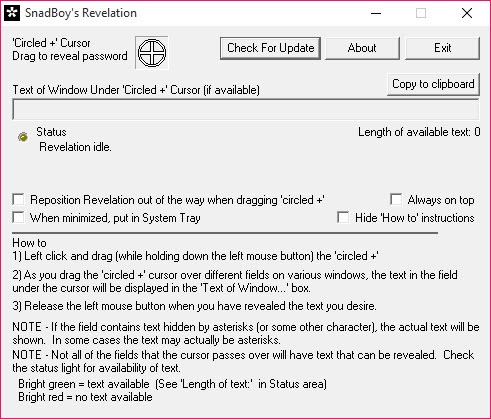
Using SnadBoy’s Revelation takes seconds. Open the program whose password you want revealed, then launch Revelation beside it. Left-click the circled plus at the top of the Revelation window and, keeping the button held, drag it over the field full of asterisks. As the crosshair passes over a window, the tool reads the text under it, and when it reaches the password field the hidden text appears in the box below. A copy button sends it to the clipboard.

A handful of options tidy the experience. The window can stay on top of everything else, minimise to the tray, and step out of the way automatically while you drag so it does not cover the field you are aiming at.

The how-to text can be hidden once you know the routine. None of it needs configuring, and the defaults are fine.

Where it works

The tool reads passwords from the standard text fields that ordinary programs use, and on those it works well. Old desktop mail clients, FTP tools, database front ends and countless small utilities store a password in exactly that kind of field, and Revelation pulls it out reliably.

The web browser wall

The wall SnadBoy’s Revelation hits is the web browser. Passwords shown as dots on a web page are not in a standard field the tool can read, they are part of the page the browser draws itself, so dragging the crosshair over them reveals nothing. Every current browser falls into this category, which is the single biggest thing to know before relying on the tool. For a password saved in a browser, the browser’s own password manager shows it, and a tool that recovers stored passwords and keys does what this one cannot.

Programs that deliberately protect their fields, and those built on frameworks other than the standard one, also resist it, but the browser case is the one most people hit.

A reveal tool, not a manager

It is worth being clear about what this is not. It does not store passwords, generate them or keep a vault. It reads one that is already masked in front of you and shows it. Once you have the password, keeping it somewhere safe is a separate job, and an encrypted local vault is where it belongs so you never have to go hunting behind asterisks again.

There is also the matter of trust. A tool that reads passwords off the screen trips many antivirus programs, which flag password revealers as a category regardless of intent, so a warning on download is expected rather than a sign of trouble.

And a tool like this only reveals what is on your own screen in front of you, which is a reminder that a password shown as asterisks on a shared machine is not as hidden as it looks.

Conclusion

SnadBoy’s Revelation suits anyone who needs a password that an older program is showing as asterisks and will not otherwise hand over, from a forgotten mail account login to a database password buried in a utility. For standard desktop fields it does the job in one drag, uses next to no system resources, and runs from a stick.

It is useless for browser passwords, which rules out the case many people first think of, and it is a reveal tool rather than anything more. Use it for the stubborn desktop field it was made for, move the result into a real password manager, and you should not need it often.

02 — Verdict

Pros & Cons

The good
  • Reveals masked passwords in standard program fields with one drag
  • Copies the revealed password to the clipboard
  • Tiny and portable, running from a stick with no installation
  • Options to stay on top and move out of the way while dragging
  • Does its single job quickly and simply
The not-so-good
  • Cannot reveal passwords masked on web pages in any current browser
  • Fails on programs that protect their fields or use non-standard frameworks
  • Antivirus software often flags it as a password revealer
  • Only reveals, with no storage or management
03 — FAQ

Frequently asked questions

No. Browser password fields are part of the web page, not a standard field the tool can read. Use the browser's own password manager instead.

Open the program with the masked password, launch Revelation, and drag its circled crosshair over the asterisks. The password appears in the Revelation window.

Password revealers are flagged as a category because of what they do. The warning is expected, not necessarily a sign the file is harmful.

No. It only reveals a password already masked on screen. Keep recovered passwords in a dedicated password manager.

Specifications

Technical details

Latest version2.0.1.100
File nameRevelationV2.zip
MD5 checksumDD9F826249323E13CFD6B8213302594C
File size 212.56 KB
LicenseFree
Supported OSWindows 11 / Windows 10 / Windows 8 / Windows 7
Author SnadBoy Software
Alternatives

Similar software

Community

User reviews

guest
0 Comments
Oldest
Newest Most Voted