

SmartFix Tool
About SmartFix Tool
SmartFix Tool repairs the damage malware leaves behind after the antivirus has done its part. An infection that has been cleaned often leaves the machine in a worse state than the infection did.
Network settings rewritten, the proxy pointed somewhere strange, services disabled, security tools blocked from launching, Task Manager and the registry editor switched off by policy. A scanner removes the payload. It does not always put the system back. This one does, and it is portable, so it runs from a stick on a machine you do not trust.
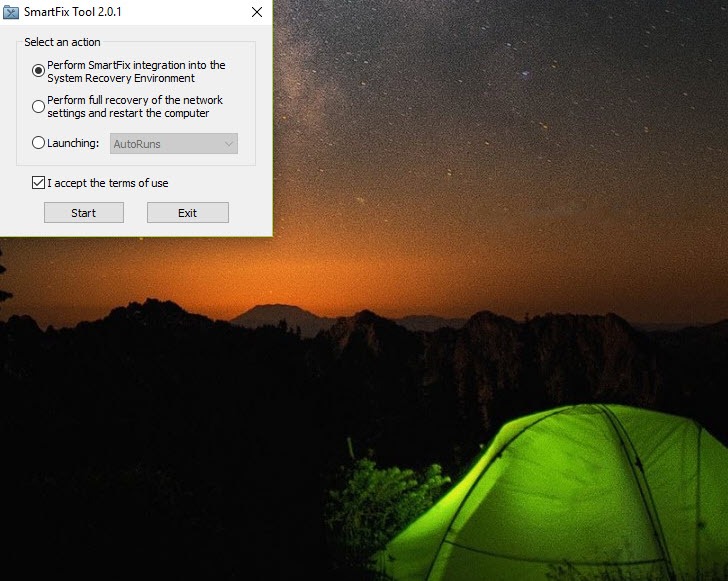
The window that opens is three lines long. Integrate into the recovery environment, perform a full network recovery and restart, or download and launch a set of well-known removal tools. That is the entire interface. There is no dashboard, no scan progress, no list of what it found.
SmartFix Tool is built for a technician who already knows what is wrong and wants it undone, not for someone browsing options.
Integration into the recovery environment
The first option adds an entry to the recovery menu reached with F8 at boot, and a shortcut in the start menu. The point of that is obvious the moment you meet a machine that will not boot properly or where malware kills every repair tool the second it launches. From the recovery environment nothing on the infected system is running, so nothing can interfere.
Start the SmartFix Tool run from there and the computer reboots into the recovery environment on its own, works for roughly five minutes, then boots back into the normal session. What it did in those five minutes is written to a log in the SmartFix folder under the system directory, and reading that log is not optional.
It is the only account you get. Startup entries the tool disabled during the repair can be turned back on afterwards through the system configuration utility.
Network recovery, and the leap of faith
The second option in SmartFix Tool resets network settings and restarts, and it is the fix for the most common post-infection symptom, a machine that cleans up fine and then cannot reach anything.
Proxy entries, DNS overrides and a poisoned hosts file all go back to default, which saves the manual cleanup people usually do with a second-opinion scanner still running in the background.
It gives you no choices and no progress information. Click it and the machine restarts. That opacity is the single biggest complaint about the application and it is a fair one, because you are trusting a black box with the network stack of a computer that is already having a bad day. Take a restore point first.
The downloader for other people’s tools
The third option fetches and launches a curated set of removal utilities, among them a startup entry inspector, an adware cleaner and a second-opinion scanner. There is no magic here. It is a convenience that saves a technician hunting down current copies of four utilities on a machine whose browser may not work, which is exactly when that hunt is hardest.
The selection is a good one. These are the utilities that appear in every cleanup thread, and having them fetched in the right order with one click is a real time saver on a call-out.
What it does not tell you
Documentation in English does not exist. The forum and the instructions are in another language, which leaves you translating or guessing. There is no undo either. The recovery environment integration cannot be removed from within the program, and the start menu shortcut has to be deleted by hand, which is an odd omission in a portable utility.
The name also causes confusion, because an unrelated commercial optimiser shares it and advertises registry cleaning and driver updates. This one does none of that. If you want a repair utility with a documented list of individual fixes you can pick from, FixWin shows you every switch it will flip.
This one flips them for you and tells you afterwards.
Conclusion
SmartFix Tool is a technician’s utility, and the audience is people who fix other people’s computers. For them, the recovery environment integration and the one-click network reset turn a two-hour cleanup into twenty minutes, and the bundled downloader removes the worst part of working on a machine with no working browser.
Home users should be careful. The lack of English documentation and the silence during repairs mean you cannot tell what happened until you read the log, and there is no way back if you disagree with it. Make a restore point, run it once, read the log, and you will get what it promises.
Pros & Cons
- Runs from the recovery environment where malware cannot block it
- Full network reset undoes proxy, DNS and hosts file tampering in one step
- Fetches and launches the standard removal utilities without a working browser
- Portable, so it runs from a stick on an untrusted machine
- No English documentation of any kind
- Network recovery runs with no progress or detail shown
- Recovery environment integration cannot be removed from the program
- Repairs happen before you see the log, not after a preview
Frequently asked questions
Damage left after an infection. Network settings, proxy and DNS entries, disabled services, blocked system utilities and startup entries changed by malware.
Not directly. It repairs the system and downloads established scanners to do the removal. Run a scanner first, then this to put the machine back together.
In a SmartFix folder inside the system directory. Read it after a repair run, because it is the only record of what changed.
There is no option in the program. The start menu shortcut can be deleted by hand, and the recovery entry has to be removed with the system's own boot configuration tools.


