

MemTest
About MemTest
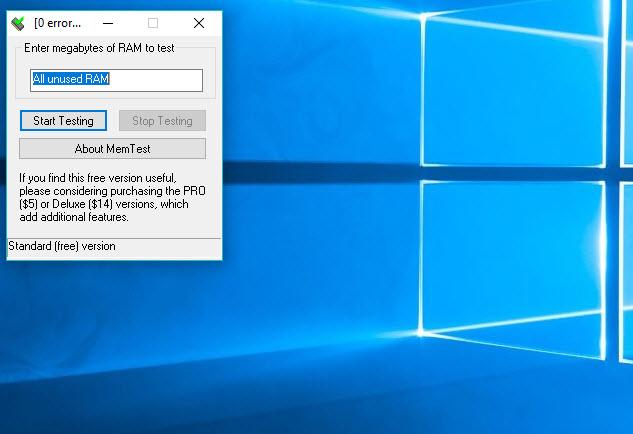
MemTest finds faulty RAM from inside a running system. Start it, type how much memory to test, press Start, and it fills that memory with unique bit patterns, reads them back, and reports every mismatch as an error. A healthy module returns exactly what was written, every time, for hours. A failing one slips a bit, and the error counter ticks up. The program is a single file of a few kilobytes that keeps no settings and leaves nothing behind when its folder is deleted.
It is often confused with two other things, so a correction up front. MemTest is not a memory cleaner. It does not free RAM, close processes or speed anything up, and a page that describes it that way describes a different kind of program.
It is also not the bootable tester with a similar name that runs from a USB stick before the operating system starts. This one runs in a window, which has one consequence that shapes how it is used.
It can only test memory the system has not already taken, so several copies run at once to cover the rest. The sections below cover how the test works, the multiple-instance routine, how to read coverage and errors, when to run it, and where the bootable testers fit.
How the test works
MemTest tests memory by storing values and checking that they survive. The program writes a long series of unique bit patterns into the block of RAM it was given, waits, reads the block back and compares. Any difference is an error, and the pattern that failed is reported. Because the patterns vary and the waiting periods differ, it catches both the errors that show up at once and the ones that only appear when a cell has held a value for a while.
Coverage is the measure of how much testing has been done, and it is shown as a percentage that climbs past a hundred. One hundred percent means every byte in the block has been through the full set of patterns once.
The program’s own figures put the odds plainly. Around ten percent coverage catches more than half of bad modules, and a hundred percent catches nearly all of them. The remaining intermittent faults need something like four hundred percent, which in practice means an overnight run.
Why you run several copies at once
A program running inside the system, as MemTest does, cannot touch memory the system and other programs are using. One copy tests one block, and that block is limited by what the program can allocate, so a single window on a machine with a lot of RAM covers only a fraction of it. The answer is to open several copies, give each one a share of the free memory, and run them together until the sum of their blocks is close to the free total.
The routine is a short calculation. Note the free memory in the task manager. Divide it by the number of processor threads, or by a round figure such as two thousand megabytes. Open that many copies and type the share into each one. Leave a little memory for the system so it stays responsive. Enthusiasts who tune memory timings run this routine as a matter of course, since a dozen copies at once also load the memory controller like a heavy session does.
For checking what is installed before dividing it up, CPU-Z reads the modules, their speed and their timings.
Reading coverage and errors
Each copy of MemTest shows its own coverage and its own error count, and the test ends when you stop it. Correctly working RAM has zero errors, and it still has zero after a full night. The program’s own support notes are blunt about the alternative. If errors appear, even with conservative firmware settings, the memory is bad. Errors found before coverage reaches one percent mean memory so bad that a working system is a matter of luck.
A result of zero errors after one hundred percent on every copy is a pass for ordinary purposes. Four hundred percent, or a full night, is the pass for a machine that has been crashing intermittently or has just had its memory timings changed.
Where coverage crawls, give each copy less memory rather than waiting longer.
When to run it
Three moments call for a MemTest run. A new machine or new modules, before trusting them with work. A system that crashes, freezes or corrupts files for no reason you can find, since bad memory produces exactly those symptoms and nothing else in the system will admit to it. And any change to memory timings, voltage or speed in the firmware, where a boot that completes proves nothing and a night of this test proves a great deal.
The program finds the sorts of errors that real programs trigger, which is why its findings should not be ignored even when another tester gives a pass. When it reports a fault, test modules one at a time to find the culprit, then replace it or back off the settings that pushed it.
For watching the processor’s temperature during a long run, CPU Temp keeps an eye on the heat a dozen copies generate.
Where the bootable testers fit
Testing from inside the system, as MemTest does, has a ceiling. The operating system holds a share of memory the program can never reach, so some addresses are never tested. The bootable testers take over the whole machine before the system starts and test nearly every byte, in exchange for a reboot and a USB stick prepared with Rufus. The two approaches catch different faults, and serious diagnosis uses both. The open-source bootable tester of similar name does that half.
The usual order is a bootable pass first, then this program for hours inside the running system. A module can pass the bootable test and still fail under the load and heat of a real session.
For a deliberately heavy load on processor and memory together, a stress test for the whole system rounds out the kit.
Conclusion
MemTest suits anyone who suspects their memory, from the owner of a machine that crashes without reason to the enthusiast who has just tightened the timings and wants proof the system will hold. The pattern test, the coverage figure and the multiple-copy routine make it a quick, trustworthy check that runs without leaving the desktop.
It cannot reach the memory the system holds, it asks you to do the arithmetic for several copies, and a proper run takes a night. Open enough copies to cover the free memory, let them run to the right coverage, and treat a single error as a verdict rather than a fluke.
Pros & Cons
- Tests RAM for errors from inside the running system, with no reboot
- Unique bit patterns held over varying periods catch immediate and intermittent faults
- Coverage percentage shows how thorough the test has been, with clear thresholds
- Several copies run together to cover all free memory and load the memory controller
- Single small file that keeps no settings and leaves nothing behind
- Finds errors that real programs trigger and that other testers can miss
- Cannot test memory the system itself is using
- Several copies must be opened and configured by hand
- Thorough testing means hours or an overnight run
- Often confused with memory cleaners and the bootable tester of similar name
Frequently asked questions
No. It tests RAM for errors by writing and reading patterns. It does not free memory, close programs or speed anything up.
One copy can test only the block it is given, and the system holds the rest. Several copies, each with a share of the free memory, together cover nearly all of it.
To one hundred percent coverage on every copy for a routine check, and to about four hundred percent, or overnight, after changing memory settings or chasing intermittent crashes.
The memory failed to hold a value it was given. Correctly working RAM shows zero errors even after a full night, so any error means a faulty module or settings pushed too far.


