

Driver Signature Enforcement Overrider

 (23 votes, average: 4.09 out of 5)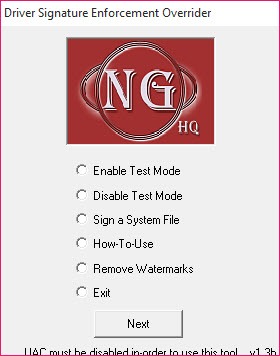
About Driver Signature Enforcement Overrider
Driver Signature Enforcement Overrider is useful if you need to bypass the signature drivers on your system and make sure they don’t get installed automatically.
System updates that are rolled out constantly are crucial for the operation of your computer. They enhance the functioning of your computer and enable it to be more stable.
That’s why messing with these drivers is not for everyone because if you miss out on them and don’t manage them properly, you’re risking the health of your computer.
However, if you’re a power user and don’t want installed updates automatically, you can use the Driver Signature Enforcement Overrider application. It is a fairly simple application whose purpose is to stop the updates from being installed automatically and give you more control over when you want them installed.
Operating System Security Bypass
This application bypasses the operating system functions for security. It means that some level of caution needs to be taken when you use this application, which is likely to be more useful for advanced users who are sure of their actions.
This application can help you determine which updates are necessary and which ones you need to have installed, while you can also disable some updates that you think might not be the most helpful for your system.
Create Virtual Certificates
For installing the drivers you need and want, you’ll be able to create virtual certificates to allow them to be installed.
These certificates essentially tell the system that you want some updates installed.
You’ll have full control over what gets installed and what doesn’t.
Conclusion
To conclude, this app is meant for more advanced users that don’t want some system updates to be installed, and it will allow you to select which drivers are to be installed and which ones you don’t want to install.


