

AMTRA
About AMTRA
AMTRA converts ordinary stereo recordings into ambiophonic ones, a different way of reproducing sound through two speakers. It processes each track with the RACE crosstalk cancellation algorithm, which stops the left speaker’s sound from reaching the right ear and the other way round. The result, on the right setup, is a wider and more realistic stage with clearer placement of each instrument.
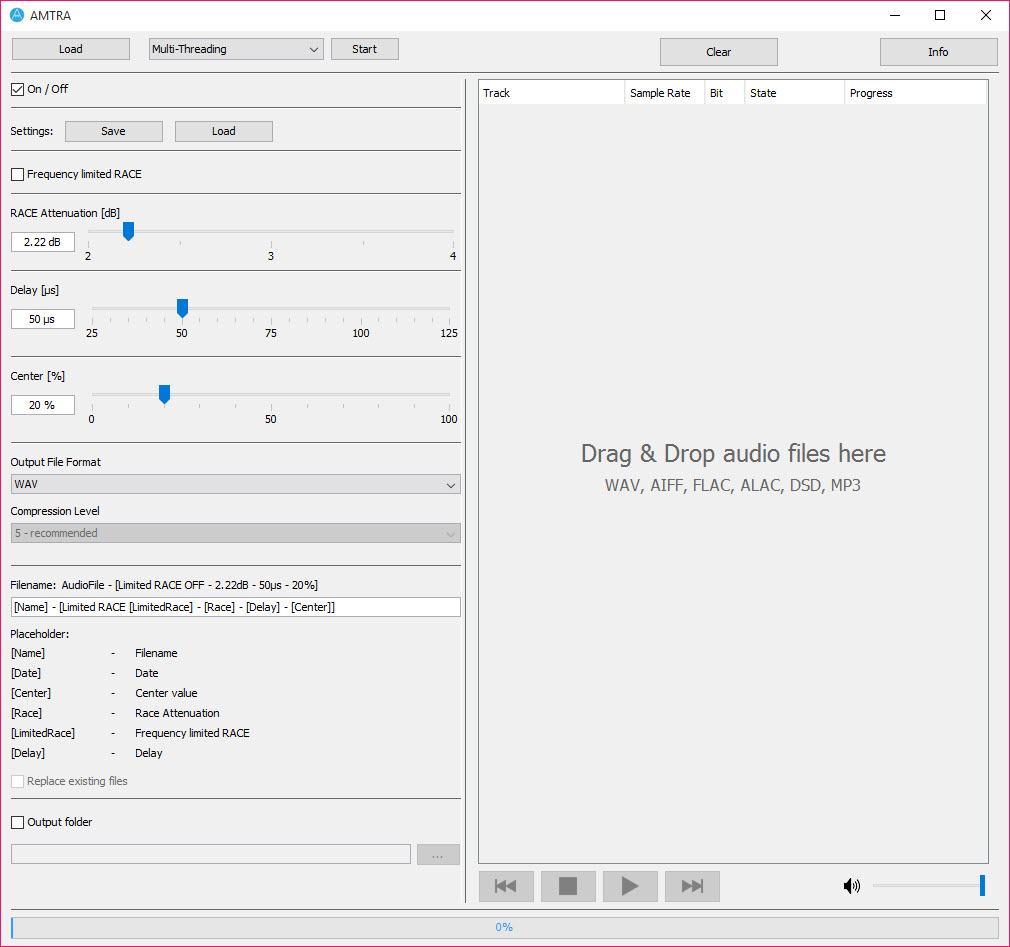
It works as a player and a batch converter in one. You audition a track through the built-in player while adjusting the parameters, then convert a whole folder with the settings that sounded best. The output is a new set of files that play with the ambiophonic effect on any player, with no plugin needed afterwards.
What ambiophonics changes, and what it needs
In normal stereo, each ear hears both speakers. That crosstalk creates comb filtering, a slightly hollow, raspy tone in voices, and blurs where sounds seem to come from. RACE cancels it by feeding each speaker a delayed and inverted copy of the opposite channel at reduced level, repeated in a loop until it fades out.
The catch is geometry. Ambiophonics expects two speakers placed close together in front of you, roughly 10 to 20 degrees apart, rather than the usual wide stereo triangle. AMTRA assumes a 20-degree layout by default. You need to sit centred between them, and the effect disappears on headphones, because headphones never had crosstalk to begin with.
Closely spaced desktop or laptop speakers are actually a good starting point.
Tuning the delay and the filters
Three adjustments shape the result. The delay setting reflects the relationship between your speaker angle and the width of your head, usually a few dozen microseconds. Attenuation controls how strongly each cancelling repetition is reduced, which in practice sets how wide and how aggressive the effect sounds.
Low and high cut filters limit the processing to the frequency band where it helps most, typically leaving deep bass and the very top end untouched. Listeners on ambiophonics forums report wildly different favourite settings, and some prefer low delay values with small speaker angles.
So use the player as intended. Change one value at a time while the music plays, and keep the setting where vocals lose their hollow edge without the sound becoming phasey. Comparing a converted file against the untouched original in a familiar audio player makes the difference easier to judge.
Formats and batch conversion
Input support is broad for a niche tool. AMTRA reads MP3, WAV, FLAC, AIFF, ALAC and DSD files, at sample rates from 44.1 kHz up to 384 kHz and bit depths of 16, 24 and 32 bits. Processing runs in 64-bit precision, so the extra calculation does not add audible rounding noise.
Output goes to WAV, AIFF or FLAC, with an adjustable compression level for FLAC. A naming pattern can write the chosen parameters into each file name, which is handy when you are comparing several versions of the same track. When a batch finishes, the program can also delete the source copies it processed, so check that option before converting your only copy.
For converting the results onward to lossy formats, fre:ac is a capable batch converter.
Converting files versus processing live
The file-based approach has a clear advantage. Once converted, tracks play with the effect on any device or player, including a phone connected to the same close-set speakers. The drawback is just as clear. Every setting change means converting again, and a music library ends up stored twice, once in stereo and once in ambiophonic form.
If you want to experiment before committing disk space, live processing is the alternative. A system-wide equaliser such as Equalizer APO can host filters in real time, and several music players accept DSP components.
Neither offers the same dedicated RACE controls, though, which is where this program remains useful.
Conclusion
AMTRA suits audiophiles curious about ambiophonics who are willing to rearrange their speakers and spend time tuning. With close-set speakers and a centred seat, it can strip the hollow tone from voices and place instruments more convincingly than standard stereo.
It is a specialist tool with strict conditions, useless on headphones and dependent on room geometry. Within those conditions, it offers precise control over a technique few programs implement at all.
Pros & Cons
- Dedicated RACE processing with adjustable delay, attenuation and filters
- Built-in player for tuning settings while listening
- Reads MP3, WAV, FLAC, AIFF, ALAC and DSD up to 384 kHz
- Batch conversion with 64-bit processing
- File names can record the parameters used
- Only works with closely spaced speakers and a centred listener
- No benefit on headphones
- Converted files duplicate the library and must be redone for new settings
Frequently asked questions
No. Ambiophonics cancels crosstalk between two speakers, and headphones have no crosstalk to cancel. Use closely spaced speakers in front of you.
Close together, roughly 10 to 20 degrees apart as seen from your listening position, with you sitting centred. The default settings assume about 20 degrees.
WAV, AIFF and FLAC, with an adjustable FLAC compression level. Input files can be MP3, WAV, FLAC, AIFF, ALAC or DSD.


