

WinSockFix
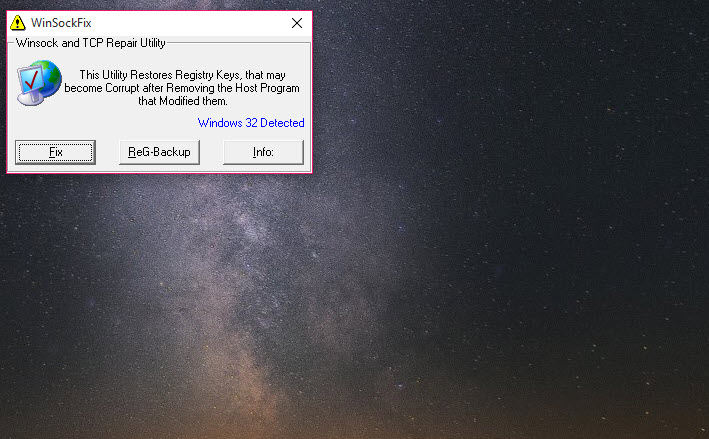
About WinSockFix
The network icon says connected. The router is fine, other devices work, and yet no page loads and no program can reach anything. That specific failure, connected but deaf, is what WinSockFix exists to repair, and the cause is almost always something that was removed rather than something that is present.
The mechanism matters here. Network traffic passes through a chain of layered service providers, small modules that programs can insert into the stack to see or modify what goes through. Firewalls do it, proxy tools do it, and so does a good deal of adware that arrives bundled with something else.
Remove one of those programs carelessly and its link stays registered while the file it points to is gone, breaking the chain for everything.
Clean the cause before repairing the chain
Cleaning the cause first is the right order. AdwCleaner or a similar scanner removes whatever inserted itself, and only then does repairing the chain make sense, since fixing it with the offender still installed invites a repeat.
The sequence it runs
WinSockFix is not subtle, and knowing what it does removes the anxiety of running something that promises to rewrite your network settings.
It identifies the system generation, releases the current IP address to take the machine offline, resets the TCP stack through the built-in network shell, deletes the existing TCP and Winsock registry values, imports a set of known-good replacements, backs up the hosts file, replaces it with a default, and reboots.
There is also a separate registry backup button, which saves the relevant keys to a folder you pick before anything is touched. Press it. You are already in trouble if you are here, and the reboot happens whether you feel ready or not.
For a gentler approach that resets the same keys among a long menu of other repairs, a general repair suite for a damaged system lets you choose which fixes to apply.
The hosts file surprise
One step in the WinSockFix sequence deserves calling out, because it catches people who had no reason to expect it. The hosts file is replaced with a default one.
If you keep entries there, and plenty of people do, an ad-blocking list, a redirect for a development server, a block on something you never want the machine reaching, all of it goes. The original is backed up first, so recovery means finding that backup and merging your entries into the new file by hand.
When it is the wrong tool
A modern system has a built-in command that resets the Winsock catalogue in one line, and for most cases that is enough. This program predates the convenience and does more around the edges, particularly the hosts file and the TCP values, which is why it survives as a last resort rather than a first move.
It also fixes exactly one class of problem. If name resolution is the fault, nothing here helps and DNS Jumper is the shorter path. Driver faults, a failing adapter, a router quietly dropping the connection, none of those are addressed by rewriting registry keys.
Diagnosing before resetting is the better habit, and a tool that reports where a connection actually fails will tell you whether the problem is even in the layer this repairs.
One more caution. Resetting the catalogue removes legitimate entries as well as broken ones, so VPN clients, proxy software and some security suites may stop working afterwards and need reinstalling to register themselves again.
Conclusion
WinSockFix is a specialist for one failure, and it handles that failure decisively. Technicians who see the connected-but-dead symptom regularly, and anyone who has just cleaned adware off a machine only to find the browser useless, will get their connection back in one run and a reboot.
Approach it as the second step rather than the first, though. Confirm the fault is actually in this layer, try the built-in reset command, and take the registry backup it offers before you start. And remember what happens to your hosts file, because that is the part people find out about later, usually while wondering why the ads came back.
Pros & Cons
- Fixes the specific case where a machine reports a connection but reaches nothing
- Backs up registry keys and the hosts file before making any changes
- Runs the whole repair sequence in one action rather than several manual steps
- Handles TCP values and the hosts file, not only the Winsock catalogue
- Requires no configuration, which suits a machine you cannot research on
- Replaces the hosts file with a default, discarding any entries you added deliberately
- Removes working layered providers along with broken ones, so VPN and proxy tools may need reinstalling
- Fixes nothing if the fault is DNS, drivers, the router or the hardware
- Reboots the machine as part of the sequence rather than asking first
- Largely superseded by a built-in reset command for straightforward cases
Frequently asked questions
A broken chain of layered service providers, usually left behind when adware or a firewall is removed without unregistering itself properly. The symptom is a machine that reports a working connection while no program can reach anything.
Yes. Replacing that file with a default is part of the sequence, so custom blocks and redirects disappear. The original is backed up first, and restoring your own entries means merging them back manually.
For most cases the built-in command is enough and simpler. This one goes further, covering TCP values and the hosts file too, which makes it a reasonable fallback when the single command does not restore the connection.
Because the fault was somewhere else. Name resolution, adapter drivers, the router or the physical link all produce similar symptoms, and none of them live in the registry keys this program rewrites.


