

TCP Optimizer
About TCP Optimizer
There is a large body of folklore about making an internet connection faster by adjusting settings, and most of it stopped being true some time ago. TCP Optimizer is the serious tool in that space, and using it well means understanding which parts of the folklore still hold.
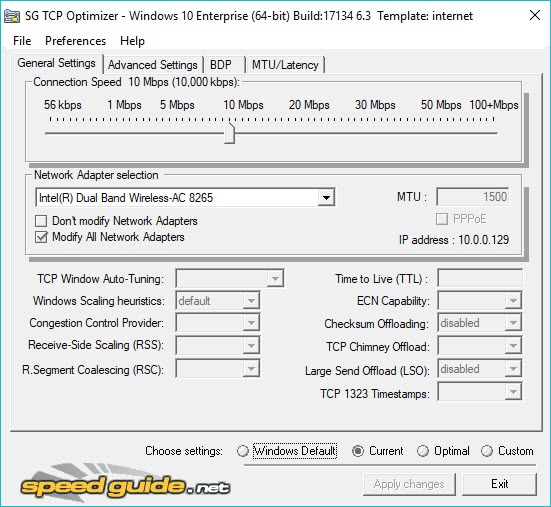
TCP Optimizer adjusts the parameters governing how the machine’s network stack behaves. The receive window and whether it tunes itself, which congestion control algorithm is used, whether checksum and segmentation work is handed to the network adapter, how much bandwidth background transfers may take, packet lifetime, and the maximum packet size.
All of it applies per adapter, so a wired connection and a wireless one can be configured differently, which matters on a laptop that uses both.
Applying a whole network configuration rather than tuning one is a different job, and a profile switcher that stores complete network settings handles machines that move between networks with different requirements.
Why this mattered, and why it matters less
The historical case for TCP Optimizer was real. Systems of a certain generation shipped with a fixed receive window sized for the connections of the time, and when connections became faster the stack became the limit rather than the line. Adjusting it produced dramatic, measurable improvements, which is where the folklore comes from.
That gap has closed. Current systems tune the receive window automatically, scaling it to the connection they observe, and the defaults are broadly sensible for the connections people actually have.
The honest consequence is that most people running TCP Optimizer on a current machine with a modern connection will measure no improvement at all. Not a small one, none. The stack is no longer the bottleneck, and adjusting something that was not limiting you changes nothing.
That is the opposite of what the category promises, and it is what an accurate review has to say.
The packet size test is the part worth having
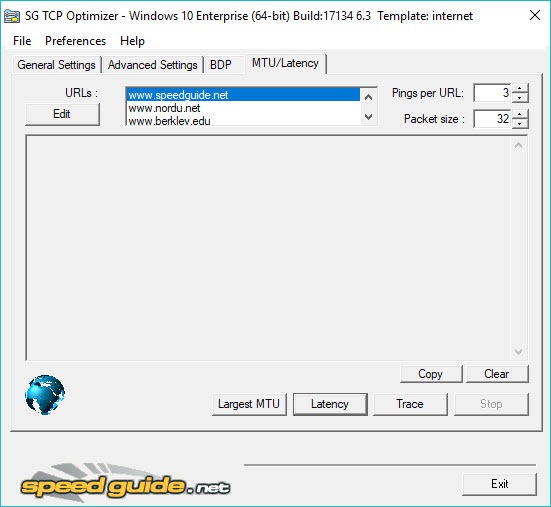
Where TCP Optimizer earns its place is diagnosis rather than optimisation, and the maximum packet size test is the reason.
Every path across a network has a limit on how large a packet may be before it must be split. When a machine sends packets larger than the path allows and the notification that they were too large gets lost, the result is not slowness. It is specific pages that never finish loading while everything else works, connections that hang partway, and transfers that stall at the same point every time.
The test finds the largest size that crosses your particular path intact, by sending packets of decreasing size until they pass. Setting the value to what actually works resolves that entire class of symptom, and nothing else in the folklore is nearly as useful.
Confirming what is happening at the packet level is the next step where the picture is still unclear, and Wireshark shows the traffic itself.
Three modes, and what optimal means
TCP Optimizer offers current settings, the system defaults, and a set labelled optimal.
Be clear about that last one. Those values are a considered opinion about sensible settings rather than a calculation derived from your connection. They are reasonable, they were chosen by people who understand the subject, and they are not measurements of anything on your machine.
Treating them as a computed answer is the mistake that leads people to apply everything and then wonder why nothing improved, or why something broke.
The restore path is what makes experimenting acceptable
TCP Optimizer backs up settings before changing them, and restoring the system defaults is offered explicitly as one of the modes.
That matters more than any individual parameter, because it means an experiment is reversible. Somebody who applies a set of changes, finds a particular application misbehaving, and restores the defaults has lost twenty minutes rather than acquiring a permanent mystery.
Use it. The single most common way people get into trouble with network tweaking is applying changes over months, forgetting which ones, and eventually facing a machine with an unexplained problem and no path back.
When to reach for it
The honest TCP Optimizer guidance is short. Reach for it when you have a specific symptom that points at the stack, particularly the pattern where some sites work and others hang, which is the packet size problem described above.
Do not reach for it because a connection feels slow generally. That is far more often the connection itself, the wireless link, a congested path, or something on the machine using bandwidth. PingPlotter traces the route and shows where latency and loss actually appear, which answers the question this tool cannot.
And where the suspicion is that something on the machine is consuming the connection, a monitor that attributes traffic to individual programs identifies it directly rather than by inference.
Conclusion
TCP Optimizer is a well-made tool for a problem that has largely gone away. The era when a badly sized receive window throttled a fast connection is over, modern systems handle that themselves, and somebody applying these settings hoping for a faster connection will usually measure nothing.
What remains worth having is the diagnosis. The packet size test addresses a real and specific failure that produces confusing symptoms, and the explicit restore path makes trying anything else reversible. Approach it as an instrument for a symptom you can describe, rather than as a way to make a connection faster in general, and it is properly useful within that narrower role.
Pros & Cons
- Exposes stack parameters that are otherwise buried or unreachable
- Settings apply per adapter, so wired and wireless can differ
- The packet size test finds the value that actually works on your path
- Restoring system defaults is offered explicitly as a single action
- Backs up the existing configuration before applying anything
- Portable, with no installation, and free of the surrounding clutter such tools often carry
- On a current system with a modern connection, most changes produce no measurable gain
- The optimal preset is an opinion rather than a calculation for your connection
- Some settings can degrade performance or break specific applications
- Most changes require a restart before they take effect
- Encourages tweaking as a response to slowness that usually has another cause
Frequently asked questions
On a current system, almost certainly not. Modern stacks tune themselves and the defaults suit typical connections, so the parameters this adjusts are rarely what is limiting you. The dramatic gains belong to an earlier generation of systems.
Finding the largest packet that crosses your network path without needing to be split. A wrong value produces a distinctive symptom, where some sites hang while others work normally, and correcting it resolves that specific problem.
Yes. Settings are backed up before changes, and restoring the system defaults is one of the three modes offered. Using that restore is the sensible response to anything behaving oddly afterwards.
A set of values chosen by people who understand the subject as generally sensible. It is an informed opinion rather than a measurement of your connection, so applying it is a reasonable experiment rather than a guaranteed improvement.
Most require a restart, since they alter parameters the stack reads when it initialises. Anything appearing to change nothing before restarting has probably not been applied yet.


