

Winamp
About Winamp
Winamp is a music player for files on your own disk. It opens MP3, AAC, FLAC, OGG, WAV, WMA, MIDI and a shelf of tracker formats, and plays the common video containers as an afterthought. The collection goes into a media library with playlists and ratings and saved searches. Around that sits the part it is remembered for. Skins that change every pixel of the interface and a plugin system that has grown for a quarter of a century. An equaliser with presets that load per song, and visualisations that still look better than anything a streaming service draws.
It belongs to the small group of local players that survived the streaming decade, beside foobar2000, AIMP and MusicBee. Those three are more modern in their engines and their handling of large libraries.
Winamp is the one whose skins and plugins people still have on a drive somewhere, and the one whose Milkdrop visualiser has no equal. Whether the nostalgia carries a daily driver is the question this review tries to answer with the current release, not with the one from a decade ago.
Playing files and the playlist editor
Drop a folder onto the main window and it plays. The Winamp playlist editor beside it lists the queue with times, sorts by title, path or random, and saves and loads M3U and PLS files. A playlist made anywhere else opens here and one made here opens anywhere.
The Jump to File window, a keystroke away, searches the current playlist as you type and queues the match, which for a long list is faster than any scrolling. Ratings and play counts accumulate in the library.
Playback controls include a preamp and a ten-band equaliser with a list of presets and an option to remember a preset per track. A quiet live recording and a loud modern master then play at matched levels. ReplayGain tags are read and applied.
Gapless playback between tracks, the thing an album of continuous music needs, is present but imperfect in some format combinations. This is one of the places a rival built later shows its age advantage.
The media library and Smart Views
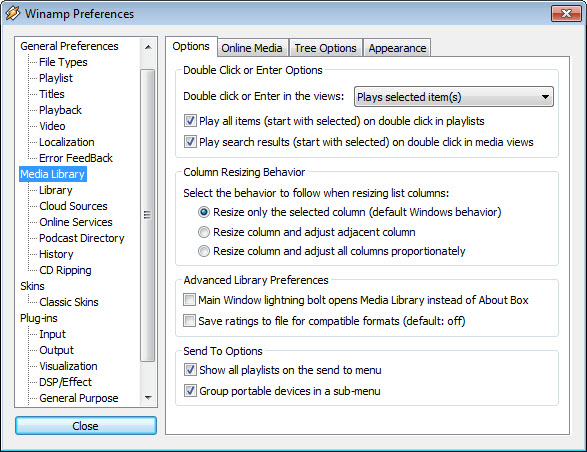
The Winamp library scans the folders you give it, watches them for changes, and presents the collection by artist and album, by genre and by year, with a search box that filters as you type. Smart Views are saved searches. Top-rated tracks, recently added, never played, a genre from a decade, each is a live list that updates as the library does. Podcasts have their own view with subscriptions and downloads, and the internet radio directory sits in the same tree. Album art displays from embedded tags or folder images, and a basic tag editor fixes a title or an artist in place.
For a collection of a few thousand tracks the library is quick and pleasant. Past tens of thousands, scanning slows and the search stops feeling instant. People with libraries that size tend to keep this player for listening and manage their tags in a dedicated tag editor.
The auto-tagging service that once filled in missing titles from an online database is gone, so untagged files stay untagged unless you type.
Two kinds of skin
Two skin formats are supported. Classic skins are the original bitmap kind, a set of images that redraw the small main window, the equaliser and the playlist. There are tens of thousands of them, most drawn by teenagers a long time ago and many still charming. Modern skins are freeform, with their own layouts and behaviours, and the default Bento skin is one of these. It puts the library, the playlist and the player into a single resizable window with tabs. Its Big Bento variant is the one most people who use the program daily end up on.
Both kinds install by dropping a file into the skins folder or double-clicking it, and the Skins preference switches between them. Windowshade mode collapses the classic player to a single bar, double-size mode scales it for large displays, and always-on-top keeps it above the work.
Modern skins on a very high resolution display can look small, since they were drawn for screens of another era. The scaling option only partly helps.
Plugins
Winamp is a host for plugins, and the categories are precise. Input plugins decode formats and output plugins send sound to the hardware through different paths. DSP plugins process the sound between the two, visualisation plugins draw it, general plugins add features and media library plugins add views. Any of them can be replaced. The hundreds of third-party plugins built over the years still load, which is the main reason people stay. A few, such as a broadcasting DSP that streams your playback to a radio server, are the only way to do what they do.
The plugin architecture is also why the program can play an obscure game music format or output through a bit-perfect path to a high-end converter. Plugins are unsigned code from decades of authors, so the usual caution about running old binaries applies.
A plugin from the early years occasionally crashes a current release on startup, which is fixed by removing its file from the plugins folder.
Milkdrop and the visualisers
The Winamp visualisation window draws what the sound is doing, and Milkdrop is the one that made the program famous. Its presets are small programs describing waves and shapes and feedback, and it blends between them in time with the music, at any resolution, on a second monitor if you like. Thousands of presets exist and new ones still appear.
The older AVS visualiser is here as well, with its editor, for the people who liked to build their own. In full screen on a large display with a good track, Milkdrop remains the best argument for owning a local music player.
Internet radio, podcasts and CDs
The Winamp radio directory lists thousands of streams by genre with bitrate and listener counts. A stream plays like a file, with its metadata in the title bar. The current release plays HTTPS streams, which older ones could not, and hi-res files above CD quality.
Podcasts subscribe by feed address or from a built-in directory and download new episodes to a folder on a schedule. CDs play, rip to MP3, AAC, FLAC, OGG or WAV with tags fetched where a database still answers, and burn from a playlist. Some encoders and full-speed ripping are tied to the paid edition.
Video playback works for the common containers through the system’s codecs, and it is a convenience rather than a feature. Anyone who wants a video player has one already.
What has aged and what is coming
Several things show their years. The library struggles at scale and gapless playback is not complete. High-resolution displays defeat most skins, and a few dialogs look exactly as they did long ago. The menus also carry links to a newer web player and creator services, which open a browser rather than doing anything inside the program. Most users ignore them.
A community continuation project rebuilds the player with modern components and 64-bit support while keeping the skin and plugin formats. People who hit the limits described here often move to it.
For a music library on a local drive, a set of skins you like and a Milkdrop session on a Saturday night, the current release does what it always did. For a modern, scalable, gapless library manager, a player built around a large library and tagging is the honest recommendation, and it will even wear a classic skin.
Conclusion
Winamp is for the person with a music collection on a drive, a folder of skins from another life and an appetite for a visualiser that turns a track into a light show. For that person the current release is a working, familiar player. Its library copes with a normal collection and its plugin catalogue covers nearly any format.
Anyone with a hundred thousand tracks, a demand for perfect gapless playback or a high-resolution monitor that shrinks every skin should look at the modern players, or at the community rebuild. The llama is still standing. It is just not the only animal in the room any more.
Features & benefits
Pros & Cons
- Plays every common audio format and most obscure ones through plugins
- Classic and modern skins with a vast catalogue behind them
- Milkdrop visualiser with thousands of presets, still unmatched
- Media library with Smart Views and ratings plus podcast subscriptions
- Equaliser presets per track and ReplayGain support
- Internet radio directory with HTTPS stream playback
- Library slows on very large collections
- Gapless playback is imperfect for some formats
- Most skins were drawn for low-resolution screens
- Some CD ripping features belong to the paid edition
- Menus carry links to web services that open a browser
Frequently asked questions
Yes. The current release runs on recent systems, plays HTTPS streams and hi-res files, and loads the old skins and plugins. A few very old plugins crash it on startup and should be removed from the plugins folder.
Double-click the skin file, or copy it into the Skins folder inside the program's directory, then pick it from the Skins menu. Classic and modern skins both install this way.
Gapless playback depends on the format and the output plugin. Enable gapless options in the input plugin preferences and try a different output plugin. Some combinations still leave a short gap.
Yes. The library has a radio directory with thousands of streams and a podcast view that subscribes to feeds and downloads new episodes on a schedule.
The online tagging service that filled in missing titles has been discontinued. Tags are now edited by hand in the library or with a separate tag editor before importing.


