

Virtual Router Plus
About Virtual Router Plus
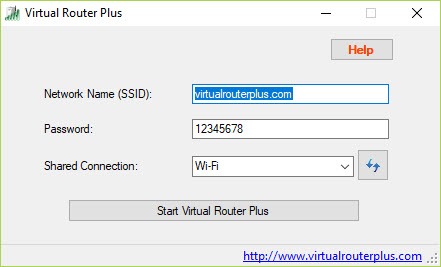
A hotel gives you one wired port and you have three devices. Virtual Router Plus was built for that, turning the wireless adapter in a laptop into an access point that hands out the connection the machine already has. Type a network name, type a password, choose which connection to share, press start. Devices see an ordinary access point and join it as such.
Underneath, it is a front end for a capability the system itself provides rather than a networking stack of its own. That explains both why the interface is so bare, with no menus and no help file, and why the most important question about it has nothing to do with the software at all.
Setting it up, and what you cannot change
The password has to be at least eight characters, and encryption is not optional. WPA2 is enforced by the underlying interface, so there is no way to run an open network even if you wanted one for a printer that cannot handle a key. Whether that counts as a limitation or a favour depends on the day.
The upstream side is flexible. Whatever the host machine is connected to can be shared, whether that is a wired port, a mobile broadband dongle or in some configurations the wireless adapter itself.
Administrator rights are needed to start it, no restart is required, and Virtual Router Plus stops broadcasting the moment you press stop.
The connected devices list
The peer list is the one useful extra. Connected clients appear with their hostname, IP address and MAC address, which is enough to tell whether the phone you expected joined, or something else did.
The reason it probably will not start
Here is the part that matters more than any feature. The hosted network capability this program depends on has been deprecated, and wireless drivers from the major chipset brands, Intel, Realtek and Qualcomm among them, no longer expose it.
You can check in a few seconds. Query the wireless driver from a command prompt and look for the hosted network line. If it reports that hosted networks are not supported, Virtual Router Plus will fail with a state error no matter what you do, and the virtual adapter it needs will never appear among your network devices.
Reinstalling drivers will not fix it, because the removal was deliberate. Newer drivers were pushed toward a peer-to-peer scheme instead, which is what the system’s own built-in hotspot uses.
That is why Connectify Hotspot is the answer on a current machine. It installs its own virtual adapter rather than borrowing a deprecated one, so it does not care what the driver reports.
When it does work, what breaks it
On hardware old enough to expose the capability, the usual failure is routing rather than the hotspot. Clients associate happily, get an address, and have no way out to the internet. That is almost always connection sharing not being enabled on the upstream adapter, which is a separate setting the program does not manage for you.
Stability depends on the host, so if the machine sleeps, changes networks or resets its adapter, every client drops. Channel selection is available where the driver permits it, and if the network is slow rather than absent, a scanner that shows which channels are congested will usually explain why before you blame the software.
Conclusion
Virtual Router Plus solved a real problem cleanly, and on hardware of the right generation it still does. Three fields and a button remains a better experience than command-line syntax, the mandatory encryption means nobody accidentally opens a network, and the peer list answers the one question you actually have while it is running.
The trouble is that the foundation was pulled out from under it. On a machine bought recently, the driver will refuse and the program will produce an error that explains nothing, which is a frustrating way to learn about deprecated interfaces.
Check the driver first, use the system’s own hotspot or a tool with its own adapter if the answer is no, and keep this one for the older laptop in the cupboard where it still works perfectly.
Pros & Cons
- Setup is a name, a password and a start button, with nothing else to configure
- WPA2 is mandatory, so the shared network is never left open by accident
- Any upstream connection can be shared, including wired and mobile broadband
- Connected clients are listed with hostname, address and hardware identifier
- Requires no restart and stops cleanly when you press stop
- Depends on a capability that current wireless drivers no longer expose
- Failure messages describe a state error rather than explaining the driver situation
- No client controls at all, so no disconnecting, blocking or throttling
- Connection sharing on the upstream adapter has to be enabled separately
- Every client drops if the host sleeps, switches networks or resets its adapter
Frequently asked questions
Almost certainly because your wireless driver no longer supports hosted networks. Query the driver from a command prompt and check that line. If it reads as unsupported, nothing in the program's settings will change the outcome.
Yes, that is its main use. The machine takes the wired connection, the wireless adapter broadcasts it, and phones join as they would any access point, provided the driver still exposes the hosted network capability.
No. Encryption is enforced by the interface the program sits on top of and cannot be switched off, and the key has to be at least eight characters long.
Connection sharing is not enabled on the upstream adapter. The hotspot itself is working, since clients associate and receive addresses, but nothing is routing their traffic onward until that setting is turned on.


