

tinySpell
About tinySpell
tinySpell watches everything you type, in any program, and tells you when a word is spelt wrong. It sits in the tray. The moment the last word you typed is not in its dictionary the icon turns yellow, a small tip appears beside the cursor and, if you leave the option on, it beeps. Click the tip or press a hotkey and a list of corrections drops down, and picking one replaces the word where you typed it. It also checks anything you copy to the clipboard.
The point is the programs that have no spell checker of their own. Plain text editors, file naming, terminal windows, the address bar, and the form on a website that never learned to underline anything. tinySpell covers all of them with one dictionary and one hotkey.
The trade is that it also covers the places you did not want it, which the settings exist to fix. A clipboard manager such as Ditto keeps the text you copy. This one checks it.
Typing, the tip and the beep
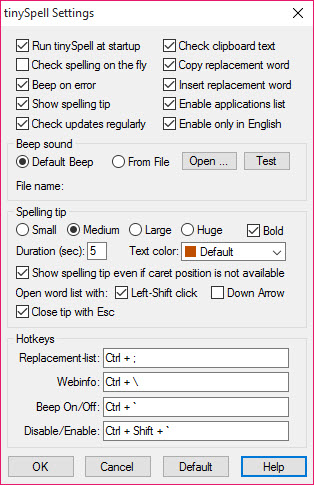
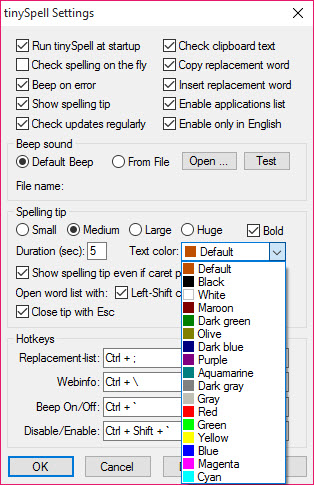
The check runs on each word as you finish it. A misspelling produces the tray icon change and the tip near the cursor, a small floating label with the word and a hint, and the beep if enabled. The tip’s size and colours are adjustable, and it can be hidden when the program cannot find the cursor, which happens in some full-screen applications.
The beep can be any sound file, and the advice from long-term users is to pick a short, distinctive one rather than the system default, which most people switch off within an hour.
Left-click with Shift, the down arrow or the hotkey opens the suggestions list, and a right-click with Shift or the F12 key replaces the word with the first suggestion instantly. The replacement is inserted into the document, or copied to the clipboard where the program in front does not cooperate.
The dictionary and what you teach it
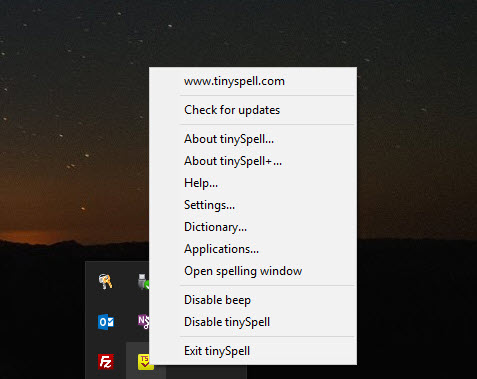
The bundled dictionary is American English with more than a hundred thousand words. Any word can be added to a private dictionary from the tray menu or the tip, so a name or a piece of jargon stops being flagged after the first time.
A Learn mode records the corrections you choose and offers them first next time, and an auto-replace list fixes habitual typos without asking. The plus edition loads additional dictionaries in the same format an office suite uses, so a second language can run alongside.
There is no grammar checking and no context. A real word in the wrong place passes, and a correctly spelt name that is not in the dictionary is flagged until you add it. tinySpell is a spelling checker in the literal sense, and it is accurate at that and silent about everything else.
Excluding the programs that should be left alone
The feature that makes the program liveable is the application list. Add a program by process or window name and tinySpell ignores it, so a code editor full of variable names, a terminal and a browser that already checks spelling stop triggering the beep.
The list can work the other way too, enabling the check only in the programs you name. Password fields in the major browsers are ignored automatically, so a strong password is not flagged and, more to the point, not shown in a tip.
Set that list up in the first ten minutes. Without it the program chimes at every URL and every filename, and most of the people who uninstall it in the first day never found the setting.
Clipboard checking and the lookups
Copy any text and the clipboard checker lists every misspelt word in it with suggestions, and buttons to skip or replace each one work through them. It is the way to proofread something somebody else wrote. From the same panel a word can be sent to an online dictionary, thesaurus, encyclopedia or search engine, with the addresses editable so your preferred references are a click away.
A hotkey switches the whole thing off when a burst of deliberate nonsense is about to be typed.
Conclusion
tinySpell is for anyone who types into programs that never learned to check spelling, which covers plain editors, terminals and half the forms on the web. They want one checker for all of them rather than none. Set the exclusions, change the beep and add your jargon, and it becomes a quiet second pair of eyes.
Anyone who wants grammar, style or a second language without paying for the plus edition should look at the larger writing assistants. This one checks spelling everywhere and stops there.
Pros & Cons
- Checks spelling as you type in any program, with a tip and an optional sound
- Suggestions on a hotkey with one-key replacement
- Clipboard checker for text from anywhere
- Private dictionary, learn mode and auto-replace
- Per-application exclusions and automatic password field skipping
- Flags URLs and filenames and jargon until excluded or taught
- No grammar or context checking
- Only American English in the standard edition
- Default beep wears thin quickly
Frequently asked questions
Open the applications list from the tray menu and add the editor by process or window name. The program then ignores everything typed there while checking everywhere else.
The standard edition includes American English only. The plus edition loads additional dictionaries in the common office dictionary format and can run more than one at once.
The program in front does not accept inserted text through the usual method. The correction is copied instead, and pasting it over the misspelt word finishes the fix.


