

Syncplay
About Syncplay
Watching a film with somebody in another city usually means counting down over a phone call and then discovering forty seconds later that one of you paused. Syncplay removes that entirely by putting everybody’s media player under the control of one shared clock.
The mechanism is worth understanding because it explains both the strengths and the one requirement people baulk at. It does not play video and it does not send any. Instead it drives a media player you already have installed, and a small server keeps track of where each person is, sending pause, unpause and seek commands to everybody when one of them acts.
The consequence is that nothing is transmitted except positions and messages, so quality never suffers and bandwidth is irrelevant. The requirement is that every person needs their own copy of the same file before you start.
It controls a player rather than replacing one
Four media players are supported, and the program launches whichever one you have configured, loads the file, and then issues instructions to it. Pausing on your machine pauses on everyone else’s within a moment, and somebody joining halfway through is dragged to the current position automatically rather than starting at the beginning.
VLC Media Player is the one most people already have and it works, so the quickest route to a first session is installing Syncplay and pointing it at that.
There is a reason to think harder about the choice though, which the next section covers, and it is the most consequential decision in setting this up.
The player you pick changes how it behaves
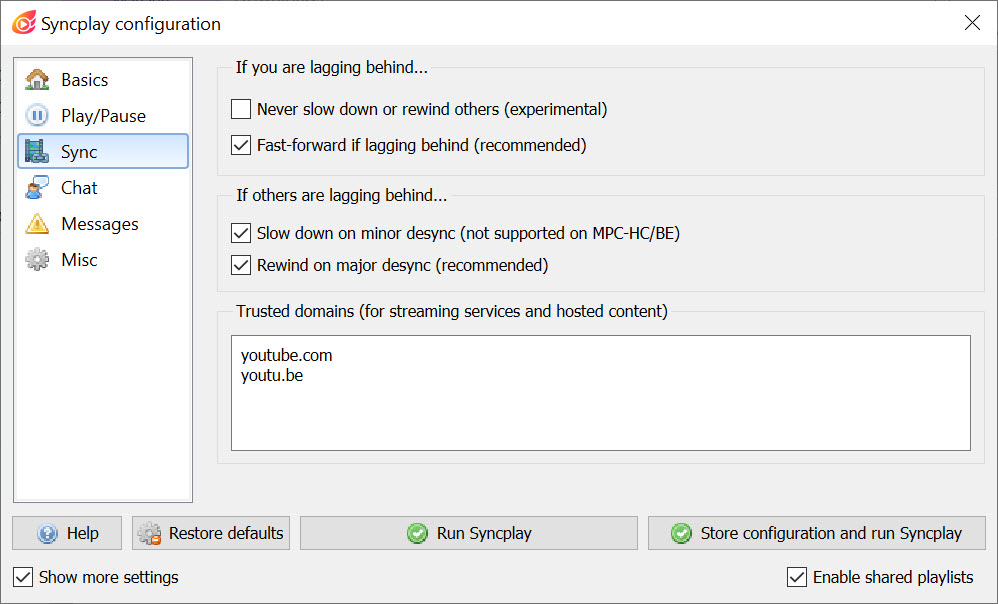
Desynchronisation is inevitable. Somebody’s connection hiccups, somebody’s machine stutters, and after twenty minutes two people are four seconds apart. How that gets fixed depends on which player you chose.
The gentle correction is a temporary reduction in playback rate, so the person ahead drifts back into line without anybody noticing. That behaviour is not available in one of the supported players at all, and in another it works well enough that the maker’s own guidance describes it as far better than the alternative.
The alternative is rewinding, which jumps you backwards to catch up and is exactly as disruptive as it sounds during a quiet scene. There is also a forward jump for anyone lagging behind. In a room with a designated operator, all three act relative to that person rather than to whoever is furthest ahead.
Syncplay also pauses automatically when somebody disconnects or leaves, which prevents two people carrying on while the third reconnects to find they have missed a scene.
A player with deeper integration than the mainstream choice supports the smooth correction and can draw the room chat over the video itself, so nobody has to alt-tab to a separate window to comment.
If you would rather stay with a familiar interface, a codec pack bundling another of the supported players covers that option.
Rooms, servers and who sees what
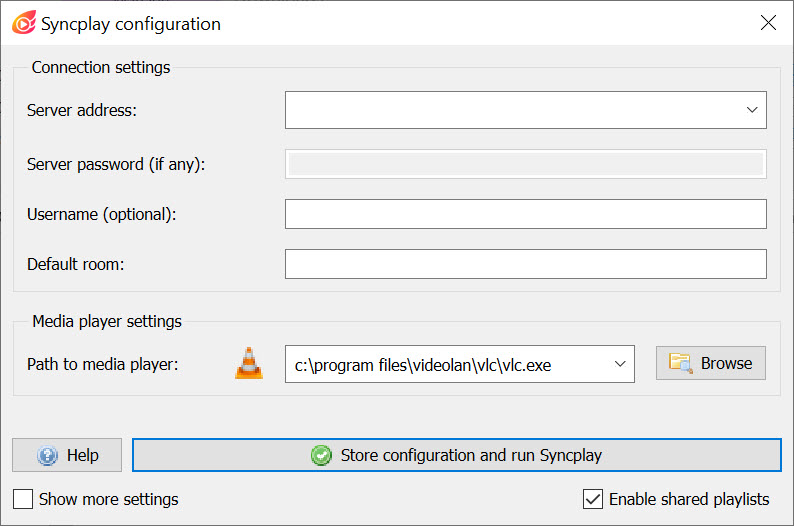
Syncplay sessions happen in named rooms on a server. Public servers exist and work fine for a couple of friends, or you can run your own, with a password if you want it closed.
Room isolation means only people in your room receive your playback state. What gets sent is position, play state and the commands you issue, which incidentally reveals something about your latency to the others in the room. On a public server that is a small consideration rather than a serious exposure, and it is honest to know it happens.
Some servers keep rooms persistent, retaining the playlist between sessions, and appending a marker to the room name creates a temporary one instead when you would rather nothing was remembered.
Readiness and the shared queue
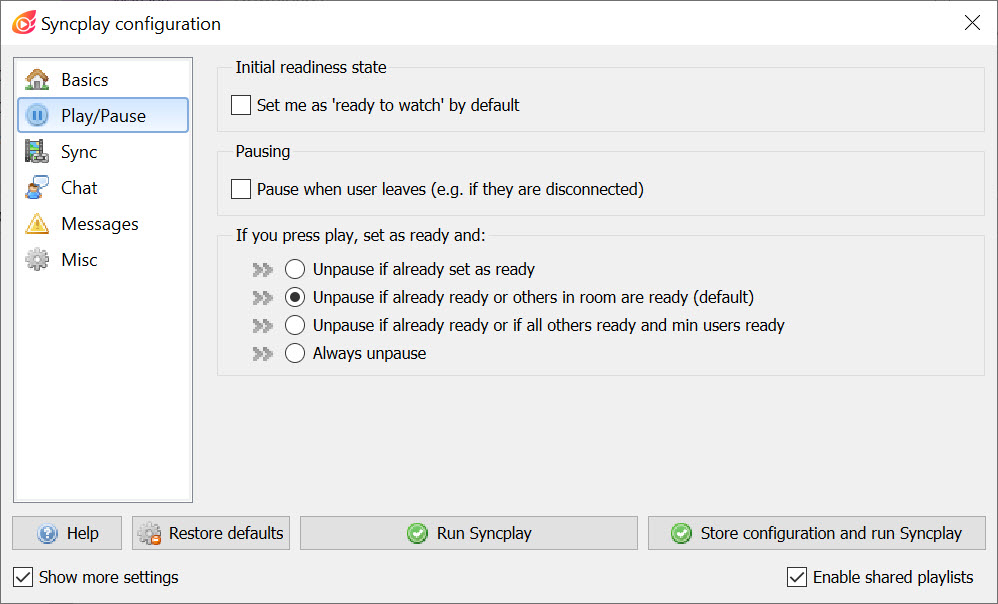
Nobody starts a film at the same moment, so Syncplay has readiness indicators. Each person marks themselves ready, and an automatic start counts down from three once everybody is, with a minimum number of people required before it triggers. What happens when a person who is not marked ready presses play is configurable, which sounds fussy until somebody unpauses a film for four other people while fetching a drink.
The shared playlist lets anyone add a file to a joint queue, and reaching the end of one file loads the next and rewinds it for everybody. That turns a series night into something that runs itself.
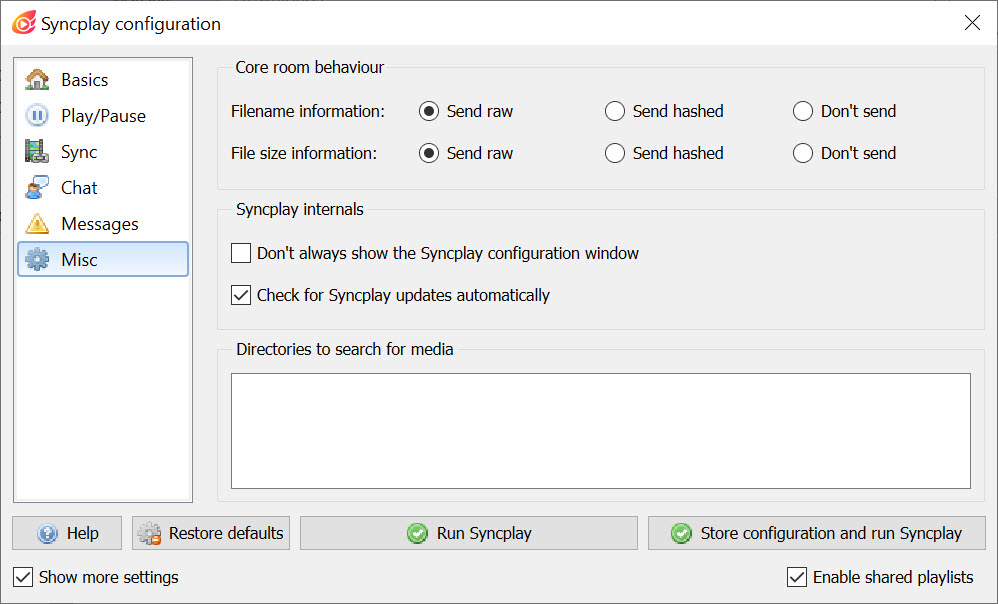
Setting it up needs two things. You nominate the directories it should search for the files people add, and the maker’s guidance warns against pointing it at a folder containing an enormous number of files, because scanning takes too long. A trusted domains list controls which websites it may ask the player to open, which stops a room member sending everybody somewhere unexpected.
What stays individual
Not everything is shared, and this catches people out. Audio track and subtitle selection remain personal choices on each machine, so one person watching with subtitles and another without is perfectly possible, and equally a subtitle file that is out of step is your problem rather than the room’s.
Fixing that before the session is quicker than discovering it during, and Subtitle Edit corrects timing in a couple of minutes.
Voice is the other thing this does not provide. Text chat exists in the room and works, and most groups run Discord alongside it for talking, because commenting on a film by typing is not the same experience at all.
Conclusion
Syncplay solves the remote film night properly rather than approximately. Positions stay locked, latecomers catch up by themselves, somebody dropping out pauses everybody, and the smooth resynchronisation on a capable player means the correction happens without anyone noticing it happened.
The requirement is the part to settle first. Everybody needs the same file in advance, which makes this a tool for organised groups rather than spontaneous viewing, and it rules out anything you were planning to watch from a subscription service.
Agree the file, pick the player that supports the gentle correction, open a voice channel alongside, and it works better than any service built for the same purpose.
Pros & Cons
- Nothing is transmitted but positions and messages, so playback quality is unaffected
- Latecomers are pulled to the current position automatically rather than starting over
- Three desync strategies, including a smooth slowdown that nobody notices
- Automatic pause when somebody disconnects or leaves the room
- Readiness indicators with an automatic countdown once everybody is ready
- Shared playlist advances to the next file for everybody at the end of one
- Public servers are available, and a private password-protected one can be run instead
- Every participant needs their own copy of the same file before starting
- Only four media players are supported, with different capabilities between them
- The smooth slowdown correction is unavailable in one of those players
- Audio and subtitle track choices stay individual and can differ between viewers
- No voice chat, so a separate application is needed for talking
- Playback state sent to the room reveals something about your connection latency
Frequently asked questions
No. It sends only playback positions and commands, and each person's own copy of the file plays locally. That is why quality is unaffected and why everybody has to have the file already.
Four are supported, and the choice matters more than it appears because the desync correction options differ between them. The smooth playback slowdown is unavailable in one and works particularly well in another.
Depending on the settings, their player slows down briefly to drift back into line, rewinds to catch up, or jumps forward. In a room with a designated operator, those corrections apply relative to that person.
No, public servers are available and adequate for a small group. Running your own makes sense when you want a password-protected room or would rather nothing about your session touched somebody else's machine.
No, those stay individual. Each viewer picks their own tracks, so one person can watch with subtitles while another does not, and a subtitle file with wrong timing is fixed on that machine alone.


