

k2pdfopt
About k2pdfopt
k2pdfopt reflows PDF and DJVU files to fit small screens, taking a document originally laid out for letter or A4 pages and reshaping it for a Kindle, Kobo, or phone display. The problem it solves is older than e-readers themselves: academic papers, technical manuals, and scanned books are designed for paper, and shrinking them to a 6-inch screen produces text small enough to require constant zooming and panning.
k2pdfopt rebuilds the page layout instead, detecting columns, splitting them, reordering content into a single reading flow, and outputting a new PDF sized correctly for the target device.
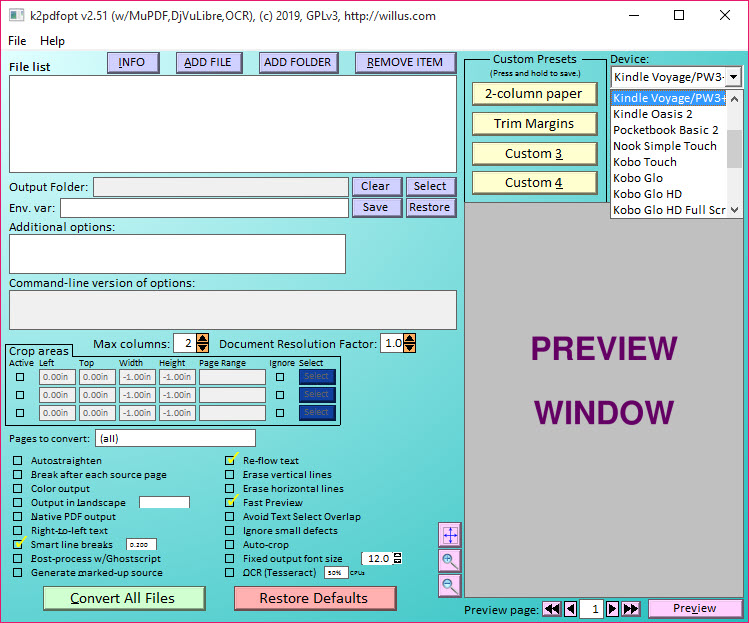
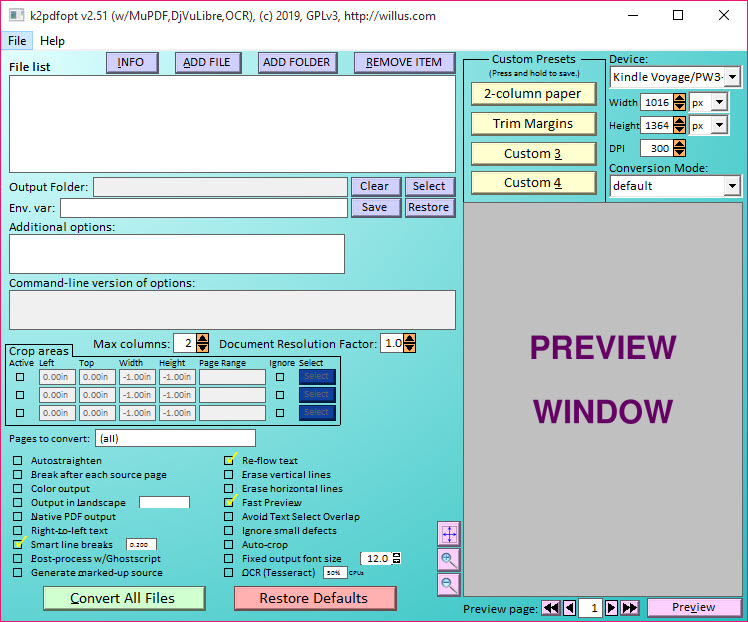
The application started as a command-line tool and has stayed close to those roots. A basic graphical wrapper exists for users who prefer not to touch a terminal, but the real power lives in the command-line flags. Hundreds of options control how text gets detected, how columns get split, how figures and equations get handled, and how aggressive the reflow should be on a given page.
The default settings work surprisingly well for most academic PDFs, and the advanced flags exist for cases where they don’t.
Column detection and text reflow
This is the core mechanism. A scientific paper laid out in two columns at A4 size produces tiny, unreadable text on an e-reader screen. k2pdfopt analyzes each page, identifies where the columns are, splits them, and outputs them in correct reading order on the smaller device. The detection algorithm uses whitespace gaps, line alignment, and text density to figure out the layout, and it gets most academic and technical PDFs right without intervention.
For documents with mixed layouts (single column for the abstract, double column for the body, full-width tables and figures), the application handles transitions automatically in most cases. Tables stay intact rather than getting chopped column-by-column. Figures get scaled to fit the target screen width and inserted at appropriate breakpoints rather than getting orphaned at column boundaries.
The reflow can go further. With -mode set to fp (fitted page) the tool keeps the original page layout but crops aggressively to remove margins. With -mode copy it produces a copy with no changes. With -mode 2col it forces two-column treatment.
The defaults pick a sensible mode automatically based on what the document looks like, but knowing the mode flags exist saves time on edge cases.
Equations, figures, and scientific content
Scientific PDFs are where most reflow tools fail and where k2pdfopt earns its reputation. Mathematical equations inline with text get treated as image regions and preserved intact rather than getting broken across lines. Inline figures stay aligned with their captions. Vector graphics survive the conversion in most cases, though raster-only scanned diagrams sometimes look soft after rescaling.
The application detects equation regions specifically through height-and-density heuristics, treating them differently from plain text paragraphs. This matters because the alternative (treating every line as text and reflowing it) destroys mathematical notation. For a physicist or mathematician trying to read papers on a Kindle, this single feature is often the reason to use this over any other reflow approach.
Pair it with Calibre for managing the resulting library on a personal e-reader, and the workflow stays clean.
OCR for scanned PDFs
Scanned documents (the kind that look like pictures of pages rather than searchable text) require OCR before any reflow can work. The application includes built-in OCR through Tesseract integration, so a scanned book can be processed end-to-end in a single pass: detect text regions, OCR them, reflow the recognized text, output a screen-fitted PDF with selectable text.
The OCR quality depends on the scan quality. Clean 300 DPI scans of modern typeset books produce excellent results. Old microfiche reproductions, library scans with shadow gradients, and badly skewed pages produce mixed results that may need cleanup in a tool like NAPS2 before the reflow step.
For documents that started as proper digital PDFs with embedded text, OCR isn’t needed and the reflow happens directly on the existing text layer.
Output sizing and device profiles
Output dimensions match common e-reader screen sizes by default. The -dev flag accepts profile names for popular devices (Kindle models, Kobo readers, generic small-screen targets) and adjusts page dimensions, DPI, and target font size to match. Custom dimensions through -w and -h cover devices not in the built-in list, which matters for users with phones, tablets, or less common e-readers.
The font size control is more nuanced than a single number. You can target a specific character height in pixels, a specific number of lines per page, or let the application pick based on the original document’s text size and the target screen.
For users who want consistent reading experience across a library of documents converted at different times, locking the font height in pixels produces predictable results.
Conclusion
k2pdfopt sits in a narrow niche and does the work in that niche better than the alternatives. The target audience is anyone who reads PDFs on small screens, especially academics, students, and engineers dealing with two-column papers and scanned reference material on a Kindle or Kobo. The OCR-plus-reflow combination in a single tool, with equation handling that actually works, justifies the command-line learning curve for users who’d otherwise be stuck pinch-zooming through PDFs page by page.
It’s the wrong choice for users who want EPUB or MOBI output, for casual readers who only occasionally need to view a PDF on a small screen, or for anyone whose tolerance for command-line tools is zero.
For everyone else who reads serious technical material away from a desktop, the application turns an awkward reading experience into a comfortable one.
Pros & Cons
- Column detection and text reflow handles academic and technical PDFs better than most alternatives
- Equation and figure preservation keeps scientific notation intact through the conversion
- Built-in OCR through Tesseract handles scanned documents in a single processing pass
- Device profiles for common e-readers eliminate guesswork about output dimensions
- Command-line interface enables batch processing of large document libraries
- Free and actively maintained with a long track record in the e-reader community
- Command-line interface intimidates users who expect a polished GUI
- OCR quality on poor scans falls short of dedicated paid tools
- Processing time on large scanned documents can be substantial
- The graphical wrapper feels minimal compared to the depth of options available
- Output PDFs can lose subtle typography quirks present in the original layout
Frequently asked questions
It reformats PDF and DJVU files for small screens by detecting columns, splitting them, and reflowing the content into a layout that fits e-readers, phones, or tablets. The result is a new PDF sized correctly for the target device.
Yes. The column detection and equation handling make the application especially useful for technical and scientific PDFs, where most simpler reflow tools fail to preserve mathematical notation and figure layout.
Yes, with built-in OCR through Tesseract. Clean 300 DPI scans produce reliable results. Poor-quality scans may need cleanup before the reflow step.
No. The tool outputs PDF files sized for small screens, not EPUB or MOBI. For format conversion to true reflowable e-book formats, a dedicated converter is the right approach.
The built-in device profiles cover common Kindle and Kobo models. Custom dimensions through command-line flags handle any other screen size, including phones and tablets.
Yes. A basic graphical wrapper exists for users who prefer not to use a command-line interface. The terminal version exposes more options and runs faster on batch jobs.
Internal hyperlinks and the document outline are preserved in most cases. External hyperlinks may break depending on how the source document encoded them.


