

K-Lite Codec Pack Full

 (37 votes, average: 3.97 out of 5)
About K-Lite Codec Pack Full
If you’ve ever opened a video file only to be greeted by an error message about missing codecs, or watched what should be a normal movie play with no sound while the image stutters, you’ve experienced the strange world of media format support on Windows. D
ifferent video files use different containers and different codecs, and the codecs your system happens to have installed determine what plays smoothly versus what refuses to cooperate. K-Lite Codec Pack Full is the long-running solution to this fragmentation, bundling essentially every codec and component needed to play virtually any audio or video file you might encounter.
Maintained for over two decades by Codec Guide, this software has earned its reputation as the standard codec collection for Windows. The Full variant specifically targets power users and people who want to do their own video work, sitting between the simpler Standard edition and the kitchen-sink Mega edition.
For most users who want comprehensive playback plus the high-quality rendering options that distinguish serious media setups from casual ones, this is the variant that hits the right balance.
Where Full sits in the K-Lite lineup
The codec pack comes in four variants, and understanding the differences matters for choosing the right one. Basic includes only the essential LAV Filters decoders for common formats like AVI, MKV, MP4, and WebM, without bundling a media player.
Standard adds Media Player Classic Home Cinema (MPC-HC) and MediaInfo Lite to the Basic foundation, which is enough for the 95% of users who just want videos to play.
K-Lite Codec Pack Full builds on Standard by adding components that matter for users who care about video quality and unusual formats. The most notable addition is madVR (the advanced video renderer), along with DC-Bass Source Mod for high-quality audio decoding and plugins for 3D video decoding. The fourth variant, Mega, layers on additional VFW/ACM codecs that video editors need, including x264VFW, Lagarith, and ffdshow.
For users who watch a lot of video content and want the best possible quality without doing video editing work, the Full edition is typically the right choice. For users who edit video, Mega adds the encoder-side components that editing workflows require.
madVR and what advanced rendering actually does
The headline feature that distinguishes Full is the inclusion of madVR (madshi Video Renderer), an alternative video renderer that handles the final stage of getting decoded video onto your screen. Default Windows renderers do this job adequately, but madVR does it dramatically better through superior scaling algorithms, more accurate color management, and processing options that mainstream rendering pipelines don’t offer.
The practical difference shows up most clearly when you’re upscaling lower-resolution video to a high-resolution display. Watching 1080p content on a 4K display through the default renderer looks acceptable, while the same content through madVR with appropriate settings can look noticeably sharper and cleaner. The same applies to color handling on calibrated displays, where madVR’s processing produces more accurate output than typical alternatives.
For users who care about getting the best from their display hardware, this single component justifies choosing Full over Standard. For users on basic monitors who don’t notice or care about upscaling quality differences, the Standard edition’s simpler renderer is genuinely sufficient.
LAV Filters as the decoding foundation
Underneath the rendering layer, the actual work of decoding video and audio streams falls to LAV Filters, which are included in all variants of the codec pack. This open-source decoder set handles essentially every modern format including H.264, H.265 (HEVC), AV1, VP9, and dozens of less common codecs.
The LAV Filters benefit from active development that keeps up with new formats as they emerge. AV1 support, for instance, came relatively quickly after the format gained traction, ensuring the codec pack stays current with the formats users actually encounter on streaming services and modern content sources.
For users who occasionally encounter exotic file formats from older sources or specialized applications, the comprehensive format coverage means you rarely run into the “this file format isn’t supported” error that simpler codec setups produce.
Hardware acceleration for efficient playback
A practical consideration for video playback is CPU usage, particularly on laptops where high CPU usage means short battery life and noisy fans. The codec pack configures hardware acceleration through your GPU’s video decoding capabilities, offloading the decoding work from the CPU to dedicated video hardware that does it more efficiently.
The configuration handles different GPU types automatically, including NVIDIA’s NVDEC, AMD’s UVD, and Intel’s Quick Sync. For most modern systems, this hardware acceleration runs by default, and you only see CPU-based decoding in cases where the format isn’t supported by the GPU’s hardware decoder.
For users on older hardware or systems with limited GPU capability, the codec pack falls back gracefully to software decoding, which still works but uses more CPU resources. The flexibility means the pack works across a wide range of hardware rather than requiring specific GPU capabilities.
3D video and specialized decoding
Less commonly relevant but valuable for the audience that needs them, the Full edition includes plugins for H.264 MVC 3D video decoding. While 3D content has largely faded from mainstream relevance, users with 3D video collections from earlier eras need specific decoder support to play those files properly.
The 3D decoding capability is one of those features you don’t think about until you need it, at which point the lack of broader codec support in simpler tools becomes immediately apparent. For users with even occasional 3D content needs, Full includes what’s needed.
Codec Tweak Tool for ongoing maintenance
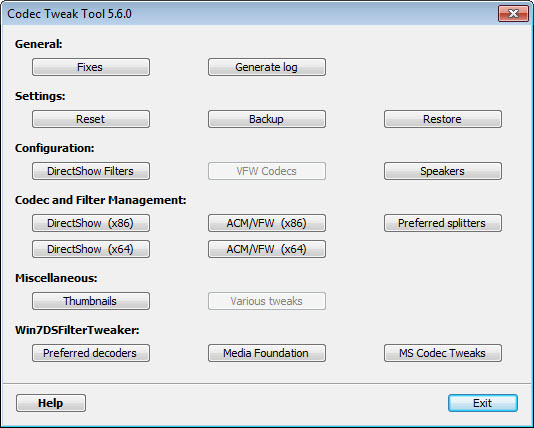
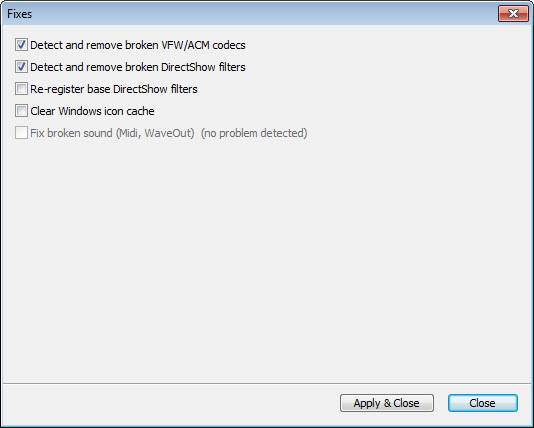
A particularly useful component bundled with the pack is the Codec Tweak Tool, which provides a way to manage and repair the codec configuration on your system. After years of installing and uninstalling various media-related software, codec configurations can become tangled in ways that cause playback problems even when individual codecs are correctly installed.
The tweak tool detects broken or conflicting registrations, identifies orphaned codec entries, and provides repair options for common issues. For users who occasionally find that their media playback has stopped working correctly without obvious cause, this maintenance tool is often the fastest route back to a working state.
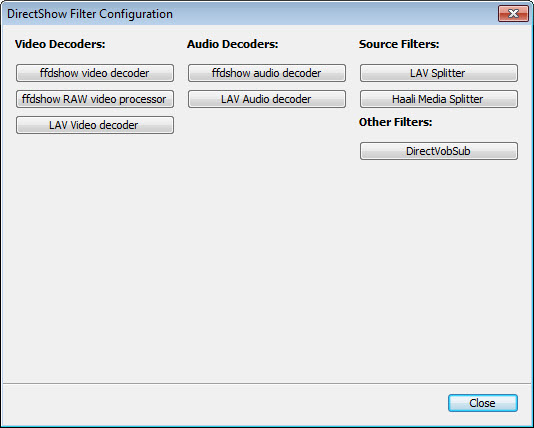
It also includes options for fine-tuning which codecs handle specific file types, useful for users with strong preferences about decoder selection or for resolving conflicts when multiple codec packs have been installed over time.
Thumbnail support in Windows Explorer
A small but appreciated detail is that the codec pack enables Windows Explorer to show thumbnails for all popular video formats, including formats that Windows by default doesn’t generate previews for.
For users browsing video collections through file explorer rather than dedicated media management software, having thumbnails for every video file makes navigation significantly easier.
This works through shell extensions that let Windows generate previews using the same decoders that handle playback, ensuring that thumbnail generation succeeds for any format the codec pack can decode.
MPC-HC as the bundled player
The included media player, Media Player Classic Home Cinema (MPC-HC), is itself a notable component. This lightweight player has been around for many years and remains popular among users who want capable playback without the bloat that affects larger media centers. It supports essentially every format the codec pack handles, includes useful features like subtitle support and playback speed adjustment, and uses minimal system resources.
Users who prefer alternative players like VLC or PotPlayer can use those instead, since the codec pack provides system-wide decoder support that benefits any player that uses standard Windows codec interfaces.
The bundled MPC-HC is convenient for users who don’t have a strong preference but functions equally well as one of several options.
Conclusion
K-Lite Codec Pack Full has earned its long-standing reputation as the comprehensive codec solution for users who want to handle essentially any media format that Windows might encounter. The combination of LAV Filters for decoding, madVR for rendering, hardware acceleration support, and the Codec Tweak Tool for maintenance addresses the full lifecycle of media playback on a Windows system.
It’s not the right choice for users who just want to play videos with minimal setup, where standalone players like VLC accomplish the same basic goal without system-level codec installation.
But for users who want better playback quality, broader format support, and the flexibility to use any media player with consistent codec support behind it, K-Lite Codec Pack Full delivers exactly what its long history suggests it should.
Pros & Cons
- Comprehensive codec coverage handles essentially any audio or video format
- madVR renderer significantly improves playback quality on quality displays
- LAV Filters provide modern format support including HEVC and AV1
- Hardware acceleration reduces CPU usage and extends battery life on laptops
- Codec Tweak Tool helps maintain and repair codec configurations over time
- Bundled MPC-HC player provides immediate playback capability after installation
- Thumbnail support in Windows Explorer for all common video formats
- Long-running active development keeps support current with new formats
- Better choice than Mega for users who don't do video encoding work
- More complex installation than codec-free media players like VLC
- madVR requires configuration to get the best results from advanced features
- Some interactions between codec packs can cause conflicts on systems with prior installations
- Standard edition is genuinely sufficient for users who don't care about advanced rendering
- Installation defaults occasionally enable components most users won't use
Frequently asked questions
The Full edition contains all the components from the Standard edition (LAV Filters, MPC-HC, MediaInfo Lite) plus advanced additions including the madVR video renderer, DC-Bass Source Mod for high-quality audio, and plugins for 3D video decoding. It's intended for users who want better playback quality and broader format support than basic codec setups provide.
Mega adds VFW/ACM codecs that are mainly useful for video editing workflows including x264VFW, Lagarith, and ffdshow. If you don't edit or encode video yourself, the additional Mega components offer no practical benefit. For most users wanting comprehensive playback, Full provides the right balance without the editing-focused extras.
madVR (madshi Video Renderer) is an advanced video renderer that handles the final stage of displaying decoded video on your screen. It uses better scaling algorithms and color management than default Windows renderers, producing noticeably sharper image quality especially when upscaling lower-resolution content to high-resolution displays. The improvement is most visible on quality monitors and TVs.
Yes, the codec pack provides system-wide decoder support that benefits any media player using standard Windows codec interfaces. Players like VLC, PotPlayer, and others can use the installed codecs alongside or instead of their own bundled decoders. The included MPC-HC player is just one option among many that can take advantage of the codecs.
VLC and similar players bundle their own codecs internally, working independently from system codec configuration. Codec packs install codecs at the system level, benefiting any player that uses Windows codec interfaces. Each approach has merits, with codec packs providing broader compatibility across applications while bundled-codec players avoid potential conflicts with other software.
The Codec Tweak Tool included with the pack can detect and repair codec conflicts that arise from accumulated installations of various media software. Running the tool's diagnostic scan identifies issues, and the repair options resolve most common conflicts automatically. For persistent problems, the tool also provides manual configuration options.
Yes, the codec pack enables Windows Explorer to show thumbnails for all popular video formats, including formats Windows doesn't preview by default. Browsing video collections through file explorer becomes significantly more practical when every file shows a thumbnail rather than just generic icons.
Yes, the codec pack configures hardware acceleration through GPU-based video decoding using NVIDIA NVDEC, AMD UVD, or Intel Quick Sync depending on your hardware. This reduces CPU usage during playback and extends battery life on laptops. The configuration runs automatically with appropriate fallbacks to software decoding when hardware support isn't available for specific formats.
Codec packs occasionally interact unexpectedly with previously installed software, causing temporary playback issues. The Codec Tweak Tool resolves most of these problems through its repair functions. For more serious cases, completely uninstalling all codec-related software and starting fresh with this pack typically restores normal operation.


