

Gopher360


 (20 votes, average: 3.60 out of 5)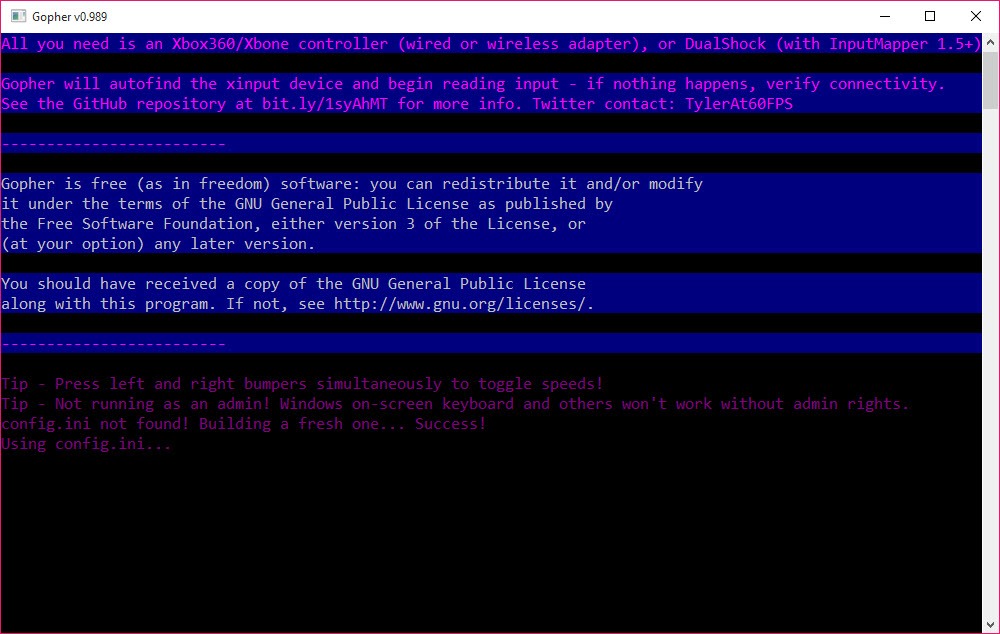
About Gopher360
Gopher360 is a lightweight utility that makes it easy to control your computer with a game controller. If you want to turn your Xbox or PlayStation controller into a mouse and keyboard, this tool gives you a straightforward way to do it.
Gamers and home theater enthusiasts can navigate, click, and even type directly from their gamepad.
Effortless Setup and Direct Control
Setting up Gopher360 is as simple as launching the standalone executable and connecting your supported controller. The tool requires no installation and recognizes most Xbox, PlayStation, and generic USB gamepads instantly.
You use the gamepad’s analog sticks to move the mouse pointer, and the buttons are mapped to left and right mouse clicks or keyboard events. Some controls can also be remapped, letting you tailor the experience to your needs.
This approach makes it practical for gaming setups, media centers, or any situation where using a mouse and keyboard is less convenient. The default control scheme covers all basic actions, so you can browse, launch apps, or even type with the on-screen keyboard.
Command Line Interface and Usage Experience
Unlike many utilities, Gopher360 does not feature a standard graphical user interface. Instead, it runs from the command line. When you launch the program, a window appears with status information, including whether it is running with or without Administrator rights. This design keeps the software lightweight and easy to run on any system.
While it lacks a full visual interface, all essential details are clearly displayed at startup, and control assignments are well-documented in the project’s online resources. For those who want to adjust their setup, control remapping can be done through configuration.
Ideal for Accessibility and Media Centers
Controlling your PC with a gamepad using Gopher360 is simple and effective. For home theater environments or users with limited mobility, this software makes Windows navigation accessible from the couch.
Its minimal system requirements also mean it runs smoothly on older computers or compact media center PCs.
Conclusion
Gopher360 offers a straightforward and reliable way to turn your favorite gamepad into a mouse and keyboard. Its lightweight, portable nature and intuitive controls make it a top choice for media center users, those seeking alternative input devices, or anyone wanting to navigate their PC from the comfort of a controller.
With no installation and minimal setup, Gopher360 is an accessible solution for simple, effective controller-based computing.
Pros & Cons
- Transforms Xbox, PlayStation, or generic controllers into mouse and keyboard input for Windows.
- No installation required, just run the executable.
- Analog sticks and buttons map to mouse and keyboard events for intuitive control.
- Lightweight design with no impact on system performance.
- Command line interface displays relevant information on launch.
- Remapping is possible for select controls.
- Works well for home theaters, gaming PCs, or as an accessibility tool.
- No standard graphical user interface, only command line feedback.
- Limited advanced remapping and customization compared to some alternatives.
- Some controllers may need additional drivers or tweaks for full compatibility.
- Primarily focused on basic mouse and keyboard emulation.
Frequently asked questions
Yes, you can use analog sticks to move the pointer and buttons for mouse clicks and keyboard commands.
Some control remapping is supported, allowing for customized input.
Most Xbox, PlayStation, and many USB gamepads are recognized out of the box.


