

Express Scribe


About Express Scribe
Express Scribe is an audio player built for one job, typing out what someone said. It plays recordings at any speed without turning voices into chipmunks, obeys a foot pedal or system-wide hotkeys so your hands never leave the keyboard, and sits underneath your word processor rather than replacing it. Load an interview, press play with your foot, type in your own document, and tap rewind whenever you miss a word.
That division of labour is the whole design. A general media player makes you reach for the mouse every few seconds, which is why transcribing an hour of audio with one takes most of a day. Here the pedal or the keyboard does the stopping and backstepping.
The typing happens in whatever program you already write in. Transcribers and journalists, researchers and legal typists have used it for exactly that reason for years.
Playback shaped around typing
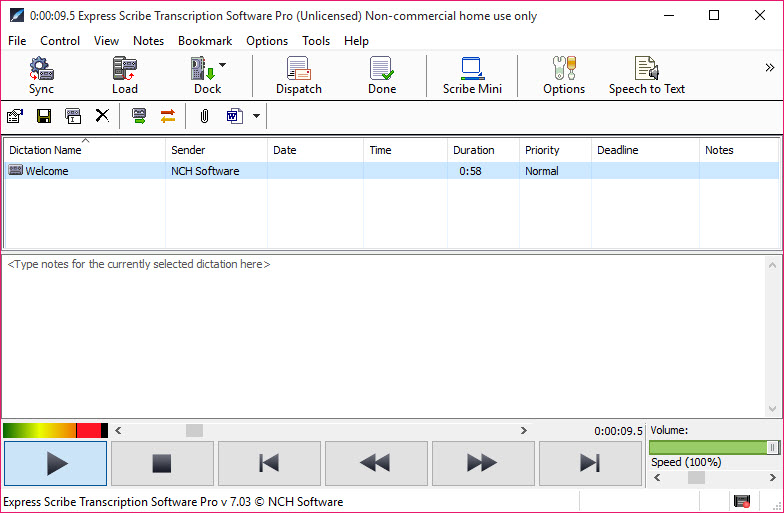
Variable speed playback in Express Scribe keeps the pitch constant, so a fast talker slowed to 70 percent still sounds like a person rather than a tape dragging. Speed and position sit on sliders in the main window, and a backstep setting automatically rewinds a second or two every time you pause, so the phrase you were halfway through comes back without a deliberate rewind.
Audio processing helps with bad recordings. Background noise reduction, a high-pass filter to cut hum and rumble, and extra volume boost can be applied on the fly, which makes a phone interview recorded in a café far easier to follow.
Multi-channel control lets you isolate one side of a stereo recording when each speaker was captured on a separate channel. Recordings in a container the player refuses, such as an unusual video format, can be converted to plain audio first with a general media player that also converts.
Pedals and hotkeys
A USB foot pedal plugs in and maps its switches to play and rewind, leaving both hands typing. The hotkeys do the same from the keyboard, and because they are system-wide, they keep working while a word processor has the focus. Express Scribe stays in the background, often in its mini mode, a narrow strip that shows the file name and position and nothing else.
Pedal support splits by edition. A few standard pedals work in the basic edition, while the full range of professional controllers, including the dictation microphones with built-in buttons, belongs to the top edition.
Check your pedal against the supported list before buying one, since a pedal that works as a generic keyboard device will often work regardless.
Formats, dictation files and video
Everyday formats such as MP3, WAV, WMA, M4A and encrypted DCT dictation files play in every edition. The proprietary dictation formats from handheld recorders, DSS and DS2 among them, require the top edition, as does video playback, which matters for transcribing lectures or depositions recorded on camera. Audio CDs load directly and can be worked on while they are still being read.
Portable voice recorders can be docked to pull their recordings into the file list automatically. Dozens of files can be loaded at once and worked through in order, each remembering its own position, which suits a batch of interviews or a week of meeting recordings.
Recordings that need editing rather than transcribing, such as cutting a long silence or splitting a file, belong in an audio editor first.
Automatic loading and sending
For people who transcribe for others, the file management features replace a lot of email juggling. Express Scribe can watch a local folder, a network share, an FTP server or an email account and load new dictations as they arrive. When the typing is done, the finished document can be sent back to whoever dictated it with one command, which closes the loop without opening a mail client.
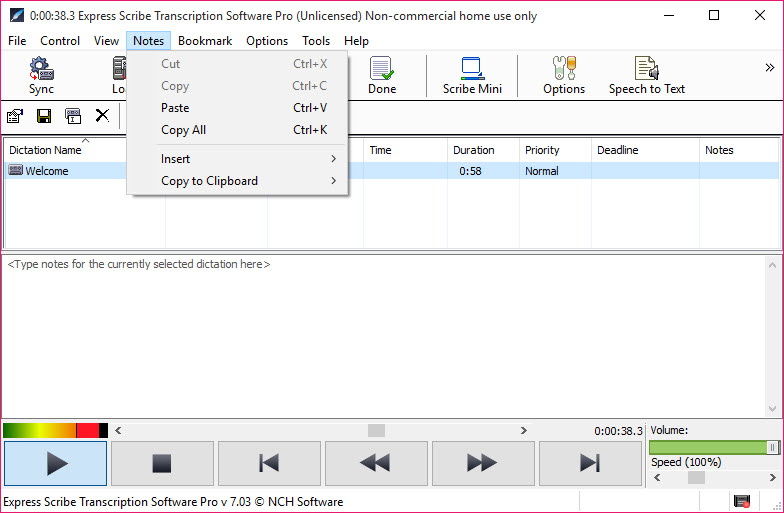
Notes attached to each dictation carry instructions from the speaker, and a timestamp can be inserted into the transcript to mark where in the recording a passage sits.
That last feature is what researchers coding interviews rely on, since a transcript with timestamps can be checked against the audio months later.
Typing in Word, or in its own window
Most people type into their usual word processor with the player underneath, and the hotkeys make that natural. A built-in notes window exists as well, which keeps the transcript next to the player for short jobs, and the program works with speech recognition engines that produce a rough draft for correction. The draft from those engines is rarely good enough to use as is, but correcting a draft is faster than typing from nothing.
Two things to expect. The installer offers other programs from the same software family during setup, so read each screen and decline what you do not want. And the interface looks dated, with small icons and a layout that has not changed much, which is forgivable in a program that is meant to sit out of sight under a full office suite while you work.
Conclusion
Express Scribe suits anyone who turns recordings into text, from a student with three interviews to a transcription professional working through a queue of dictations from clients. Constant-pitch slow playback and pedal control, plus automatic file loading, remove most of the friction from the job.
The format and pedal limits of the basic edition and the bundled offers in the installer are the irritations, and the interface shows its age. As a transcription player that stays out of the way of your typing, it remains the standard choice.
Pros & Cons
- Variable speed playback with constant pitch and automatic backstep on pause
- Foot pedal and system-wide hotkeys keep both hands on the keyboard
- Noise reduction, high-pass filter and channel isolation for poor recordings
- Loads dictations automatically from folders, FTP or email and sends transcripts back
- Dozens of files queued at once, each remembering its position
- Timestamps and dictation notes support research and legal work
- Proprietary dictation formats and most professional pedals need the top edition
- Installer offers unrelated programs during setup
- Dated interface
Frequently asked questions
Yes. USB pedals map to play, rewind and fast forward. Some standard pedals work in every edition, while professional controllers and dictation microphones need the top edition.
Yes. The hotkeys are system-wide, so playback responds while your word processor has the focus, and the player can shrink to a mini strip.
MP3, WAV, WMA, M4A and encrypted DCT files in every edition. Recorder formats such as DSS and DS2, and video files, require the top edition.
Yes. Variable speed playback keeps the pitch constant, so slowed speech stays natural and easy to follow.


