
Breakaway Audio Enhancer
About Breakaway Audio Enhancer
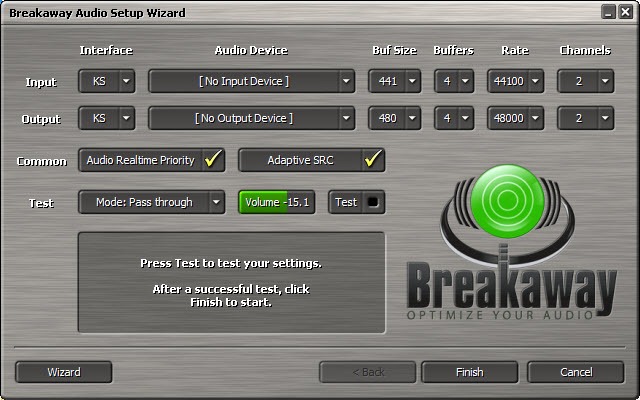
Radio stations sound consistent because everything they broadcast passes through a processor that evens it out. Breakaway Audio Enhancer applies that same treatment to everything a computer plays, so a quiet podcast and a loud advert arrive at roughly the same level without anybody touching the volume.
Breakaway Audio Enhancer sits between the applications and the sound device, so every source is covered rather than one player at a time. Nothing has to be configured per application.
What it does to the sound is specific enough to describe properly, and whether you want it is a matter of taste rather than quality.
What the processing actually does
The Breakaway Audio Enhancer technique is specific, and whether you want it is a matter of taste rather than quality.
Breakaway Audio Enhancer splits the audio into several frequency bands, between four and seven depending on the preset, and each band is examined and adjusted thousands of times a second. Quiet passages are raised, loud ones are held down, and look-ahead limiting catches peaks before they clip.
The result is that everything sits in a narrow loudness range. Nothing is ever too quiet to hear and nothing suddenly startles you.
That is precisely what broadcast processing is for, and it is why it sounds impressive immediately. Making everything louder and more even is the most reliable way to make a first impression.
The trade nobody mentions
Being honest about the other side, since Breakaway Audio Enhancer divides opinion sharply among people who care about audio.
Dynamic range is the difference between the quietest and loudest parts, and film soundtracks and classical recordings use it deliberately. A whisper before an explosion is the composer’s intention rather than a defect.
Compressing that range removes the intention along with the inconvenience. The explosion no longer startles, the whisper is no longer intimate, and everything arrives at a similar level because that is what you asked for.
So the honest framing is a choice rather than an improvement. On laptop speakers, in a noisy room, or late at night when the explosion would wake somebody, evening it out is exactly right. For attentive listening on decent equipment it removes something the recording was built around.
For adjusting the frequency balance rather than the dynamics, Equalizer APO applies system-wide equalisation without touching the loudness relationships.
Where it actually helps
Being specific about where Breakaway Audio Enhancer helps, rather than claiming general improvement.
Breakaway Audio Enhancer earns its place on laptop speakers, which have almost no bass and a limited output, so quiet detail disappears entirely. Raising those levels makes dialogue audible that would otherwise be lost, which is a real gain rather than a cosmetic one.
Mixed sources are the other case. Moving between a video site, a music service and a downloaded film normally means adjusting the volume at every switch, because each was mastered to a different level. Processing everything to a common level removes that entirely.
Late-night listening is the third. Keeping the loud parts controlled means the quiet parts can be loud enough to follow without the loud parts carrying through the house.
For a maintained tool covering much of this ground, a virtual mixing desk with its own processing and routing is where people go now.
Presets, and choosing between them
The Breakaway Audio Enhancer presets are not cosmetic, since each changes how many frequency bands the processing uses.
Lighter presets split the audio into fewer bands and intervene less, which suits material that was mastered well and needs only its levels evened out. Heavier ones use more bands and work harder, which suits difficult material and difficult listening conditions.
That is the control that matters most and the one people leave alone. Somebody who finds the effect too aggressive should reach for a lighter preset before concluding the whole approach is wrong, because the difference between presets is larger than the difference between this and no processing at all.
The metering shows its work
An unusual amount of the Breakaway Audio Enhancer window displays what is happening rather than offering controls.
Input and output levels, the gain reduction being applied in each band, and the limiting activity are all visible in real time. Watching a quiet passage being lifted and a loud one being held down makes the processing comprehensible rather than magical.
That matters more than it sounds for anybody deciding whether they want it. Hearing a difference and not knowing what produced it is how people end up arguing about audio software, and a meter showing four decibels of gain reduction on the low band settles the question.
The window itself resizes and docks, so the metering can sit somewhere visible or be reduced to something small once the settings are decided.
Sitting in the audio path
The architectural consequence, since it applies to anything working this way.
Everything the system plays passes through Breakaway Audio Enhancer, which is what makes it universal and also means it is always in the path. A problem with it is a problem with all sound rather than with one application.
Latency is the related consideration. Look-ahead processing needs to see slightly ahead of what it is playing, which introduces a delay. For music and film that is irrelevant, and for anything where you need sound to match an action closely it is not.
For routing particular applications to particular outputs rather than processing everything, Audio Router addresses that different problem.
Conclusion
Breakaway Audio Enhancer did something real rather than marketing, which was applying genuine broadcast processing to a computer’s entire output. On laptop speakers or in a noisy room it makes a difference nothing else matches, and the reason it sounds impressive is that evening everything out is the most immediately convincing thing you can do to audio.
Decide it on the processing rather than on the claim. Compressing dynamic range removes something recordings were built around, which is a preference rather than a fault, and the right answer depends entirely on where and how you listen. Try it on the material you actually play, in the room you actually play it in, and the trial will settle it faster than any description.
Pros & Cons
- Broadcast-style multiband processing applied to everything the system plays
- Quiet detail raised and loud peaks controlled, in real time
- Removes the need to adjust volume between different sources
- Makes a real difference on laptop speakers and in noisy surroundings
- Metering shows what the processing is doing rather than hiding it
- No per-application configuration, since it sits in the audio path
- Compressing dynamic range removes effects recordings were built around
- Sits in the path of all audio, so any problem affects everything
- Look-ahead processing introduces a delay
- Paid, in a category where maintained alternatives exist
Frequently asked questions
Splits the audio into several frequency bands and adjusts each thousands of times a second, raising quiet passages and holding down loud ones, with limiting to catch peaks. Everything ends up within a narrow loudness range.
Start with a lighter one, since presets change how many frequency bands the processing uses and how hard it works. Anybody finding the effect too aggressive should move down before concluding the approach is wrong.
Showing what the processing is doing in real time, meaning input and output levels, the gain reduction in each band, and limiting activity. That turns an argument about whether you hear a difference into a number you can look at.
It will make it sound louder and more even, which is not the same thing. Recordings that use dynamic range deliberately lose that, so the honest answer is that it suits difficult listening conditions rather than attentive listening.