

BOB's File Splitter
About BOB's File Splitter
BOB’s File Splitter cuts one large file into pieces of a size you choose and glues them back together later. That is the entire feature list. There is one window, a box for the file, a box for the piece size with presets for a 700 MB CD and a 4.7 GB DVD, and a button for each direction. It runs without an installer, on a 64-bit machine, and it is written in Java, so it needs a Java runtime on the computer before it will open.
The category it belongs to has almost disappeared, because 7-Zip and every other archiver will split an archive into volumes as it compresses. The case for a dedicated splitter is the file you do not want to compress or touch at all. A disk image, a finished video, a database backup that has to arrive byte for byte identical.
BOB’s File Splitter does that job and nothing around it, and the maker describes the interface, with some pride, as the ugliest available.
Splitting a file
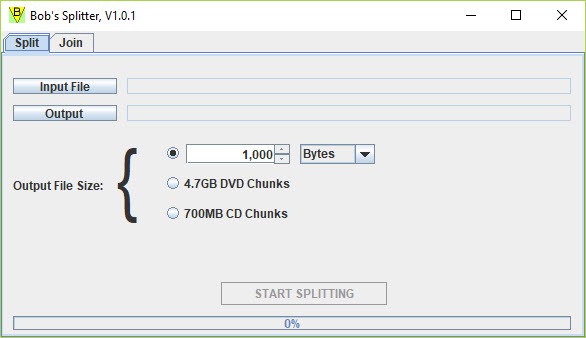
Pick the file, pick a size and click. The presets cover the two optical disc capacities, and a general option takes any figure. A 40 GB image goes onto FAT32 sticks in 4 GB pieces or through an email gateway in 20 MB ones. The pieces land beside the original with a numbered suffix and the original is left untouched.
There is no progress bar to speak of, just a wait, and on a fast drive the wait is short. The program reads and writes in large blocks and is quicker than most of its older rivals, which is the one claim on its own page that holds up.
Nothing is compressed and nothing is encrypted. A piece is a plain slice of the original bytes, which is why the operation is fast and why the pieces are exactly the size you asked for and not a byte less.
Joining the pieces
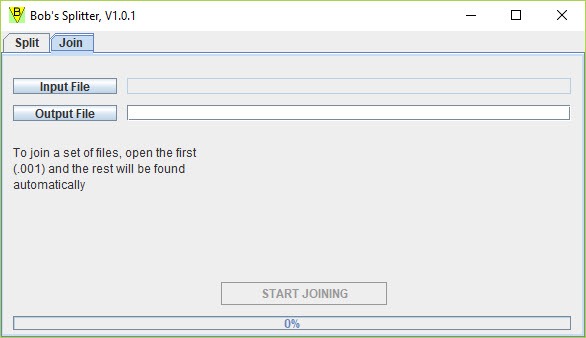
Point the program at the first piece and it finds the rest by name and writes the original back out. The output is bit-identical to what went in, which you can confirm with any checksum tool. The order comes from the numbering, so renaming a piece breaks the join, and a missing piece stops it with an error rather than producing a truncated file that looks complete. Both behaviours are correct, and both catch people who tidy the folder before joining.
The receiving end needs the same program. Pieces are not self-joining and there is no self-extracting option, so the person you send them to needs the same Java runtime and the same tool. For a one-off transfer to somebody non-technical, that means a conversation about Java first.
An archiver’s split volumes, which anyone can open, are the easier route.
The Java question
The program is a Java archive with a small launcher around it. If the launcher does nothing when double-clicked, the runtime is missing or is the 32-bit version, and installing a current 64-bit runtime fixes it. Once running it makes no other demands. No registry entries, no settings file, no update check. Delete the folder and it is gone.
That dependency comes with a tool this small. In return, BOB’s File Splitter runs from a flash drive on any machine that already has Java for some other reason. In offices with older business software, that is more machines than you would guess.
Where it fits, and where it does not
If the file needs to be smaller, split it with an archiver and let compression do some of the work. If the file needs to be protected, the same archiver adds a password. If the file needs to go to a stranger, use volumes they can open with what they already have. BOB’s File Splitter is for the remaining case, where you control both ends, the bytes must not change and you want the pieces made quickly and joined back with a single click.
Disk images going onto a stack of discs, camera footage going onto a pocket of small sticks and backups being fed to a service with a per-file ceiling all qualify.
Conclusion
BOB’s File Splitter is for the person moving a huge file between machines they control, across media too small to hold it, who wants the bytes untouched and the job done in seconds. For that person the two presets and the one button are exactly enough.
Anyone who needs compression, a password or a recipient who has never heard of Java should split with an archiver instead, and lose nothing but a little speed.
Pros & Cons
- Splits and rejoins any file with no compression or alteration
- CD and DVD presets alongside a custom size in one box
- Quick on large files thanks to block-based reading and writing
- Runs from a folder with no installation
- Requires a 64-bit Java runtime before it will start
- Pieces can only be joined with the same program
- No progress indication, no self-extracting option, no encryption
- Interface is plain to the point of parody
Frequently asked questions
The Java runtime is missing or is a 32-bit build. Install a current 64-bit Java runtime and try again. If the launcher still fails, the program can be started from a command prompt as a jar file.
No. The pieces are plain slices without a header, and the join has to be done by the same program, which they can run from a folder as long as they have Java.
No. It only cuts. The pieces add up to exactly the original size. Use an archiver with split volumes if the goal is to reduce the total.


