

Autorun Eater
About Autorun Eater
Autorun Eater watches for the one file that once launched a thousand infections, the autorun.inf sitting on a USB stick or drive. For years, plugging in a flash drive meant the computer would obediently read that file and run whatever it pointed to, which is precisely how a generation of worms spread from machine to machine, riding pen drives between school labs, office PCs, and internet cafes.
This small tool sits in the background, spots suspicious autorun.inf files the moment a drive appears, and neutralizes them before the auto-run can fire, turning a classic attack into a non-event.
The mechanism it defends against is worth understanding, because it explains both the tool’s value and its narrowing relevance. A malicious autorun.inf doesn’t infect anything by itself, it’s a pointer that tells the system to execute the actual malware hiding alongside it, and killing the pointer buys the time to inspect the drive safely. Autorun Eater is a specialist guard for exactly that trick, and nothing more.
Catching the pointer before it fires
The tool runs quietly in the system tray, monitoring for newly connected removable drives. When one appears carrying an autorun.inf, it inspects the file, and if the contents look like the fingerprint of the usual autorun-abusing malware, it steps in, backing the file up and removing it from the drive so the auto-execution can’t happen. An alert tells you what it found and where, which is the moment to scan the drive properly before opening anything on it.
The backup step is the thoughtful touch. Not every autorun.inf is malicious, since some legitimate discs and installers use them for their intended purpose, so rather than deleting blindly, the tool preserves what it removed, letting you restore a false positive.
That caution separates it from cruder tools that simply nuke every autorun.inf they see and occasionally break a legitimate disc in the process.
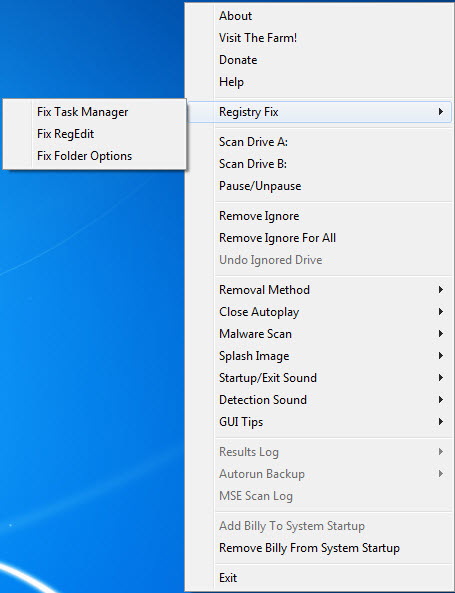
Alongside the watchdog, a small set of fix-it functions restores the system settings that autorun malware likes to sabotage, the hidden-files option it disables to conceal itself, the registry tweaks it makes to entrench, the folder-options access it blocks.
Reversing those is often the difference between a cleaned machine and one that looks clean but still hides its infection.
Where it fits, and where the ground shifted
The honest context is that the threat this tool was born to fight has receded, because the auto-execution behavior it guards against was curtained off at the operating-system level in later software generations, blunting the classic USB worm considerably. On current, updated systems, the automatic launch that made autorun.inf dangerous largely doesn’t happen anymore, which shrinks the everyday need for a dedicated guard.
But the ground is uneven, and that’s where the tool still earns its keep. Older systems that never received those protections remain fully exposed, and they are exactly the machines, in schools, small offices, and older setups, where USB sharing is heaviest and infections still circulate.
On those, this watchdog restores a defense the operating system never provided. And even on modern machines, the manual autorun.inf trick, where a user is tricked into clicking rather than the system auto-running, persists, so the pointer-killing still has value against social-engineering variants.
The right tools to keep beside it
A single-purpose guard is not an antivirus, and treating it as one is the mistake to avoid. It watches for one attack vector and does nothing about the thousand others, so it belongs beside a real scanner, not instead of one. When a drive trips its alert, a full scan with something like Malwarebytes is the proper next step, since the pointer was killed but the malware it pointed at is still sitting on the drive.
Neighboring tools cover adjacent angles. A broader USB-focused shield like USB Disk Security guards the removable-drive vector more thoroughly.
For understanding what actually launches at startup on a machine, the deeper AutoRuns exposes every auto-starting entry rather than just the removable-drive kind. This tool’s charm is its narrowness, one job, done quietly, with a backup net, and for the specific autorun.inf menace it remains a clean, unobtrusive answer.
Conclusion
Autorun Eater suits people who still live with the USB worm’s world, technicians maintaining older machines, schools and offices where flash drives pass between many computers, and anyone keeping a defense on systems the modern protections never reached. Its narrow focus, quiet operation, and backup safety net make it a tidy guard for the autorun.inf trick specifically.
On fully updated modern machines the need has largely passed, and it was never a stand-in for real antivirus regardless. Where the old threat still circulates, though, this small watchdog closes exactly the door it was built to close.
Pros & Cons
- Automatically neutralizes malicious autorun.inf files on connected drives
- Backs up removed files so false positives can be restored
- Fixes the system settings that autorun malware sabotages to hide
- Runs quietly in the tray with almost no resource cost
- Restores a defense that older systems never had
- Guards only one attack vector, never a substitute for antivirus
- The threat it targets has faded on modern, updated systems
- Kills the pointer but leaves the actual malware on the drive to be scanned
- Most valuable on older machines rather than current ones
Frequently asked questions
Malicious autorun.inf files on USB drives that tell the computer to launch malware automatically. It removes the file before that launch can happen, then alerts you to scan the drive.
No, it neutralizes the autorun.inf pointer that would launch it. The malware itself stays on the drive, so a full antivirus scan is the necessary next step.
Less than it once was, since newer systems curtailed the automatic launch behavior. It remains truly useful on older systems and against tricks that rely on a user clicking rather than auto-running.
It can flag a harmless one, but it backs up whatever it removes, so a false positive is restorable rather than lost.
No. It defends a single attack vector and does nothing about others, so it should run alongside a full antivirus, not in place of one.


