

mHotspot
About mHotspot
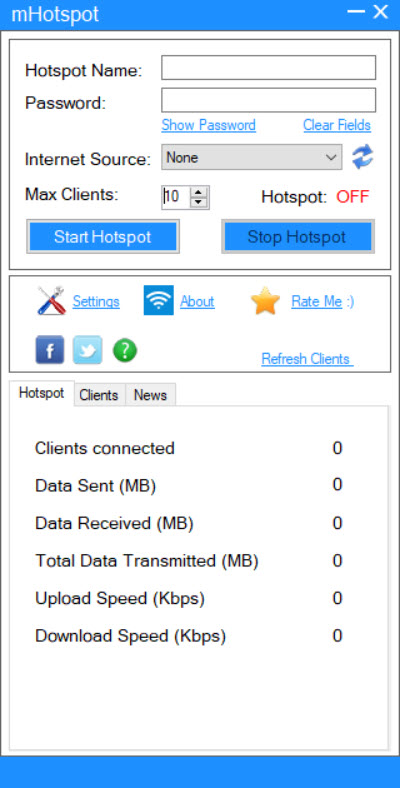
mHotspot turns a laptop into a Wi-Fi router. Plug the computer into a cable, or connect it to a mobile data stick, and the program broadcasts that same connection as a wireless network that phones, tablets, game consoles and other laptops can join. You type a network name and a password, pick which connection to share, press Start, and the hotspot is on.
A small window shows who has connected and how much data they are using. The whole idea fits in one sentence, and the program is as small as the idea.
What it replaces is a router you do not have. A hotel room with one network cable, a flat with a wired line and no wireless, a laptop with a 4G stick and three phones to feed. mHotspot also does one thing a plain router does not, which is to act as a repeater and stretch an existing Wi-Fi signal further.
ts limits are real, and one of them catches almost everybody. The wireless card inside the laptop has to support being an access point, and a large share of cards do not. The sections below cover what the program shares, how it controls the people connecting, what it will and will not do, and what to check when it fails.
What it shares, and with whom
The source in mHotspot can be almost any connection the laptop has. A wired line, a data card, a 3G or 4G stick, or another Wi-Fi network all work, and a selector inside the program picks which one to pass on.
Up to ten devices can join at once, and a setting lowers that cap if you want fewer. Phones, tablets, consoles, e-readers and other laptops all see it as an ordinary secured network, protected by a password you choose.
You pick the network name yourself, with no restrictions, which makes it easy to find among the other networks in a crowded building. The laptop does the work of a router while it runs, so it has to stay awake and powered, much as it would for Connectify Hotspot and its rivals.
Do not let it sleep with the hotspot on. A machine that goes to sleep takes the network down with it, and every device falls off at once.
Watching and limiting who connects
The mHotspot list shows every connected device with its name, its address on the network and its hardware address. You can see at a glance whether the extra device you did not recognise is the neighbour’s.
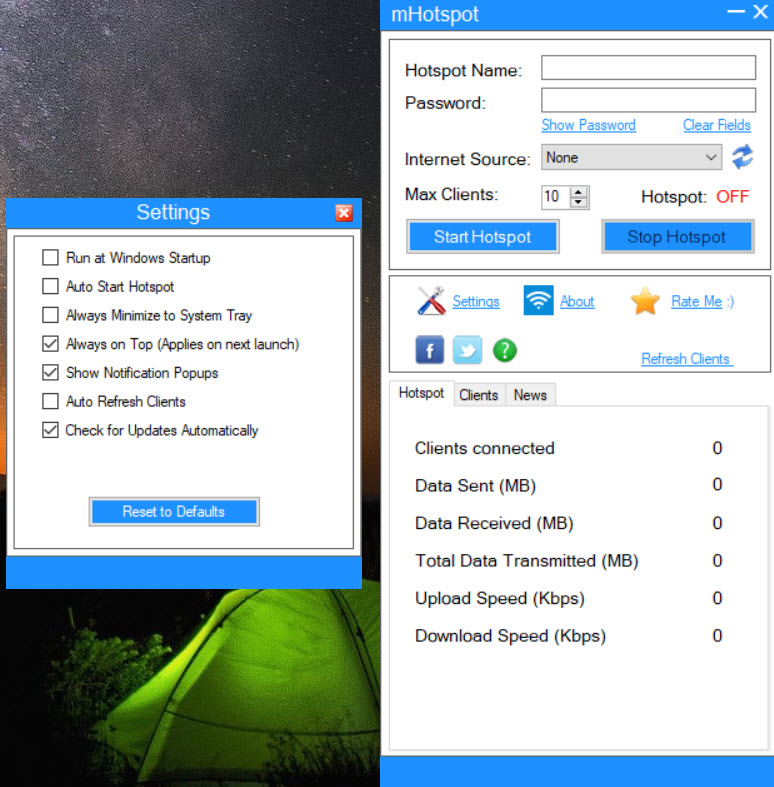
Usage figures appear next to it, the number of clients, the data sent and received, and the current upload and download speeds. That is a basic monitor and nothing more. There is no per-device limit and no history, only live numbers.
Files can be sent straight to a connected device from the same window, which turns the hotspot into a quick way of moving a document to a phone with no cable and no cloud. For watching how crowded the airwaves around you are, and which channel is quietest, a Wi-Fi analyser shows what the hotspot cannot.
Why it will not start
This is the part every forum thread about mHotspot is about. The hotspot depends on a feature of the wireless card called a hosted network, which lets the card behave as an access point while it is also connected to something else. Many cards support it. Many newer ones do not, and the program has no way around that. If the card says no, nothing you do inside the program changes the answer.
Check before you blame anything else. Open a command prompt and ask the system about the wireless driver. A line reading “Hosted network supported” followed by “Yes” means the card can do it. A “No” means it cannot with that driver.
Sometimes an older driver from the laptop maker restores support, and sometimes the hidden virtual adapter simply needs enabling in the device list. For the first, a driver pack for network cards is handy when the machine has no connection to download from.
When devices connect but have no internet
The other familiar failure of mHotspot is a hotspot that starts and shows connected devices, while the devices report no internet. The cause is almost always connection sharing. The program creates the network, but the real connection has to be shared with it. The program’s selector normally does this, and a system update or a security program can switch it off.
The usual fix is to open the connection settings, turn sharing off for the real connection, then turn it on again and point it at the hotspot’s virtual adapter. A restart sorts out many of the rest. If a security program blocks sharing, add an exception for the program. If it still refuses, the card is the likely culprit again.
Where it fits now, and the installer
Current systems include a built-in mobile hotspot that does the same job from the settings page with no extra program. That makes mHotspot a second choice. For most people on a recent machine that is the better first try. Where the built-in feature fails, or where you want the repeater mode and the device list in one window, Virtual Router Plus is the closest small alternative. A fuller commercial tool adds bridging and a repeater, with ads and upgrade prompts.
One caution about the program itself. Older installers bundled other software, so read every setup screen and decline what you do not want. The basic version is described as limited, and reviewers mention advertising, so expect nags.
That is a reason to try the built-in hotspot first, not to give up on the idea.
Conclusion
mHotspot suits anyone who needs a wireless network from a wired line or a data stick for a few devices, and who has a wireless card that supports hosted networking. The device list, the usage figures and the repeater mode make it more useful than the bare feature underneath.
If the card says no, the program cannot help, and on a recent machine the built-in hotspot is the first thing to try. Check the driver report before installing, decline the extras in the setup, and keep the laptop awake while it works.
Pros & Cons
- Shares a wired, data-stick or wireless connection as a secured Wi-Fi network
- Up to ten devices at once, with a cap you can lower
- Shows each connected device's name, address and hardware address
- Live usage figures for clients, data and speeds
- Repeater mode that extends an existing Wi-Fi signal
- Sends files straight to connected devices
- Needs a wireless card that supports hosted networking, which many do not
- Monitor is basic, with no per-device limits or history
- Laptop must stay awake and powered while it runs
- Reviewers report ads and a limited basic version, and older installers bundled extras
Frequently asked questions
The wireless card or its driver does not support hosted networking. Check with the system's driver report, try an older driver from the laptop maker, or use a USB Wi-Fi dongle that supports it.
Connection sharing is not applied to the real connection. Turn sharing off and on again for the connection you want to share, pointing it at the hotspot's virtual adapter.
Up to ten at once, with a setting to lower the limit.
Yes. It can act as a repeater, passing a wireless connection on through the laptop's own card.


