

Electorrent
About Electorrent
Electorrent is a remote control for a torrent client that runs somewhere else. The client itself sits on a home server, a network drive, a rented seedbox or a second computer, and this program sits on your desktop and talks to it. Click a magnet link in the browser and it goes to the remote client without copying anything. Drag a torrent file onto the window and it uploads. The list of transfers, with their speeds and progress, all appear in a desktop window instead of the client’s own web page. It downloads nothing itself, which is the whole idea.
It speaks to six clients. qBittorrent, Transmission, rTorrent, Deluge, the download station on a well-known brand of network drive, and the old uTorrent. Each is reached through the client’s own remote interface, so nothing has to be installed on the far end beyond switching that interface on.
Electorrent keeps several server profiles and swaps between them in a click, which suits anyone running more than one machine. It is open source, built on a desktop framework that makes it heavier than a native tool, and updated steadily, with recent releases adding a details panel, watch folders and per-server download locations.
The sections below cover the connection, the ways of adding torrents, the list and its details, the newer management features and where a remote control has limits.
Connecting to a client
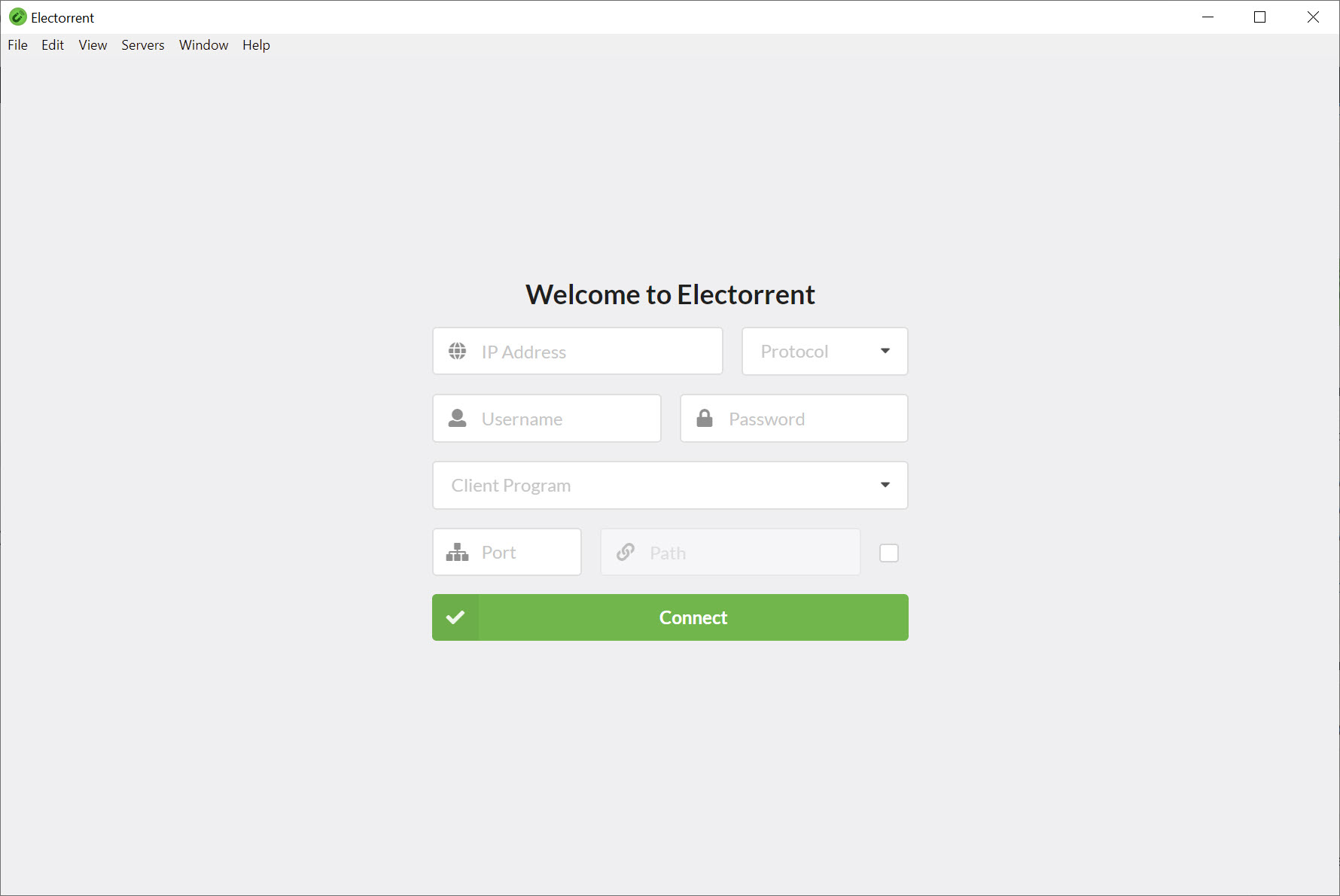
An Electorrent server profile holds the address, the port, the protocol, the user name and password, the client type and the path the client’s remote interface lives at. Fill it in once and the program connects on launch. Several profiles sit in a menu, so the seedbox and the home server are two clicks apart. Connections run over plain or encrypted links, and a built-in trust system accepts a self-signed certificate on a home server after you approve it once, which saves the ritual of installing certificates by hand.
The connection depends entirely on the remote client’s interface being enabled and reachable, which is a setting in each client and often a port to open on a router. When the program cannot connect, the fault is almost always there rather than in the program.
For the client at the other end, qBittorrent is the most common pairing and the one with the fullest support here, including a file tree for choosing which files to fetch.
Adding torrents without the web page
Three Electorrent routes put a torrent on the remote client. The program registers itself as the handler for magnet links, so a click in any browser sends the link straight to the server, with a dialog for options. A torrent file opens from the file manager, by drag and drop onto the window, or from a shortcut, and a magnet link on the clipboard is sent with a key press. Watch folders go further, uploading any torrent file dropped into a chosen folder on the desktop automatically.
The options dialog is where the newer releases have grown. Speed limits, peer limits, whether the torrent starts paused, sequential downloading for media meant to play early, and the save location, chosen from a list of reusable download locations kept per server.
Which options appear depends on the client at the other end, since each remote interface exposes a different set.
The list and the details
The main Electorrent window lists every transfer with its name and size, its progress and speeds, and its ratio and state, sortable by any column. A fuzzy search box finds a torrent by part of its name. A collapsible sidebar filters the list by label and by tracker, which on a seedbox with hundreds of transfers is how one is found. Right-click a torrent to pause or resume it, recheck it, label it or delete it, with a confirmation before anything is removed. The save location of an existing torrent can be changed on the clients that allow it.
Double-click a transfer and a details panel opens with the torrent’s information and the progress of each file inside it, which can be resized and pinned to the window. Desktop notifications announce a finished download even when the window is minimised, and a tray option keeps the program running when the window is closed. For a desktop client that does all of this locally, with a built-in player and cover art, a torrent client with a poster-style library is the opposite approach.
Keeping up with six clients
Supporting six remote interfaces is a moving target for Electorrent, since each client changes its interface with new releases, and the changelog shows the work. A recent update restored support for the newest qBittorrent after an interface change broke it. Another fixed magnet links on the current Deluge. The rTorrent support gained peer connection details and corrected file paths. The download station support carries a note that a fix is unconfirmed, which is the honest state of a client the project may not have to hand.
That is the trade of a universal remote. It follows every client at a small delay, and a client’s newest feature may wait a release or two. For a seedbox user who lives in one client’s interface all day, the native web page is sometimes ahead. For anyone managing two or three different clients, one window that speaks to all of them is the point. Deluge users in particular gain a cleaner desktop face than the client’s own.
Where a remote control has limits
Electorrent downloads nothing, so a machine with no remote client somewhere has no use for it. It is an application built on a web framework, which means a larger footprint and more memory than a native program for what is a list and a few dialogs. Features arrive at the pace the remote interfaces allow, and the clients differ in what they expose, so a dialog that shows every option for one shows fewer for another.
And a connection problem is a networking problem, with ports and certificates, which the program can report but not fix.
Conclusion
Electorrent suits anyone who runs a torrent client on a home server, a network drive or a seedbox and is tired of the client’s web page. That covers a single-machine household and someone juggling three clients on different boxes. The magnet handling, the drag-and-drop uploads, the server profiles and the details panel make the remote client feel local.
It is only as good as the connection to the far end and the interface that end exposes, and it carries the weight of its framework. Enable the remote interface on the client, open the port once, set up the profile, and the web page can stay closed.
Pros & Cons
- Remote control for qBittorrent, Transmission, rTorrent, Deluge, uTorrent and a network drive download station
- Handles magnet links from the browser and uploads torrent files by drag and drop or watch folder
- Several server profiles swapped in a click, with self-signed certificate trust
- Upload options for speed and peer limits, start state, sequential download and save location
- Details panel with per-file progress, fuzzy search and a label and tracker sidebar
- Desktop notifications and a tray option
- Downloads nothing itself, so it needs a remote client somewhere
- Heavier than a native tool because of its framework
- Options vary by client, and new client releases can break support until an update
- Connection faults are router and certificate problems the program cannot fix
Frequently asked questions
No. It controls a torrent client running elsewhere, on a server, a network drive or a seedbox, and that client does the downloading.
qBittorrent, Transmission, rTorrent, Deluge, uTorrent and the download station on a well-known network drive, each through its own remote interface.
The client's remote interface must be enabled and reachable, which usually means a setting in the client and a port opened on the router. Check the address and port in the server profile, and the path and protocol.
Yes. It registers as the handler for magnet links, so a click in the browser sends the link to the remote client with an options dialog.


