

AeroAdmin
About AeroAdmin
Most remote desktop tools make you install something, register an account, or wrestle with firewall settings before you can do anything useful. AeroAdmin throws all of that out. It is a single executable of roughly two megabytes that you simply run, on both the helper’s machine and the one being helped, and a connection is a few clicks away. No setup, no account, no configuration. That radical simplicity is the whole identity of the tool, and it is what makes it the thing you grab when a relative calls in a panic about their screen.
The other half of its appeal is the licensing. AeroAdmin is free for personal use and, unusually, for commercial use too (within certain session limits), which sets it apart from the big names that flag business use and cut off their free tiers.
For a small repair shop, an IT freelancer, or anyone who occasionally fixes computers for money, that distinction is the difference between a free tool and a subscription. It is a lightweight, genuinely usable alternative to the heavyweights, with a few honest trade-offs for the smaller footprint.
Connecting in three clicks
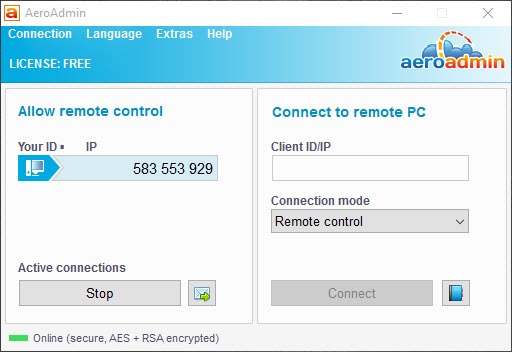
The connection flow is about as simple as remote access gets. Run the executable on both computers and each one is assigned a unique ID, generated from the machine’s hardware rather than a random number, which adds a small security benefit since the ID is tied to that specific device. To start a session, you ask the person you are helping to read out their ID, type it into the client field on your end, choose what you intend to do, and connect.
That last step is where AeroAdmin handles consent properly. The person on the remote end sees your request and decides whether to accept, and crucially they choose how much control to grant: full remote control, view-only monitoring, or file transfer alone. Nothing happens to their machine without their say-so.
It works behind NAT and firewalls without any port forwarding, automatically punching through the network configuration that usually trips up a tool like a self-hosted TightVNC setup, which is brilliant for VNC on a local network but a headache to expose across the internet.
Security and the encrypted file transfer
For something this small, the security model is solid. Every session is end-to-end encrypted using a combination of AES and RSA, the same cryptographic families that underpin banking and government systems, so the screen data, keystrokes, and files moving between the two machines are protected in transit. That matters more than people assume, because remote access is precisely the kind of channel you do not want anyone eavesdropping on.
File transfer rides over that same encrypted channel, with one detail worth calling out. If the connection drops mid-transfer, the transfer pauses and resumes from where it left off once the link is stable again, rather than starting over. On a flaky mobile connection, copying a large file without that resume behavior would be agony.
It is the kind of practical touch that shows the tool was built by people who actually used it over bad connections.
Built for shaky, low-bandwidth links
This is where AeroAdmin quietly outperforms its size. It detects your actual connection bandwidth and adjusts the balance between image quality and responsiveness automatically, so a session over a slow or mobile link stays usable instead of grinding to a crawl. You can override the balance manually if you would rather lock in sharper image quality or faster response.
The payoff is real responsiveness on connections where heavier remote tools become sluggish. A polished commercial option like AnyDesk leans on its own codec for similar smoothness, and TeamViewer is the household name in the category, but for a free tool to hold up this well on a poor connection is not something to take for granted.
Clipboard syncing and automatic screen scaling round out the session experience, and a built-in quick messaging panel lets you chat with the person at the other end without picking up the phone.
Unattended access and the operator features
Beyond one-off support calls, AeroAdmin can be set up for unattended access, where it runs as a background service on the remote machine so you can connect without anyone sitting there to approve it. You preset an ID-plus-password rule, and from then on that machine is reachable on demand. It can even be configured to reboot the remote computer and reconnect after it restarts, which is essential for the kind of maintenance that requires a restart partway through.
Several features target people who do this regularly. The flexible authentication system lets you connect manually, by password, or by ID and password combined. There is a contact book for storing the IDs, names, and details of machines you manage, organized into groups, and you can save that book to a USB stick or sync it through a cloud folder so a whole team of operators shares the same list. You can even preconfigure access rights and a password directly inside the executable, and brand it with your own logo and company name, so you hand clients a ready-to-run file rather than walking them through settings.
A simple ticket system lets the people you support send a help request straight from the app. For pure ad-hoc support without any of this overhead, a stripped-back tool like CrossLoop covers the basics, but it does not scale into managed access the way this one does.
The honest trade-offs
Free-for-business is generous, but it comes with limits, and we should be straight about them. The free tier caps how much you can use it over a given period, session time and connection counts among them, and heavy commercial users will eventually hit those walls and need a paid license. So “free for business” is true, but with an asterisk that matters if remote support is your full-time job rather than an occasional task.
The feature depth also does not match the giants. There is no sprawling ecosystem of integrations, no mobile-side polish, and the interface, while clean, is plain and utilitarian next to the more refined commercial clients.
The auto-generated hardware ID, while a security plus, is not memorable, so without the contact book you are constantly reading long numbers aloud. None of these are dealbreakers for the tool’s intended use, but they explain why a large managed-services operation tends to pay for something heavier.
Conclusion
AeroAdmin is for the person who needs to jump onto someone else’s screen right now, with no installation dance and no account to create, and equally for the small operator or freelancer who wants a remote tool they can legitimately use for paid work without a subscription. Its instant, no-setup nature and surprisingly strong encryption and low-bandwidth performance make it punch well above its two-megabyte weight.
It is not the choice for a large support operation that needs deep integrations, generous session limits, and a polished cross-device experience, since the free tier’s restrictions and the leaner feature set will eventually push heavy users toward the paid clients.
But as a grab-and-go remote support tool that respects both the remote user’s consent and your wallet, it fills a niche the big names leave wide open. For occasional help and small-scale administration, it is hard to beat the convenience.
Pros & Cons
- Single ~2MB executable runs with no installation, registration, or configuration on either end
- Free for both personal and commercial use, unlike the big-name tools that restrict business use
- AES plus RSA end-to-end encryption protects screen data, input, and file transfers
- File transfer pauses and resumes automatically if the connection drops
- Works behind NAT and firewalls with no port forwarding required
- Auto bandwidth optimization keeps sessions responsive on slow and mobile connections
- Unattended access, contact book, brandable executable, and a ticket system for regular operators
- The free tier limits session length and connection counts for heavy commercial use
- Feature depth and integrations fall short of the major commercial competitors
- The hardware-generated connection ID is secure but not memorable
- Interface is functional rather than polished
- The deepest operator features and higher limits require a paid license
Frequently asked questions
It is a free remote desktop tool that runs as a single small executable on both computers without installation. Each machine gets a unique ID, and you connect by entering the remote machine's ID, after which the remote user approves the session and chooses how much control to grant.
No. It is a roughly two-megabyte executable you simply run. There is no setup, registration, or configuration, which is why it can be kept on a USB stick or downloaded and launched on the spot during a support call.
Yes, with restrictions. The application is free for both personal and commercial use, though the free tier limits session time and connection counts. Heavier commercial users can move to a paid license for higher limits and extra operator features.
All sessions are end-to-end encrypted using AES and RSA, the same cryptographic standards used in banking and government systems. Combined with its authentication options and per-session approval, that keeps screen data, keystrokes, and file transfers protected.
Yes. Set up with an ID and password rule, the tool runs as a background service so you can connect without anyone present to approve it. It can even reboot the remote machine and reconnect after restart for maintenance tasks.
Yes. It provides automatic NAT pass-through, establishing connections through routers and firewalls without manual port forwarding, so a connection works the same across different networks as it does on a local one.


It is a great software for remote support and remote work.