

Should I Remove It?
About Should I Remove It?
Should I Remove It? is a practical utility designed to help users decide which programs to keep on their computer and which ones might be safely uninstalled. Drawing on a community-driven database that aggregates the choices of millions of users worldwide, it offers a uniquely informed perspective on whether a particular application is genuinely useful, potentially unwanted, or actively problematic.
For anyone struggling with a cluttered system, mysterious programs that appeared without clear permission, or simply the urge to clean up after years of software accumulation, this tool delivers data-backed guidance that goes well beyond what standard uninstall dialogs can offer.
Community-driven removal recommendations
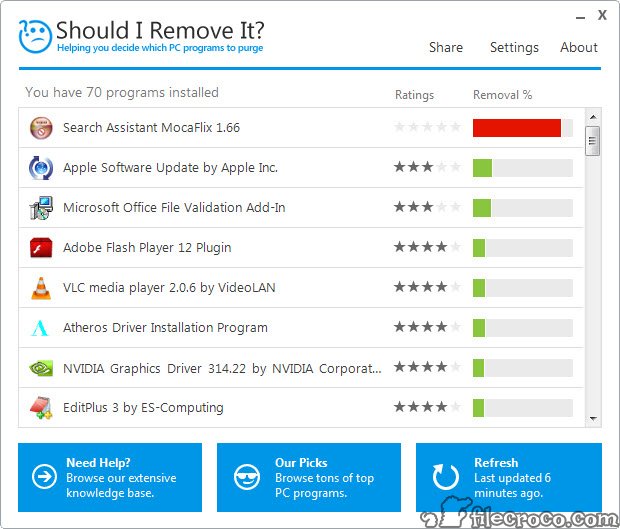
The defining feature of Should I Remove It? is its community ratings system, which shows what percentage of users have chosen to remove each program from their computers.
This collective wisdom, gathered from millions of installations, gives you immediate insight into how others have evaluated each application. A program that 90 percent of users remove is likely worth investigating before keeping it, while one that almost no one removes is probably safe to leave alone.
The ratings appear directly next to each installed program, transforming the abstract question of “do I need this?” into a concrete data point you can actually act on rather than guess about.
Detailed program information at a glance
Beyond simple removal percentages, this software provides rich details about each application installed on your system. You can see the publisher, installation date, size, version number, and a description of what the program actually does, along with links to additional information online.
This level of detail proves invaluable when dealing with cryptically named programs that you do not remember installing. Instead of nervously deleting something that might be important, or hesitating to remove something that might be junk, you get the context needed to make an informed decision quickly.
Fast scanning and clean interface
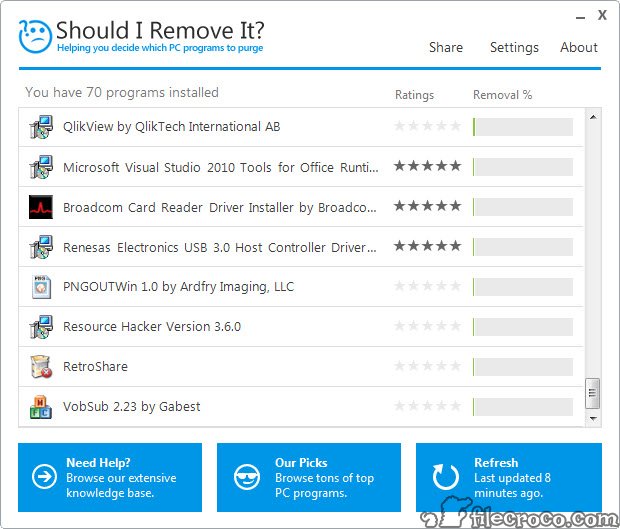
When launched, the application scans your installed programs almost instantly and presents them in a clean, sortable list.
You can organize entries by name, removal rating, installation date, size, or publisher, making it easy to identify candidates for removal based on whatever criteria matters most to you. The interface stays uncluttered and focused on the task at hand, without the visual noise that plagues some system utilities, which makes browsing through dozens or even hundreds of installed applications feel manageable rather than overwhelming.
One-click access to standard uninstall
When you decide to remove a program, this tool simply launches the standard uninstaller for that application.
This is actually a thoughtful design choice rather than a limitation, since it ensures that programs are removed using their official uninstall procedures, with all the cleanup logic the developers built in. There is no risk of leftover files, broken registry entries, or corrupted system states that can result from forced or aggressive removal techniques used by some other utilities.
Identification of potentially unwanted programs
A particularly valuable use case for this software is identifying potentially unwanted programs that may have hitched a ride during the installation of legitimate applications.
Browser toolbars, search redirectors, system optimizers of dubious value, and outright bloatware often slip onto computers without users actively choosing them. The community ratings make these programs easy to spot, since they typically show very high removal percentages from users who realized they did not actually want or need them in the first place.
Helpful publisher and version details
For each entry in the program list, this tool displays the publisher name, which helps identify whether software comes from a recognized source or something more questionable.
Version information lets you spot outdated programs that might benefit from updates or removal, and installation dates help reconstruct when various applications appeared on your system, which is particularly useful when trying to identify what got installed during a recent slow-down or unexpected behavior on your computer.
Lightweight and unobtrusive
This software is small in terms of installation size and modest in resource usage, which makes it suitable for occasional cleanup work rather than something that needs to run constantly in the background.
You can launch it when needed, scan your system, take action on whatever you decide to remove, and close it without any lingering performance impact. For users who appreciate utilities that respect their system resources and stay out of the way until needed, this approach is exactly right.
Support for older and current applications
Despite being a relatively focused utility, Should I Remove It? maintains data on a wide range of programs, from current popular applications to older software that has been around for years.
This breadth of coverage means even unusual or obscure programs typically have community data available, giving you actionable information regardless of how mainstream or niche your installed applications happen to be.
Conclusion
Should I Remove It? offers a refreshingly practical solution to the common problem of deciding what to uninstall from a cluttered computer.
Its community-driven approach turns the often guesswork-heavy task of system cleanup into a more informed decision-making process, supported by data from millions of users who have faced the same questions about the same programs. For anyone looking to declutter, identify potentially unwanted software, or simply understand what is actually installed on their computer, Should I Remove It? delivers focused functionality that genuinely helps without overwhelming users with unnecessary complexity.
Pros & Cons
- Community-driven ratings provide unique insight unavailable in standard uninstall tools
- Detailed program information helps identify mysterious or unfamiliar applications
- Fast scanning and clean interface make browsing installed programs straightforward
- Uses standard uninstall procedures to ensure clean, safe program removal
- Excellent for identifying potentially unwanted programs and bundled bloatware
- Lightweight design uses minimal resources and stays out of the way until needed
- Free to use without ads or upsells cluttering the experience
- Removal ratings reflect general user behavior, not personalized recommendations for your situation
- Database may occasionally lack information on very new or obscure software
- Cannot force removal of programs that resist standard uninstallation procedures
- Interface design feels somewhat dated compared to more modern utilities
- Does not include deep cleanup of leftover files or registry entries after uninstall
Frequently asked questions
This software uses removal data aggregated from millions of users worldwide, showing the percentage of people who chose to uninstall each application. The recommendations reflect collective behavior rather than personal judgment, giving you informed context for your own decisions.
This tool launches the standard uninstaller for each program you choose to remove, ensuring the application is uninstalled properly using its built-in removal procedures. This approach minimizes the risk of leftover files or system damage compared to forced removal methods.
Yes, this software is particularly useful for spotting bloatware and pre-installed applications that you did not actively choose. Such programs often have high removal percentages in the community ratings, making them easy to identify at a glance.
This tool typically scans programs installed for the current user account and system-wide installations. Programs installed exclusively under different user accounts may not appear in the scan results without administrator access to those profiles.
Since this software uses each program's own uninstaller, the cleanup behavior matches whatever that uninstaller is designed to do. Some applications leave behind certain files or settings, which is a limitation of the program itself rather than this tool.
Yes, the database is continuously updated based on ongoing user activity. Newer programs accumulate ratings as more people install and evaluate them, while existing entries refine over time as user behavior patterns become clearer.
The recommendations reflect what most users have chosen to do, but your specific situation might differ. A program with a high removal rating might still be valuable to you for specific reasons, so the data should inform rather than dictate your decisions about what to keep.
This software is not designed as antivirus or anti-malware protection. It focuses on legitimate program removal decisions rather than threat detection, so dedicated security tools should still handle malware identification on your computer.
Unlike the standard system uninstaller, this tool adds community ratings, more detailed program information, faster scanning, and better organization options. These additions make it significantly more useful for evaluating which programs deserve to stay and which should go.


