

Revo Uninstaller
About Revo Uninstaller
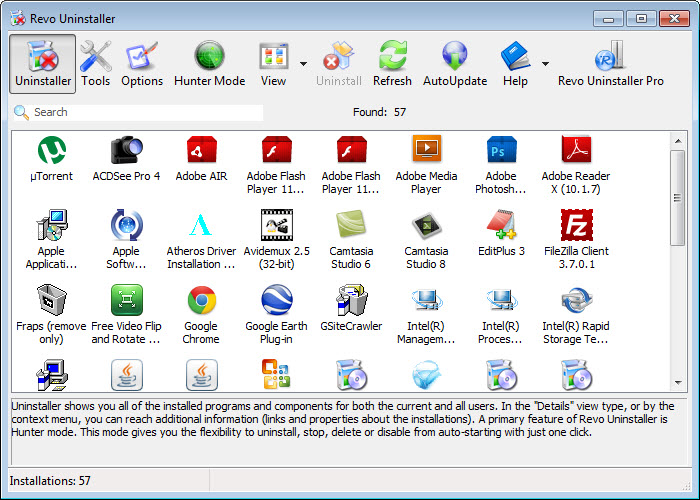
Revo Uninstaller finishes the job that a program’s own uninstaller leaves half done. Pick a program from its list, and it first runs the normal uninstall routine, then scans the disk and the registry for what that routine forgot, the settings folders, the leftover files and the keys that point at a program no longer there, and shows them in a tree for you to approve before deleting. The result is a machine where a removed program is gone, rather than lingering in a dozen places.
That leftover scan is the core, and three habits of the tool build on it. Hunter Mode turns the cursor into a target dropped on any shortcut, window or tray icon to uninstall or stop the program behind it, which is how the mystery process in the tray gets removed. The packaged apps that come with the system, the kind the built-in settings refuse to remove, appear in a separate list and uninstall like anything else. And eight cleaning tools cover startup programs, junk files and browser traces.
Revo Uninstaller holds its most powerful features, among them Forced Uninstall for broken programs and a real-time monitor that records installations, for the registered edition, and the sections below say which is which.
Uninstalling, then scanning for leftovers
Select a program in Revo Uninstaller, choose a scan depth from safe through moderate to advanced, and the program’s own uninstaller runs first. When it finishes, the scan looks for traces and presents them in two trees, registry entries and then files and folders, each with the items it is confident about pre-selected and the rest left for you. Safe mode finds the obvious folders and keys, and advanced digs deeper, takes longer and occasionally includes something shared with another program, which is why the review step matters.
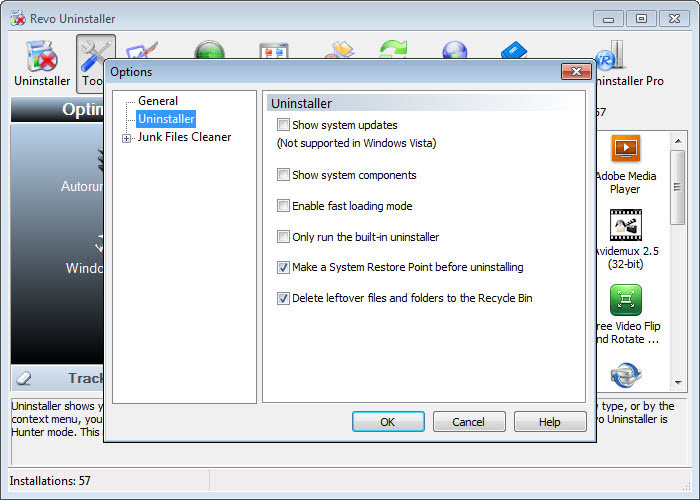
The details view shows each leftover’s full path, so a folder named after a maker rather than the program can be checked before it goes. A restore point and a registry backup are taken before deletion, and the Backup Manager restores them if something that should have stayed was removed.
Hunter Mode and the programs you cannot name
Hunter Mode shrinks the Revo Uninstaller window to a floating crosshair. Drag it over a shortcut, an open window or a tray icon and release, and a menu offers to uninstall the program behind it, stop its process, remove it from startup, open its folder or look it up online. It is the answer to the toolbar nobody chose, the updater that lives in the tray and the window with no obvious parent, since none of them has to be found in a list first.
The same mode works on the packaged apps, which the main list handles too, including the preinstalled ones the settings will not remove. Removing those is possible and should be done with care, since a few are depended upon by other parts of the system, and the tool does not stop you.
For a lighter tool that does only the leftover scan and force removal, Geek Uninstaller is the portable alternative with a smaller footprint and no registered tier for the basics.
Forced Uninstall and the registered edition
Revo Uninstaller Forced Uninstall is for the program whose uninstaller crashed, vanished or insists that the program is not installed while its folders sit on the disk. Point it at the program’s folder or type its name, and the same scanning engine hunts for everything that belongs to it in the registry and on disk, with the same tree for review. It makes a clean reinstall possible after a failed removal.
That edition also adds Quick Uninstall for removing several programs in one unattended run, an extended scan that searches every user account for leftovers, and the removal of browser extensions across the installed browsers. Several of the cleaning tools gain depth there as well.
The unregistered build covers the leftover scan, the packaged apps, Hunter Mode and the cleaning tools, which is enough for routine use and short of what a broken program needs.
Real-time monitoring and the logs database
The registered edition of Revo Uninstaller watches an installation as it happens, recording every file written and every registry key changed, and saves the record as a log. Uninstalling a monitored program later removes exactly what the installation created, with no scan and no guesswork, which is the most thorough removal possible. The maker also keeps a database of logs made by its own team for common programs, downloadable from inside the tool, so a program that was never monitored on your machine can still be removed from a trace record.
Traced uninstalls are the difference between finding leftovers and never having them. For anyone who installs and removes a great deal of software, trialware, utilities, games, the monitor is the feature that justifies the edition, and for anyone who installs a program a year, the scan is enough.
The cleaning tools
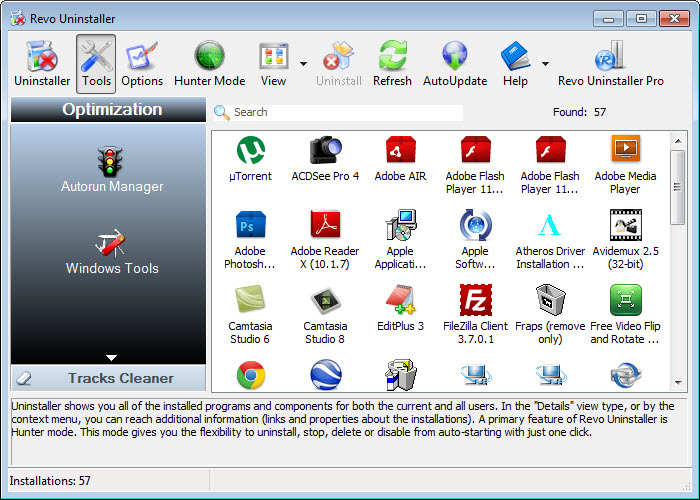
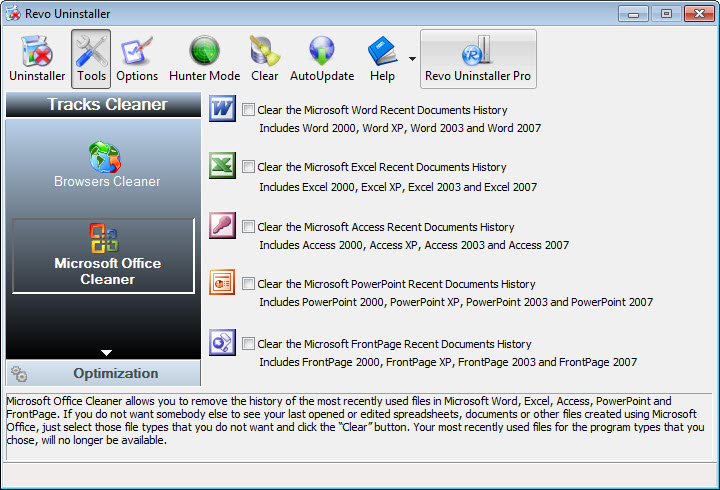
Eight extra Revo Uninstaller tools sit behind a Tools button. Autorun Manager lists everything that starts with the system, with disable and delete. Junk Files Cleaner removes temporary files and caches. The browser cleaner clears history and cookies, along with temporary files, for the installed browsers, and a separate tool clears the recent documents and usage history that the system keeps.
An unrecoverable delete overwrites files before removing them, an evidence remover wipes already-deleted data from the drive’s unused space, and the remaining tools cover shutdown scheduling and the system’s own tools in one place.
None of these is as deep as a dedicated utility. The junk cleaner is adequate and CCleaner covers the same ground with more options, and the autorun manager shows less than a full startup inspector. They are conveniences bundled with the uninstaller rather than reasons to install it.
Where it asks care
The advanced Revo Uninstaller scan is the place to slow down, since its deeper search can list a folder or key shared with another program, and deleting that breaks the other one. The restore point helps but takes time to make. The unregistered build nudges towards the registered edition, and the feature split puts Forced Uninstall, the one most needed on a troubled machine, behind it.
For a tool that removes many programs at once in the unregistered build, Bulk Crap Uninstaller fills that gap with quiet mode and leftover scanning of its own.
Conclusion
Revo Uninstaller suits anyone who wants programs removed completely rather than nominally, from a tidy-minded home user to a technician clearing a cluttered machine. The leftover scan and Hunter Mode cover the everyday cases in the unregistered build, and the monitor and Forced Uninstall in the registered edition handle the ones that go wrong.
It is heavier than the minimal uninstallers and its best tool sits behind registration. Use the safe scan by default, read the advanced tree before confirming, and treat the cleaning tools as a bonus rather than the point.
Features & benefits
Pros & Cons
- Leftover scan after every uninstall, with three depths and a review tree
- Hunter Mode removes or stops a program from its shortcut, window or tray icon
- Removes the packaged apps the system settings will not
- Restore point and registry backup before deletion, with a Backup Manager
- Forced Uninstall and real-time monitoring in the registered edition
- Downloadable trace logs for common programs
- Forced Uninstall, batch removal and browser extensions need the registered edition
- Advanced scan can flag items shared with other programs
- Unregistered build shows upgrade prompts
- Bundled cleaning tools are shallower than dedicated utilities
Frequently asked questions
Files and folders, plus registry entries, that a program's own uninstaller left behind, shown in a tree for review before deletion, at a safe, moderate or advanced depth.
A floating crosshair you drag onto a shortcut, window or tray icon to uninstall, stop or remove from startup the program behind it, without finding it in a list.
No. Forced Uninstall, batch removal, browser extension removal and real-time monitoring are features of the registered edition.
The registry backup and restore point taken before deletion can be restored through the Backup Manager, and the monitored uninstalls in the registered edition are fully reversible.


