
Roblox Studio
FREE 100% SAFE

Roblox Studio

(95 votes, average: 3.68 out of 5)
3.7 (95 votes)
Updated May 8, 2026
01 — Overview

About Roblox Studio

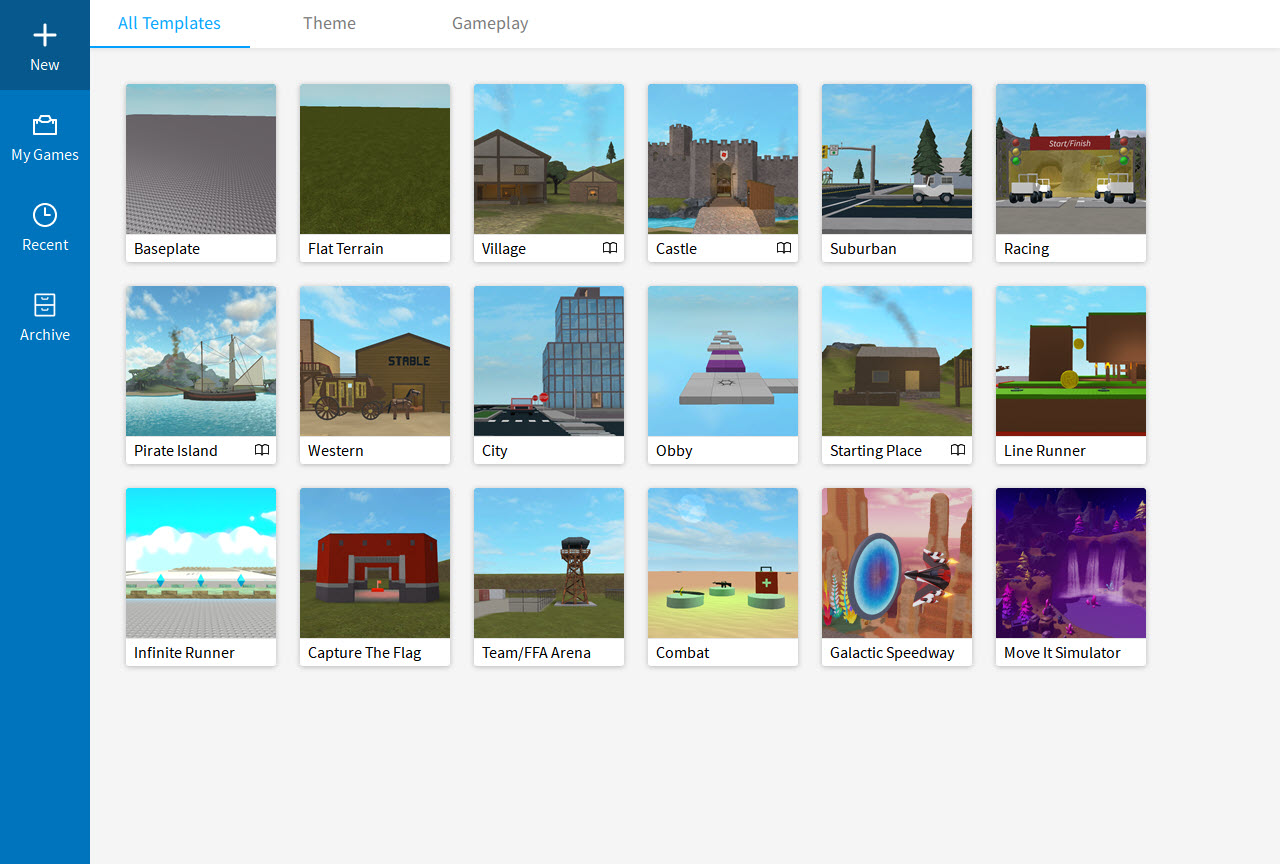
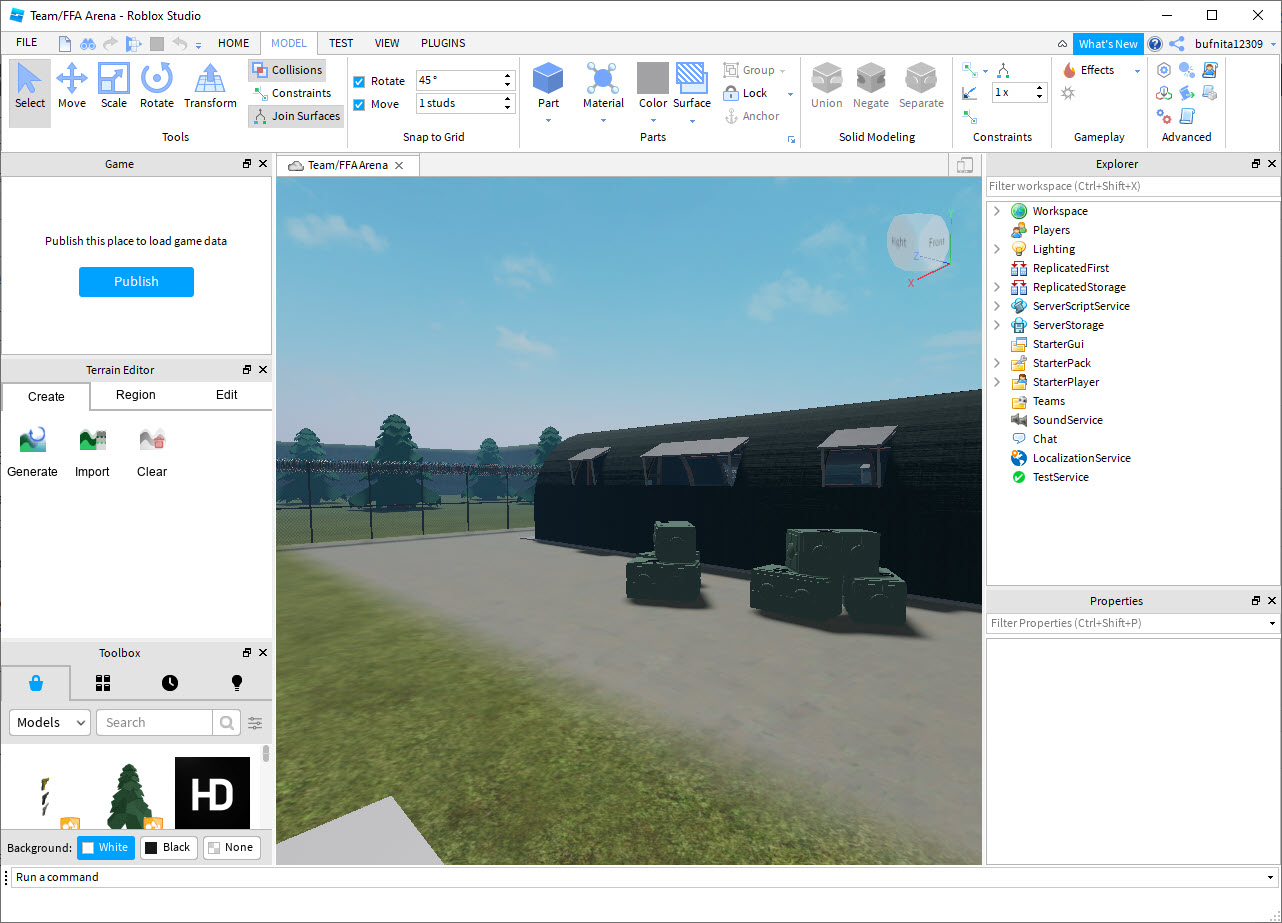
Roblox Studio is the development environment for building games and experiences on the Roblox platform. Open the application and you get a 3D scene editor with a free-form viewport, a hierarchical Explorer panel showing every object in your world, a Properties panel for tweaking each object’s attributes, a built-in script editor for writing Luau code, and a Test mode that lets you play your creation immediately to see how it works.

Whatever you build here uploads directly to Roblox where any of the platform’s hundreds of millions of monthly users can play it.

The tool covers the full game development pipeline rather than focusing on one specialty. World building happens through terrain sculpting, mesh placement, and the part-based building system that’s been Roblox’s signature since the platform launched.

Visual scripting is supported but most serious development uses Luau (Roblox’s variant of the Lua programming language) directly in the script editor with full IntelliSense, debugging, and breakpoint support. The asset library brings in models, sounds, animations, and scripts contributed by other creators, with millions of items available either free or for Robux.

Multiplayer networking, account systems, monetization through Robux purchases, voice chat, and various other infrastructure pieces are all handled by the underlying Roblox engine, which means you focus on your game’s specific logic rather than building network code from scratch.

The 3D viewport and how building actually works

The main editor view is a 3D scene where you place and manipulate objects. Move the camera through the standard mouse-and-keyboard navigation pattern that’s familiar from any 3D application, with right-click drag rotating the view, scroll wheel zooming, and keyboard shortcuts handling specific movements. Objects in the scene get selected by clicking, with handles appearing for moving, rotating, and scaling them through direct manipulation.

The basic building blocks are Parts: cubes, spheres, cylinders, and wedges that combine to form essentially any shape you can imagine. Snap-to-grid alignment makes assembling complex structures from primitive parts manageable. The Move, Rotate, and Scale tools each have specific keyboard shortcuts and configuration options for fine-grained control.

For creators wanting more sophisticated geometry than the part system offers directly, mesh imports support OBJ and FBX formats from external 3D modeling applications.

Beyond parts, Roblox includes specialty objects for common game elements. Vehicles, NPCs, weapons, vehicles, water surfaces, particle effects, lighting fixtures, sound emitters, all available as drag-and-drop objects with appropriate properties exposed for configuration.

The combination of parts and specialty objects covers what most game scenes actually need without requiring custom mesh creation for every element.

The Explorer hierarchy and Properties workflow

The Explorer panel shows every object in your scene organized as a hierarchical tree. Workspace contains all the physical objects players can interact with. Lighting holds environmental settings. ReplicatedStorage stores objects shared between server and client. ServerStorage holds server-only objects. ServerScriptService contains scripts that run on the server. StarterPlayer configures default character behaviors. Various other top-level categories handle specific systems.

For each object in the hierarchy, the Properties panel exposes the configurable attributes. A Part object has properties for size, position, color, material, transparency, anchored state, collision behavior, surface types, and dozens of other attributes.

The granularity matters for serious development, where fine control over object behavior is the difference between something that works correctly and something that almost works. Properties update in real time as you change them, with the viewport reflecting changes immediately.

The hierarchy structure also defines parent-child relationships that affect behavior. Objects parented to other objects move with their parent. Scripts in specific service folders run in specific contexts. Models grouping related parts together produce single units that can be manipulated as wholes.

Understanding the hierarchy is essential for productive development, with experienced creators organizing their projects through hierarchy structure rather than relying purely on visual placement.

Luau scripting and the script editor

Game logic happens through Luau, Roblox’s variant of the Lua scripting language. Luau adds type checking, performance optimizations, and various other improvements beyond standard Lua while maintaining backward compatibility with Lua 5.1 syntax. For users new to programming, Luau is more approachable than C# (Unity) or C++ (Unreal), with cleaner syntax and forgiving error handling.

The integrated script editor provides what you’d expect from a modern code editor. Syntax highlighting, autocomplete, error indicators, multi-cursor editing, code folding, find and replace, and various other capabilities make script editing reasonably pleasant. The autocomplete is particularly useful because it knows about Roblox’s APIs, suggesting valid functions and properties as you type rather than requiring you to memorize the exact spellings.

Debugging works through breakpoints, watch expressions, and step-by-step execution. Set a breakpoint at a specific line, run your game, and execution pauses at the breakpoint where you can inspect variables, evaluate expressions, and step through the code line by line. For tracking down bugs in complex game logic, this debugging support is essential rather than optional.

The script editor also supports Studio’s collaboration features, which let multiple developers work on the same project simultaneously. Edit scripts in real time alongside other team members, see their cursors and selections live, and resolve conflicts through the merge tools when needed.

For teams building experiences together, this collaboration support eliminates the version control friction that traditional development workflows require.

Plugins and the marketplace ecosystem

The plugin system lets developers extend Studio’s capabilities through community-built tools. Plugins install through the toolbox or through the in-Studio plugin manager, with thousands of options available for common development tasks. Modeling tools that expand the basic part-based building. Animation editors that improve on the built-in workflow. UI design tools for crafting menus and interfaces. Asset management tools for organizing large projects. Productivity tools for tasks the base Studio doesn’t address.

Notable plugins that experienced developers regularly recommend include the various building tools (F3X Building Tools provides advanced manipulation), Moon Animator for animation work, RoStrap for code organization, and various others depending on what specific kind of development you’re doing.

The plugin ecosystem is mature enough that most common development pain points have community-built solutions rather than requiring you to work around the base Studio’s limitations.

The Marketplace handles asset acquisition beyond plugins. Models, meshes, decals, audio, animations, and various other content can be purchased or downloaded freely from the Marketplace. For developers without strong art skills, this access to community-created assets means you can build fully visualized games without producing every asset yourself.

Quality varies substantially across the marketplace, but the volume of available content covers essentially every common game element.

Test mode and the play experience

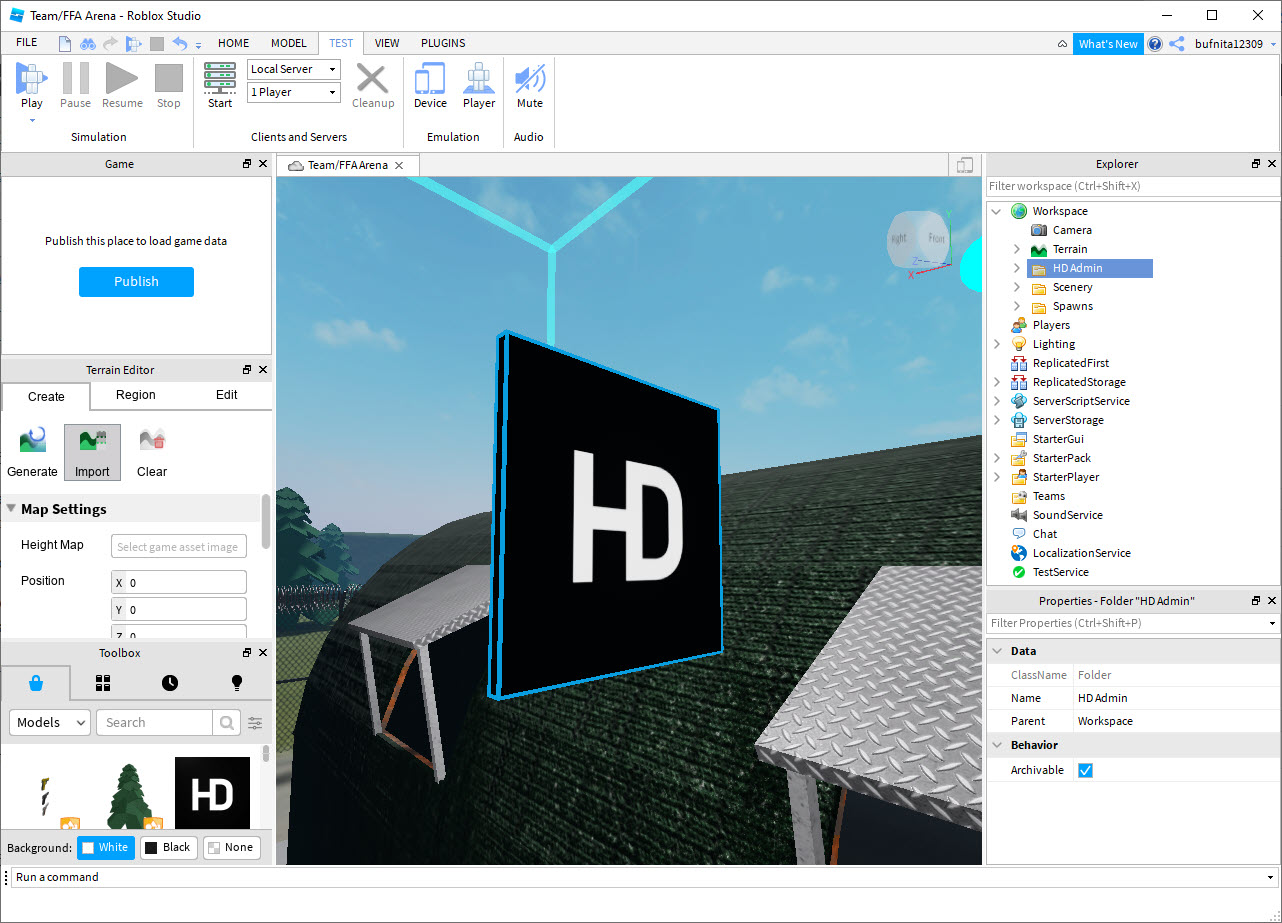
Test mode lets you play your game inside Studio without uploading to the Roblox platform first. Click Play, and the editor switches to runtime mode where your game executes exactly as it would for actual players. Move your character, interact with objects, trigger events, and verify that everything works as designed before publishing.

The Test mode supports multiple player simulation through the Local Server option, where Studio simulates several players simultaneously to let you test multiplayer interactions, networking, and player-versus-player mechanics. For multiplayer games, this local testing is essential because problems that don’t manifest with single-player testing often emerge immediately when multiple players are interacting.

For more sophisticated testing, the play modes include Run (executes scripts without entering character mode, useful for testing systems that don’t require player input), Play Solo (single-player testing of the full game flow), Play (full mode that simulates the actual platform behavior), and Local Server (multiplayer simulation).

Each mode has specific use cases, with experienced developers using whichever fits the test scenario they’re working on.

Publishing and the Roblox platform integration

When your game is ready, the Publish workflow uploads it to the Roblox platform where it becomes available for any of the platform’s users to play. The first publish creates a new game on your account. Subsequent publishes update the existing game with your latest changes, with versioning support that lets you roll back if a release breaks something.

The publishing options include privacy settings (private for testing among invited friends, public for anyone to play), genre tagging that affects discovery, thumbnail and icon configuration, descriptive text, and various other metadata. For games meant to be discovered by random players, getting the metadata right matters substantially because Roblox’s discovery algorithms use it to surface games to relevant users.

Monetization integration handles in-game purchases through Robux, the platform’s virtual currency. Set up Developer Products for one-time purchases, Game Passes for permanent benefits, or premium subscription content that recurring users can buy.

The financial integration is built into the platform infrastructure, with payment processing, fraud handling, and revenue distribution managed by Roblox rather than by individual game developers.

Multiplayer networking and the engine infrastructure

The platform handles multiplayer networking automatically through its built-in client-server architecture. Code running on the server stays authoritative for game state. Code running on each player’s client handles their specific view and input. The replication between server and client happens through the engine’s built-in systems rather than requiring developers to implement networking manually.

For developers, this means multiplayer games are generally as easy to build as single-player games. Variables and objects you mark as replicated automatically synchronize across all players. Server scripts can affect all players simultaneously. Client scripts handle local concerns like UI display and input processing. The complexity that multiplayer development normally introduces is largely abstracted away.

The trade-off is that you’re committed to Roblox’s specific networking model. Custom networking architectures, peer-to-peer setups, or specific multiplayer paradigms that don’t fit the client-server model aren’t possible because the engine doesn’t expose the lower-level networking primitives.

For typical multiplayer game scenarios this constraint doesn’t matter, but for unusual networking requirements developers may find the platform limiting.

Voice chat, in-experience features, and platform capabilities

Beyond core building, the platform exposes various capabilities developers can incorporate into their games. Voice chat lets players communicate by voice during gameplay, available through specific configuration in the experience settings. In-experience purchasing handles real-money transactions for in-game items. Friends integration surfaces social connections within games. Avatar systems handle player customization that persists across all Roblox experiences.

The in-built capabilities cover a substantial range of features that would typically require integration with third-party services in other game development platforms. Authentication, friend systems, social features, payments, voice chat, character customization, all built into the platform infrastructure rather than requiring external integrations.

For developers, this integration depth is part of the platform’s appeal. Building a multiplayer social game with payments and voice chat in Unity would require integrating PlayFab or similar backend services for accounts, integrating Vivox for voice, integrating Stripe or Steam for payments, and writing substantial code to tie everything together.

On Roblox, all of those capabilities are available through the standard development workflow without external dependencies.

Marketplace, Robux, and the developer economy

The platform’s economy runs on Robux, the virtual currency that handles all in-platform transactions. Players purchase Robux through real-money transactions on Roblox.com, then spend Robux on in-game items, accessories, and access to premium content within experiences. Developers earn Robux when players spend within their games, which can be exchanged for real money through the Developer Exchange (DevEx) program once you reach the minimum threshold.

The marketplace economy creates real revenue opportunities for successful experiences. Top games on the platform generate millions of dollars annually in developer revenue, with the most successful single creators earning more than commercial indie game developers typically achieve. For developers building experiences targeted at the platform’s audience, the monetization path is genuinely lucrative when the game catches on.

The challenge is that catching on is difficult. The platform hosts millions of experiences competing for player attention, with discovery algorithms determining which games get shown to which users.

Most experiences never reach significant audiences regardless of their quality. For developers entering the platform, understanding both the development side and the platform-specific considerations around discovery, retention, and monetization matters substantially for whether your work reaches actual players.

Considerations and limitations

The platform-specific nature is the central trade-off. Games built in Roblox Studio only run on Roblox. They can’t be ported to Steam, mobile app stores outside Roblox’s wrappers, or other platforms. For developers who want their games to exist independently of any specific platform, this constraint matters fundamentally. Unity, Unreal, and Godot all produce games that run independently. Roblox produces experiences that exist only within Roblox.

The target audience skews younger than other game development platforms. Roblox’s user base is heavily weighted toward children and teenagers, with the games that succeed on the platform reflecting this demographic. Developers expecting to build adult-oriented or mature-themed games face the platform’s content guidelines plus the practical reality that the audience for such content isn’t predominantly on Roblox.

Performance optimization on the platform is constrained by what the engine exposes. Games with complex physics, high polygon counts, or computationally intensive logic can hit performance walls that aren’t easily worked around because you don’t have access to the underlying engine internals. For ambitious technical projects, the platform’s abstractions sometimes constrain rather than enable.

The platform’s ongoing changes and updates can affect existing experiences in ways that require ongoing maintenance. Roblox occasionally changes APIs, deprecates features, or modifies engine behavior in ways that break previously-working games. Developers maintaining successful experiences need to stay current with platform changes rather than treating their games as completed projects.

Some developers have raised concerns about Roblox’s revenue split (developers receive substantially less than the gross revenue from their games due to platform fees, payment processing, and Robux exchange rates) and about working conditions for young developers building successful experiences.

These platform-level concerns affect how much value developers actually capture from their work, with the calculation being different for hobbyist creators (where any revenue is upside) versus professionals (where the economics may be less favorable than alternatives).

Conclusion

For users wanting to build games and reach a substantial player audience without the friction of building everything from scratch, Roblox Studio offers what amounts to game development on easy mode. The built-in multiplayer networking, monetization integration, audience access through the platform’s existing user base, and active marketplace ecosystem cover infrastructure that other game development platforms require developers to assemble themselves.

The free pricing and accessible Luau scripting language lower the barrier to entry substantially compared to C++ or C# game engines.

The reasons to consider alternatives are mostly about platform independence and audience targeting. Users wanting their games to exist independently of any specific platform need Unity, Unreal, Godot, or similar standalone game engines. Users targeting adult audiences specifically don’t find their target demographic on Roblox in significant numbers.

Users wanting deep technical control over engine behavior find the platform’s abstractions sometimes limiting rather than helpful. But for the specific use case of building social multiplayer experiences targeted at the platform’s existing audience with built-in monetization paths, this software remains one of the most capable options available for creators at any skill level.

02 — Verdict

Pros & Cons

The good
  • Free download with full development capabilities included from the start
  • Built-in multiplayer networking handles client-server architecture automatically
  • Luau scripting with integrated debugger, autocomplete, and collaboration support
  • Massive marketplace of community-created assets and plugins
  • Test mode lets you play your game inside Studio without publishing first
  • Built-in monetization through Robux with payment processing handled by the platform
  • Character system, voice chat, friend lists, and various other platform features included
  • Active developer community with extensive tutorials and documentation
  • Cross-platform deployment to PC, mobile, console, and VR through a single codebase
  • Real revenue opportunities for successful experiences through the DevEx program
The not-so-good
  • Games only run on Roblox and can't be ported to other platforms
  • Target audience skews young, limiting suitable content categories
  • Performance optimization constrained by what the engine exposes
  • Platform changes can break existing games, requiring ongoing maintenance
  • Revenue splits less favorable than commercial platforms for serious monetization
  • Discovery is competitive with millions of experiences competing for attention
  • Mobile development through Studio Lite has reduced capabilities compared to desktop
03 — FAQ

Frequently asked questions

This software is the development environment for building games and experiences on the Roblox platform. It includes a 3D scene editor, an Explorer panel for hierarchy management, a Properties panel for object configuration, a script editor with Luau support, Test mode for playing your game during development, and Publish workflow for uploading completed experiences to Roblox where the platform's users can play them.

The application uses Luau, Roblox's variant of the Lua scripting language. Luau adds type checking, performance optimizations, and other improvements while maintaining compatibility with Lua 5.1 syntax. For users new to programming, Luau is more approachable than C# or C++, with cleaner syntax and forgiving error handling. The integrated script editor provides syntax highlighting, autocomplete with knowledge of Roblox APIs, breakpoint debugging, and various other code editing features.

Yes, through the Roblox monetization systems. Set up Developer Products for one-time in-game purchases, Game Passes for permanent player benefits, or premium subscription content that recurring users can buy. Players spend Robux (the platform's virtual currency) on these items, and you earn Robux when they purchase. Earned Robux can be exchanged for real money through the Developer Exchange (DevEx) program once you reach the minimum threshold. Successful experiences generate substantial revenue, though achieving the audience needed for substantial earnings is competitive.

Use the Publish menu option to upload your game to Roblox. The first publish creates a new experience on your account with metadata you configure (name, description, thumbnail, icon, genre tags). Subsequent publishes update the existing experience with your latest changes. Configure privacy settings (private for testing among invited friends, public for anyone to play) based on whether the game is ready for general release. Once published as public, the game appears in your account and becomes accessible to other Roblox users. 5, How does it compare to Unity? Both are game development environments, but with fundamentally different scopes. Unity produces standalone games that run on PCs, mobile devices, consoles, and various other platforms independently of any specific service. Roblox Studio produces experiences that run only on the Roblox platform. Unity has more general-purpose flexibility, broader publishing options, more sophisticated graphics capabilities, and wider audience reach across platforms. Roblox has built-in multiplayer infrastructure, monetization integration, and a captive audience already on the platform. The right choice depends on whether you want platform independence (Unity) or platform integration (Roblox).

The most commonly recommended plugins depend on what kind of development you're doing. For general building, F3X Building Tools provides advanced manipulation beyond the base part tools. For animation work, Moon Animator improves substantially on the built-in animation editor. For code organization, RoStrap helps manage larger projects. The Roblox plugin marketplace has thousands of options covering essentially every development specialty, with community recommendations available through the developer forum and various tutorial resources.

The platform handles multiplayer networking automatically through its built-in client-server architecture. You don't write networking code directly. Instead, the engine replicates objects and variables marked as shared between server and client. Server scripts run authoritatively on the server. Client scripts run locally on each player's machine. The replication system handles synchronization between them. For most multiplayer scenarios, the built-in infrastructure handles networking without requiring developer intervention, with custom networking patterns being limited to what the engine exposes through its replication APIs.

Specifications

Technical details

Latest version0.720.0.7201168
File nameRobloxStudioInstaller.exe
File size 9.7 MB
LicenseFree
Supported OSWindows 11 / Windows 10 / Windows 8 / Windows 7
Alternatives

Similar software

Community

User reviews

guest
0 Comments
Oldest
Newest Most Voted
Inline Feedbacks
View all comments