

Intel SSD Toolbox
About Intel SSD Toolbox
Intel SSD Toolbox is the house mechanic for one family of solid-state drives, and it treats them with a thoroughness no generic utility matches. Health estimates, decoded SMART data, diagnostics, firmware updates, scheduled TRIM and a proper secure erase all live in one plain window, each tuned to the drives it was built for.
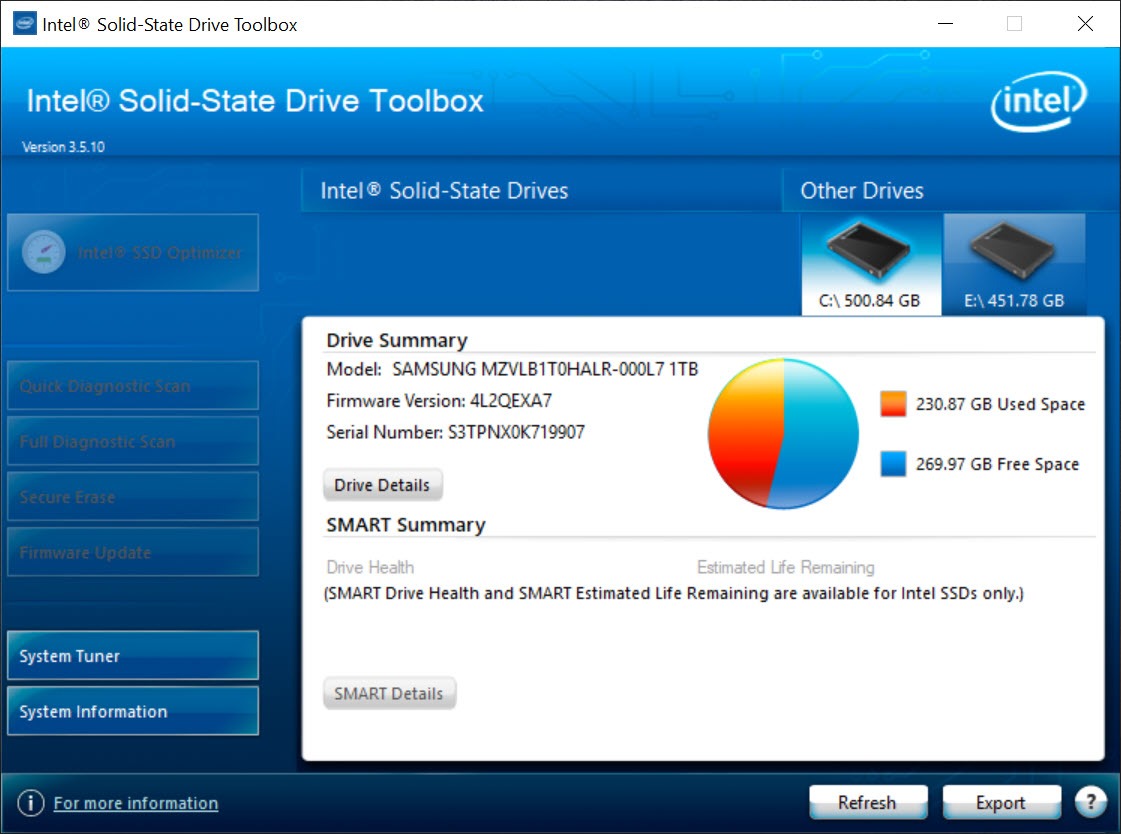
That built-for clause is the whole story. Plug in a drive from the matching family and every button lights up. Plug in anything else and the application politely shows basic information while keeping its real tools locked away, so read this as a dedicated companion for specific hardware rather than a universal disk manager.
Health, remaining life and a SMART table in plain words
The front page answers the question every SSD owner quietly carries around. How much life is left? Intel SSD Toolbox shows an estimated life remaining figure calculated from how much has actually been written to the drive, alongside capacity, model and firmware details, so the abstract fear of wear becomes one readable number.
Below that sits the full SMART table, and this is where the dedicated tool earns its keep, because each attribute comes with a plain-language description of what it measures instead of a bare hexadecimal ID. Quick and full diagnostic scans go further, reading the drive and verifying data integrity, which is the test to run when a machine starts misbehaving and you want the storage ruled in or out.
For drives outside the supported family, CrystalDiskInfo reads SMART from anything and remains the right generalist.
The Optimizer is scheduled housekeeping
An SSD slows down when its controller loses track of which blocks are truly free, and the TRIM command is how the system tells it. The Optimizer in Intel SSD Toolbox runs that housekeeping on demand or on a weekly schedule, which mattered enormously on configurations where automatic TRIM was unreliable, and still offers peace of mind as a manual lever you can pull after deleting half a drive.
A companion system tuner adjusts machine settings to suit solid-state storage, switching off scheduled defragmentation and similar mechanical-era services that do an SSD no favours. These are one-click changes you could make by hand, but having them gathered in one screen means none get forgotten.
Firmware updates and a real secure erase
Firmware is the part of an SSD people neglect because updating it sounds dangerous, and Intel SSD Toolbox domesticates the process. It checks whether the connected drive has newer firmware available and applies it from inside the window, which removes the bootable-stick ritual that kept most owners on launch-day firmware forever.
Secure Erase is the other serious tool, returning a drive to its factory-fresh state and destroying all data in the process, the correct ritual before selling or repurposing a drive. Expect its conditions, though. It refuses the system drive, the target must have its partitions removed first, and if the drive reports a frozen security state the tool will ask for a power-cable unplug and replug before it proceeds.
Those hurdles are safety features, not bugs, and they are the difference between a deliberate wipe and a catastrophic misclick. For destroying data on arbitrary drives of any make, a dedicated disk wiper covers the general case.
A tool for the drives it grew up with
Honesty about its place. Development has long since stopped, the newest generations of drives from the same family go unrecognised, and their care has moved to a successor utility. So this is not the tool for a drive bought recently.
What it remains is the definitive companion for the classic generations it supports, which still sit in millions of machines doing honest work. For those drives it reads wear accurately, updates firmware correctly and erases securely, three jobs a generic tool does worse or not at all.
Owners wanting raw speed numbers to go with the health data can pair it with AS SSD Benchmark and have the complete picture in two small programs.
Conclusion
Intel SSD Toolbox is for owners of the classic drives it was written around, and for them it remains the most competent caretaker available. Wear in one number, decoded SMART, in-place firmware updates and a correct secure erase cover everything those drives need across their whole lives.
Anyone with recent hardware should go straight to the successor tooling and never look back. That split is clean, which makes the decision easy, and easy decisions are a rare pleasure in storage utilities.
Pros & Cons
- Estimated life remaining turns drive wear into one clear number
- SMART attributes come with plain-language explanations
- Firmware updates run from inside the tool, no bootable media required
- Secure Erase properly resets a drive before sale or reuse
- The Optimizer runs TRIM manually or on a weekly schedule
- Full functionality is reserved for one family of drives
- Recent drive generations are not recognised at all
- Secure Erase demands partition removal and sometimes a power-cable replug
- The interface is plain to the point of austerity
Frequently asked questions
Only partially. Other drives appear with basic information, but the diagnostics, Optimizer, firmware updates and Secure Erase stay reserved for the supported family.
It issues the TRIM command, telling the drive which blocks are free so performance stays consistent. It runs on demand or on a weekly schedule you set once.
Usually one of three reasons. The drive is the system drive, it still has partitions on it, or it reports a frozen security state, which the tool clears by asking for a power-cable unplug and replug.


