

BatchPatch
About BatchPatch
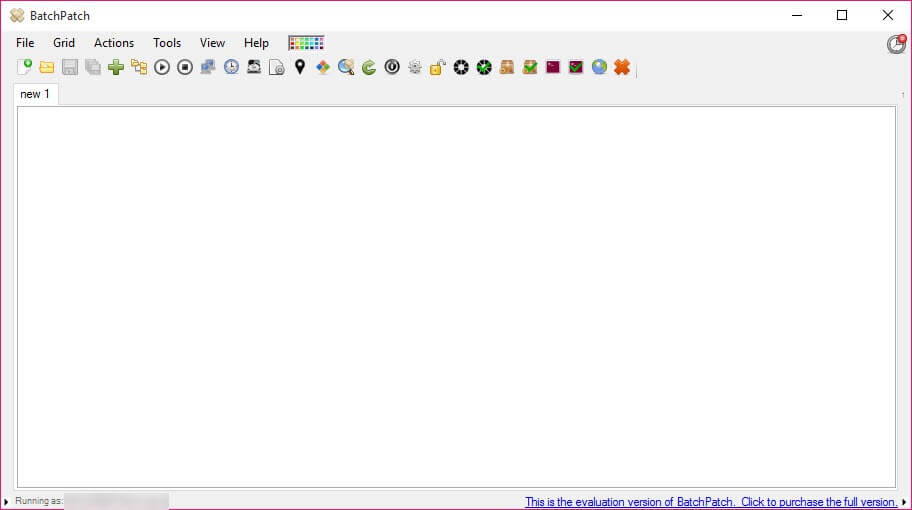
Patching one machine is a chore. Patching sixty is a job somebody has to do on a Saturday, and doing it by visiting each one is how small networks lose entire weekends. BatchPatch puts every machine in a grid and lets one person drive all of them from a single window.
Each BatchPatch row is a computer. The columns show what matters when deciding what to do next, including which updates are pending, when the machine was last checked, how long it has been running and how much space remains on its disk.
Selecting rows and issuing an instruction is the whole interaction. Check for updates on these forty, download on those, install on the ones that came back clean, reboot in a sequence that keeps the important machines available.
Nothing is installed on the machines you manage
This is the BatchPatch decision that shapes everything, and it is the reason people choose it over heavier platforms.
There is no agent. No software is deployed to the machines being managed, no service runs on them permanently, and nothing needs uninstalling if you stop using the tool. Instructions travel over the administrative channels the systems already provide.
The benefit is obvious. A network of sixty machines does not need sixty installations before you can begin, and adding a machine to the grid is typing its name.
The cost is equally real and it is where people get stuck. Those administrative channels have to be reachable, which means the right services running, the firewall permitting the traffic, and an account with sufficient rights on the targets. A machine that will not respond is almost always a permissions or firewall question rather than a fault in the software.
For the same agentless approach at the level of individual commands rather than a management console, PsTools is the free set most administrators already know.
Beyond updates, it runs whatever you tell it
Patching is the BatchPatch headline, and remote execution is what makes it stay installed.
Commands run across selected machines, scripts are deployed and executed, and installers are pushed and run silently. That covers the ordinary emergencies, meaning a setting to change everywhere, a program to remove from every machine, or a service to restart across a floor.
Doing that without walking anywhere, and seeing the result per machine in the grid rather than assuming it worked, is the difference between an afternoon and ten minutes.
Knowing which machines are actually on the network in the first place is the prerequisite, and Advanced IP Scanner sweeps a range and reports what answered.
Scheduling and the reboot problem
Updates are the easy BatchPatch part and restarts are the political part, because a reboot at the wrong moment costs somebody their work.
Jobs schedule for a chosen time, and reboots can be sequenced rather than issued simultaneously, which matters when machines depend on each other and a server going down before its dependencies produces a mess nobody wanted.
That sequencing is a genuine feature rather than a checkbox. Deciding the order in which forty machines return, and having that order actually observed, is what makes an unattended maintenance window survivable.
Where updates come from
BatchPatch orchestrates rather than supplies. Machines fetch their updates through whatever route they already use, and this decides when they do it and reports what happened.
That distinction matters on a network with no reliable connection or with machines deliberately kept offline. Nothing here delivers an update to a machine that cannot reach a source, and WSUS Offline Update covers that case by building media that patches a disconnected machine.
The opposite requirement, keeping machines from updating on their own schedule while you manage the timing centrally, is handled by a tool that holds automatic updates back on the machines themselves.
Who it actually suits
The BatchPatch audience is the middle ground, which is where the interesting problems are.
Below it, a handful of machines can be handled by hand and the licence is not worth it. Above it, large organisations already run management platforms with inventory, policy and reporting that make this look narrow.
Between those sits the network of twenty to a few hundred machines, run by one or two people, with no budget for an enterprise platform and no appetite for visiting each desk. That is exactly the situation BatchPatch was built for, and it is a common one.
Conclusion
BatchPatch does one thing that matters enormously to the person responsible for a network of moderate size, which is turning sixty individual maintenance tasks into one operation with visible results. The grid, the sequenced reboots and the remote execution together replace an entire category of walking about.
Budget for the setup rather than the software. Agentless management is convenient once the machines are reachable and frustrating until they are, and the time goes into services, firewall rules and rights rather than into learning the interface. Get that right once and the weekends stop being maintenance windows.
Pros & Cons
- Every managed machine appears as a row, with status visible rather than assumed
- No agent installed on the targets, so adding a machine means typing its name
- Commands, scripts, installers all deployed remotely alongside the patching
- Reboots sequenced rather than simultaneous, which matters for dependent machines
- Jobs scheduled for maintenance windows and left to run
- Results reported per machine, so failures are visible instead of discovered later
- Agentless operation depends on services, firewall rules and rights on every target
- A machine that will not respond needs diagnosing on that machine
- Orchestrates updates rather than supplying them, so offline machines get nothing
- Licensed per administrator rather than free
- Overkill below a couple of dozen machines and narrow above a few hundred
Frequently asked questions
No, and that is its main architectural advantage. Instructions travel over the administrative channels the systems already provide, so adding a machine to the grid requires nothing on that machine.
Almost always permissions or the firewall rather than the software. Agentless management needs the relevant services running, the traffic permitted, and an account with sufficient rights on the target.
Yes, and that is what keeps it installed. Commands, scripts and silent installers all deploy across selected machines, with the result shown per machine rather than assumed.
No. Machines fetch updates through whatever route they already use, and this decides the timing and reports the outcome. A machine with no route to a source needs offline media instead.
Roughly twenty to a few hundred. Fewer is quicker by hand, and considerably more is where organisations run full management platforms with inventory and policy behind them.


