

Autoclicker
About Autoclicker
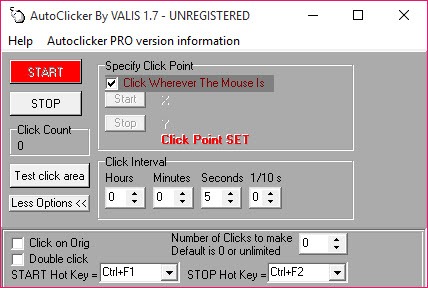
Autoclicker presses the mouse button for you at a steady interval until you tell it to stop. Set the gap between clicks, choose how many clicks you want or leave it unlimited, pick a keyboard key to start and stop the run, and the program clicks wherever the pointer is sitting.
That is the whole of it. There is one small window, half a dozen controls and a shortcut. People search for a tool this plain because half the ones on offer cannot be trusted to be only what they say.
It belongs to the smallest class of automation tools, beneath macro recorders such as TinyTask and far beneath anything with a script. Autoclicker does not record, does not move the pointer and does not know what it is clicking on.
What it offers over its rivals is an interval that can be set in hours and minutes rather than milliseconds alone. A trial lets you find out whether that suits the job before deciding.
Setting the interval
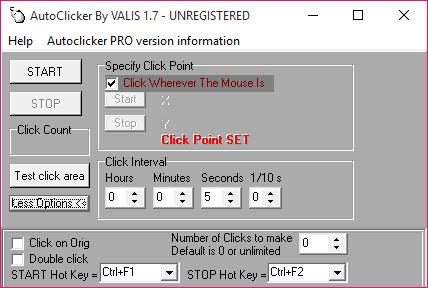
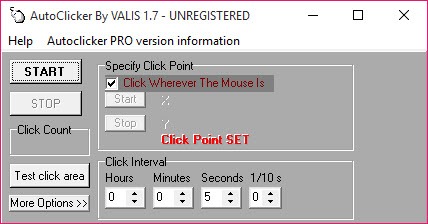
The Autoclicker interval is entered as hours and minutes, seconds and tenths of a second. That reads oddly beside the millisecond boxes of gaming auto clickers and turns out to be the point. A click every twenty minutes to keep a session alive is typed directly rather than converted into a large number.
At the fast end, tenths of a second is the floor, so ten clicks a second is the most it will produce. For a game that wants hundreds of clicks a second this is the wrong tool, and it does not pretend otherwise.
The click count is a number or unlimited. With a number set, the run ends on its own, which is the safer arrangement for a task with a known length. With unlimited set, the run continues until the stop key is pressed or the program is closed. The pointer had better be somewhere harmless when you walk away.
Which button, which key, and where
Left and right buttons are selectable, the middle one too, and a double-click option covers the dialogs that need it. The start and stop key is yours to choose from the keyboard, and it works while another program has focus. A game or a browser in the foreground is clicked without the small window ever being visible. Pick a key the foreground program does not use, since the keystroke still reaches it.
Clicks land at the pointer’s current position. There is no fixed coordinate and no list of positions. The job is to put the mouse where the click belongs, press the key and leave the mouse alone. Nudge it and the clicks follow.
That is a limitation against tools that remember a spot. It is also a convenience for anyone who wants to move the target mid-run without opening a dialog.
The trial and the age of the thing
Autoclicker is a demo. It runs a limited number of times before it asks for a licence. That is unusual for a utility this small and the first thing to know before building a routine around it. The program runs from a folder without an installer and keeps its settings between sessions. It is no longer being developed, and it works on current systems because there is nothing in it to break.
Antivirus heuristics occasionally flag tools that generate input, since malware does the same, and a small unsigned executable is exactly the shape those heuristics dislike. The flag is behavioural rather than a detection.
It is a fair reason to prefer a maintained alternative if the warning bothers you.
What it will not do
It will not click at two places in turn, record a sequence or type. It will not randomise the interval to look human and will not click faster than ten times a second. For a fixed position, a random interval or a pattern of clicks, an auto clicker with position lists and intervals in milliseconds covers what this one leaves out.
For anything involving more than a click, a macro recorder is the next step.
Conclusion
Autoclicker is for the person who needs a click every few seconds or minutes to keep a session alive, page through something slow or hold a spot in a queue. They would rather type twenty minutes than work out how many milliseconds that is. For that job it is quick to set and quick to stop.
Gamers who want hundreds of clicks a second, and anyone who needs a fixed position or a pattern, should pick a clicker built for that. This one does the slow, steady click and asks to be paid for doing it.
Pros & Cons
- Interval set in hours and minutes as well as seconds, for long-gap tasks
- Click count or unlimited run, stopped by a chosen hotkey
- Left, right or middle button, with a double-click option
- Hotkey works while another program has focus
- Runs from a folder with no installer
- Trial runs a limited number of times before requiring a licence
- Fastest interval is a tenth of a second
- Clicks only at the pointer's current position
- Unmaintained and unsigned, so heuristic antivirus flags are possible
Frequently asked questions
No. The interval's smallest unit is a tenth of a second. Tools aimed at clicking games measure in milliseconds and go far faster.
Where the mouse is. Position the pointer before pressing the start key and leave it there, or move it to change the target while the run continues.
The trial allows a limited number of runs. After that a licence is needed to continue, or a different clicker.


